

How to set the shutter sound on the Xiaomi 14T Pro?
Setting the shutter sound on the Xiaomi 14T Pro can enhance the photography experience by providing auditory feedback when a photo is taken, helping you confirm the capture.
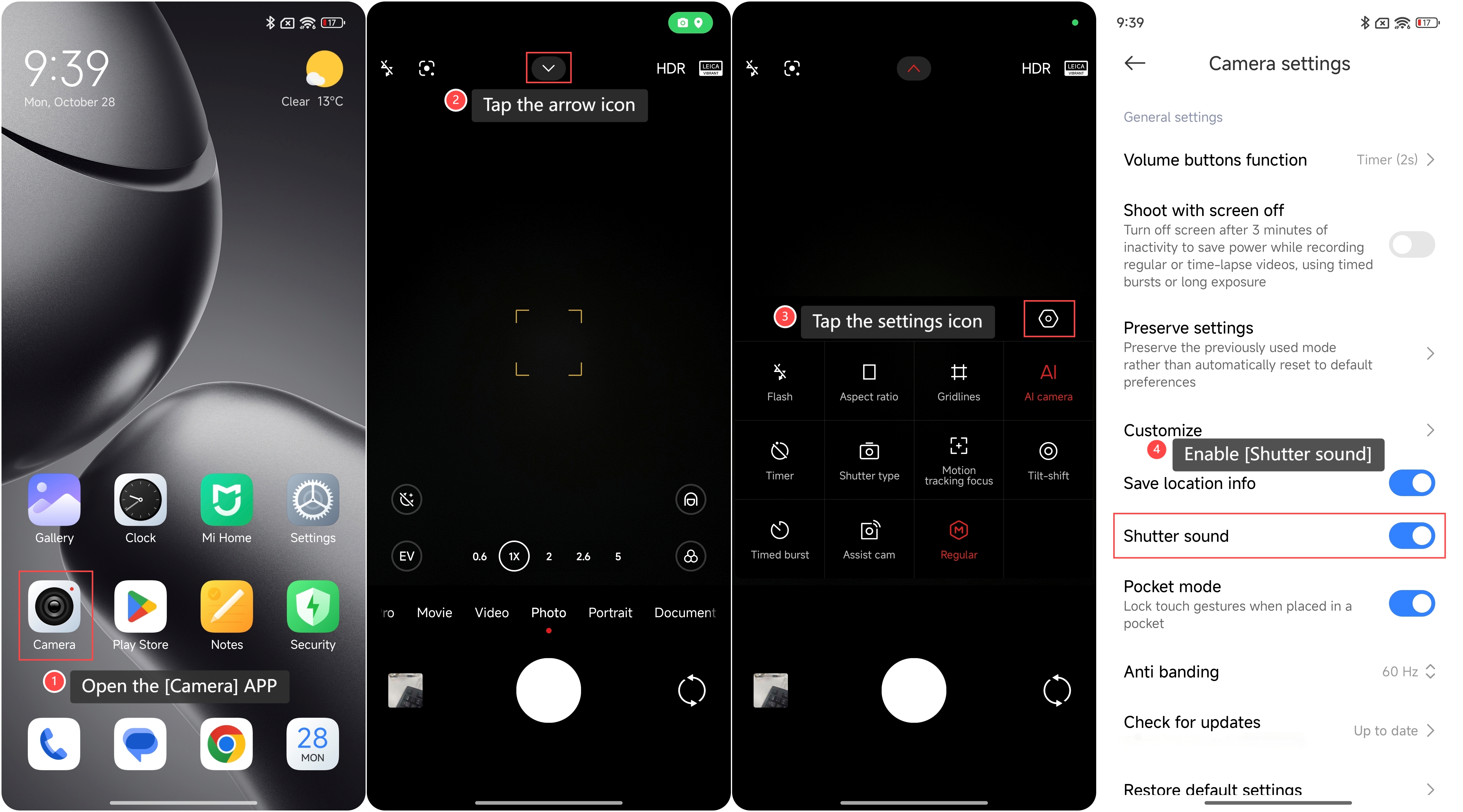
To set the shutter sound on your phone, please refer to the following steps:
1. Open the [Camera] APP on your phone;
2. Tap the arrow icon on the top of the screen;
3. Tap the settings icon;
4. Enable [Shutter sound].
To set the shutter sound on your phone, please refer to the following steps:
1. Open the [Camera] APP on your phone;
2. Tap the arrow icon on the top of the screen;
3. Tap the settings icon;
4. Enable [Shutter sound].
Note:
1. It's advisable to consider your surroundings, as the sound can be disruptive in quiet settings like events or meetings;
2. The settings for this feature can vary by region.
1. It's advisable to consider your surroundings, as the sound can be disruptive in quiet settings like events or meetings;
2. The settings for this feature can vary by region.
Does it help?
Yes
No