

How to enable adaptive telephoto on the Xiaomi 14T?
The Xiaomi 14T comes with an adaptive telephoto function, allowing the device to switch between the main and telephoto lenses based on the subject's distance and the current lighting conditions. This feature ensures optimal clarity and detail by automatically choosing the best lens, which is especially useful for capturing distant subjects in challenging lighting.
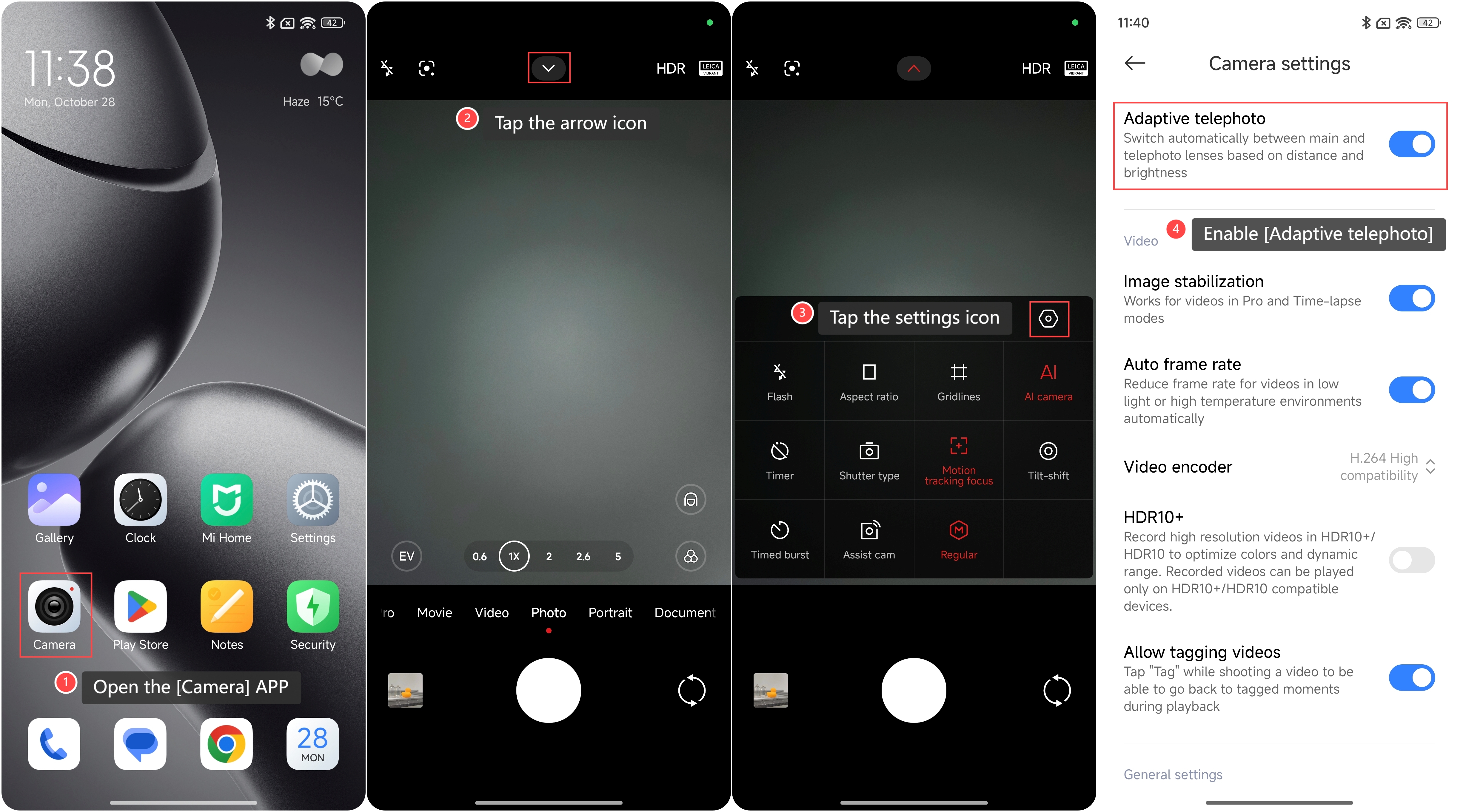
To enable adaptive telephoto function on the phone, please refer to the following steps:
1. Open the [Camera] APP on your phone;
2. Tap the arrow icon on the top of the screen;
3. Tap the settings icon;
4. Swipe down to locate and enable [Adaptive telephoto].
To enable adaptive telephoto function on the phone, please refer to the following steps:
1. Open the [Camera] APP on your phone;
2. Tap the arrow icon on the top of the screen;
3. Tap the settings icon;
4. Swipe down to locate and enable [Adaptive telephoto].
Does it help?
Yes
No