

How to adjust makeup effects for men when shooting on the Xiaomi 14T Pro?
The Xiaomi 14T Pro supports the Adjust makeup effects for men function. It is designed specifically to adjust makeup effects for men on group photos. This setting tailors facial enhancements to masculine features, refining skin texture, evening out skin tone, and subtly reducing blemishes while preserving sharp facial details and natural contours.
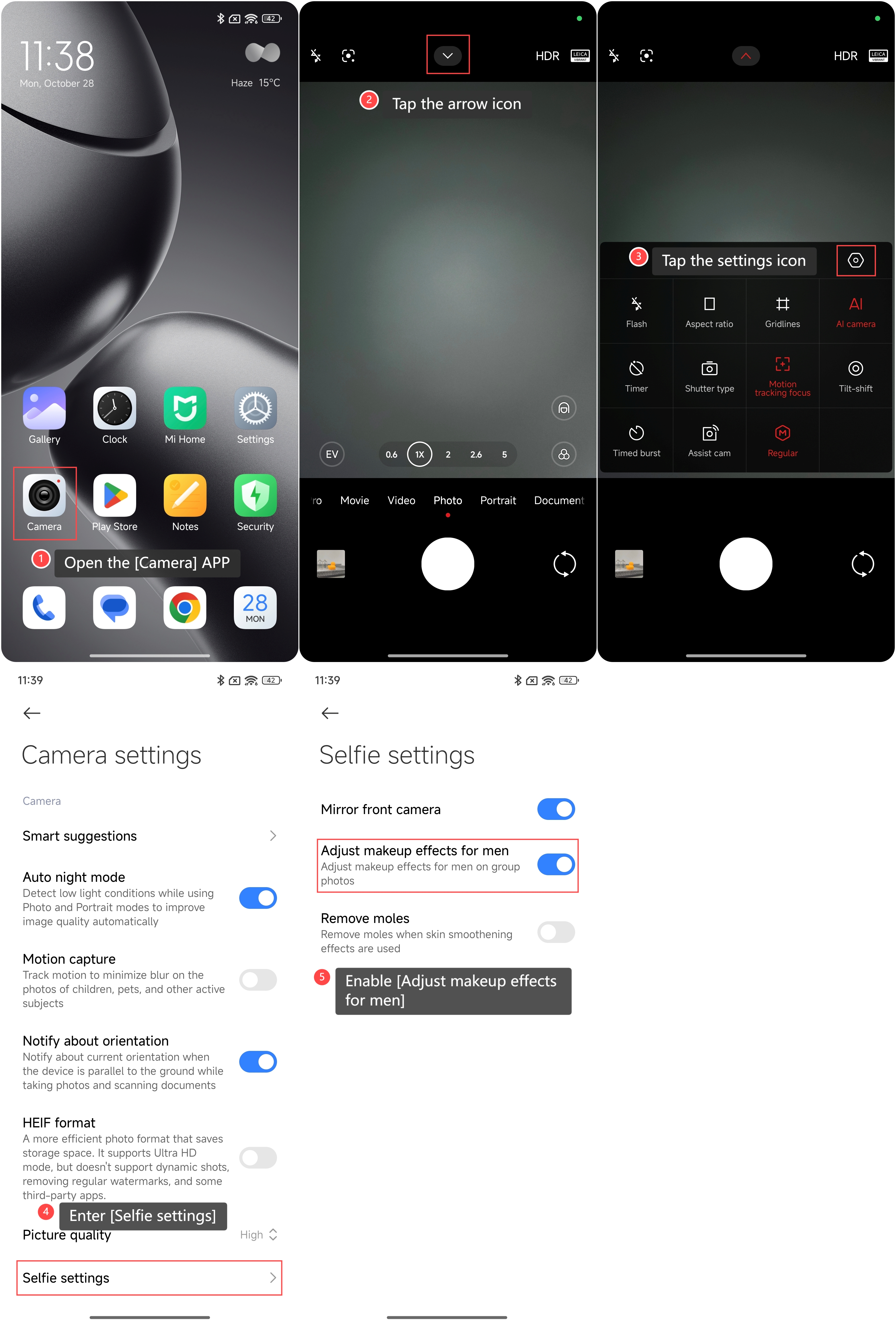
To enable this feature on the phone, please refer to the following steps:
1. Open the [Camera] APP on your phone;
2. Tap the arrow icon on the top of the screen;
3. Tap the settings icon;
4. Enter [Selfie settings];
5. Enable [Adjust makeup effects for men].
To enable this feature on the phone, please refer to the following steps:
1. Open the [Camera] APP on your phone;
2. Tap the arrow icon on the top of the screen;
3. Tap the settings icon;
4. Enter [Selfie settings];
5. Enable [Adjust makeup effects for men].
Does it help?
Yes
No