

How to take a photo with the device watermark on the Xiaomi 14T?
Taking a photo with the device watermark on the Xiaomi 14T helps identify the device used for the capture and enhances the authenticity of shared images.
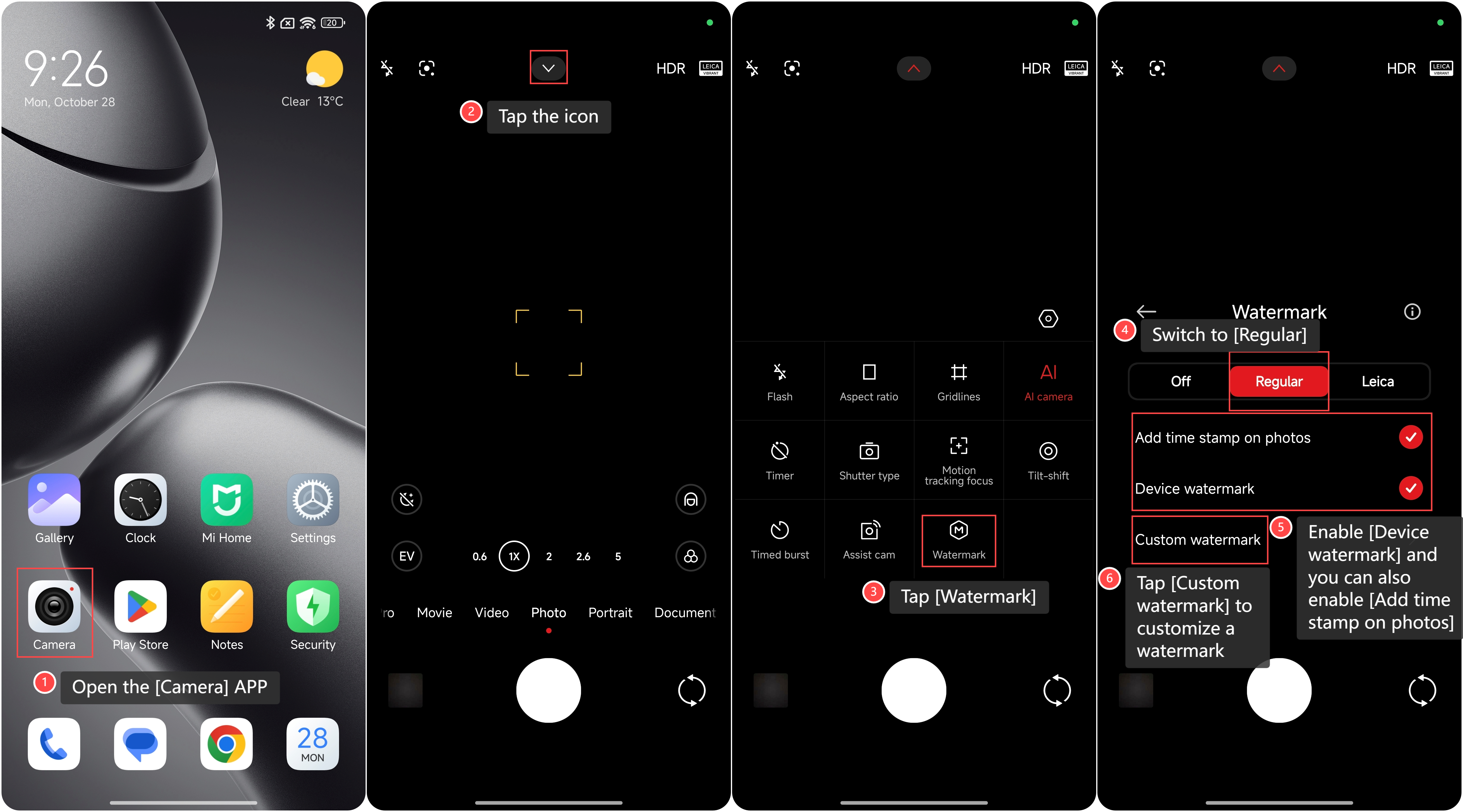
To take a photo with the device watermark on the Xiaomi 14T, please refer to the following steps:
1. Open the [Camera] APP on your phone;
2. Tap the icon in the middle at the top;
3. Tap [Watermark];
4. Switch to [Regular];
5. Enable [Device watermark] and you can also enable [Add time stamp on photos];
6. Additionally, you can tap [Custom watermark] to customize a watermark.
To take a photo with the device watermark on the Xiaomi 14T, please refer to the following steps:
1. Open the [Camera] APP on your phone;
2. Tap the icon in the middle at the top;
3. Tap [Watermark];
4. Switch to [Regular];
5. Enable [Device watermark] and you can also enable [Add time stamp on photos];
6. Additionally, you can tap [Custom watermark] to customize a watermark.
Note:
1. When sharing photos online, consider whether the watermark aligns with your privacy preferences;
2. Ensure the watermark does not obstruct important parts of the photo.
1. When sharing photos online, consider whether the watermark aligns with your privacy preferences;
2. Ensure the watermark does not obstruct important parts of the photo.
Does it help?
Yes
No