

How to use Video editor on the Xiaomi 14T Pro?
The Xiaomi 14T Pro supports the Video editor function, allowing you to trim clips, add filters and captions, adjust the aspect ratio, and even modify video speed. This feature provides a complete toolkit for creating polished, professional-quality videos directly on the phone.
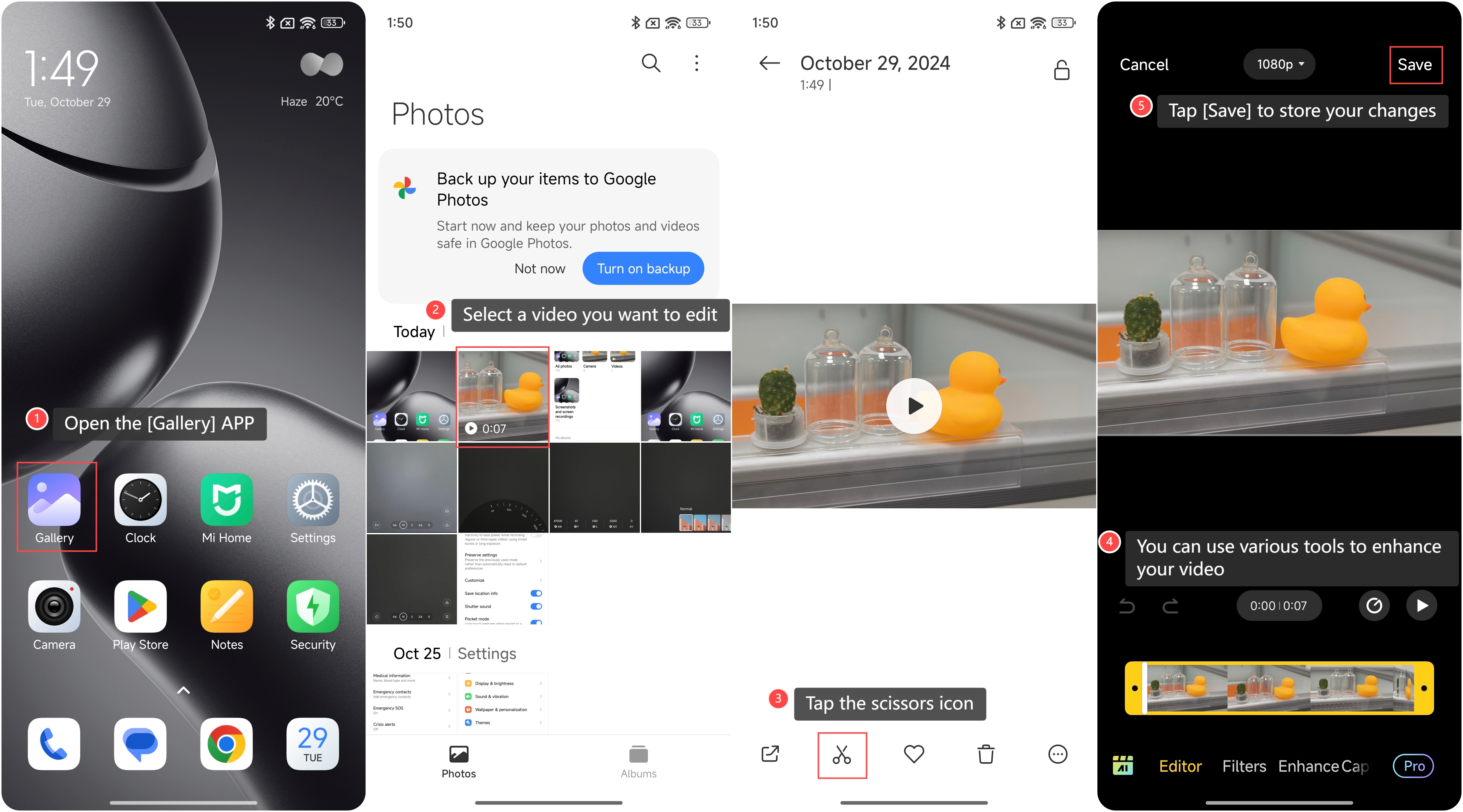
To use the Video editor function on the phone, please refer to the following steps:
1. Open the [Gallery] APP on your phone;
2. Select a video you want to edit;
3. Tap the scissors icon;
4. You can use various tools to enhance your video, such as adding filters and captions, adjusting aspect ratio, controlling playback speed, and so on;
5. Once you’re satisfied with the edits, tap [Save] to store your changes.
To use the Video editor function on the phone, please refer to the following steps:
1. Open the [Gallery] APP on your phone;
2. Select a video you want to edit;
3. Tap the scissors icon;
4. You can use various tools to enhance your video, such as adding filters and captions, adjusting aspect ratio, controlling playback speed, and so on;
5. Once you’re satisfied with the edits, tap [Save] to store your changes.
Does it help?
Yes
No