

How to turn on/off Emergency Location Service on the Xiaomi 14T?
The Emergency Location Service is a built-in feature on the Xiaomi 14T and is provided by Google, which automatically sends your device's location and essential information to emergency responders when you call or text an emergency number. This service utilizes Google Location Accuracy to provide the most precise location.
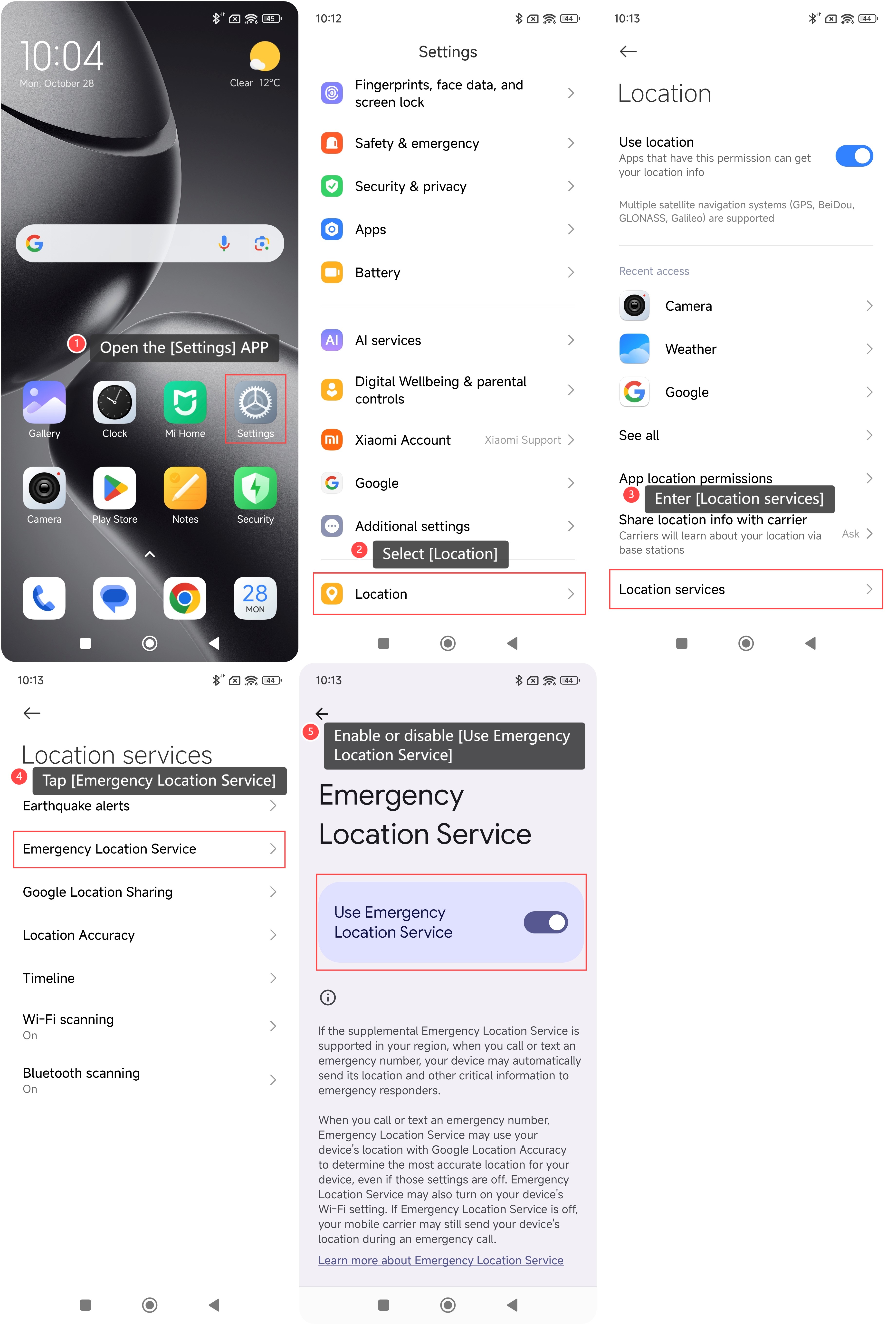
To turn on or off Emergency Location Service on your phone, please refer to the following steps:
1. Open the [Settings] APP on your phone;
2. Scroll down and select [Location];
3. Enter [Location services];
4. Tap [Emergency Location Service];
5. Enable or disable [Use Emergency Location Service].
Note:
1. This feature can enable your phone's Wi-Fi setting to enhance location accuracy;
2. If the Emergency Location Service is turned off, your mobile carrier can still send your phone's location during an emergency call.
To turn on or off Emergency Location Service on your phone, please refer to the following steps:
1. Open the [Settings] APP on your phone;
2. Scroll down and select [Location];
3. Enter [Location services];
4. Tap [Emergency Location Service];
5. Enable or disable [Use Emergency Location Service].
Note:
1. This feature can enable your phone's Wi-Fi setting to enhance location accuracy;
2. If the Emergency Location Service is turned off, your mobile carrier can still send your phone's location during an emergency call.
Does it help?
Yes
No