

How to set the AI subtitles on the Xiaomi 14T?
The Xiaomi 14T supports the AI subtitles function. It can transcribe and translate internal and external audio into bilingual subtitles in real time. Great for online meetings, online classes, live videos, hearing accessibility, and more.
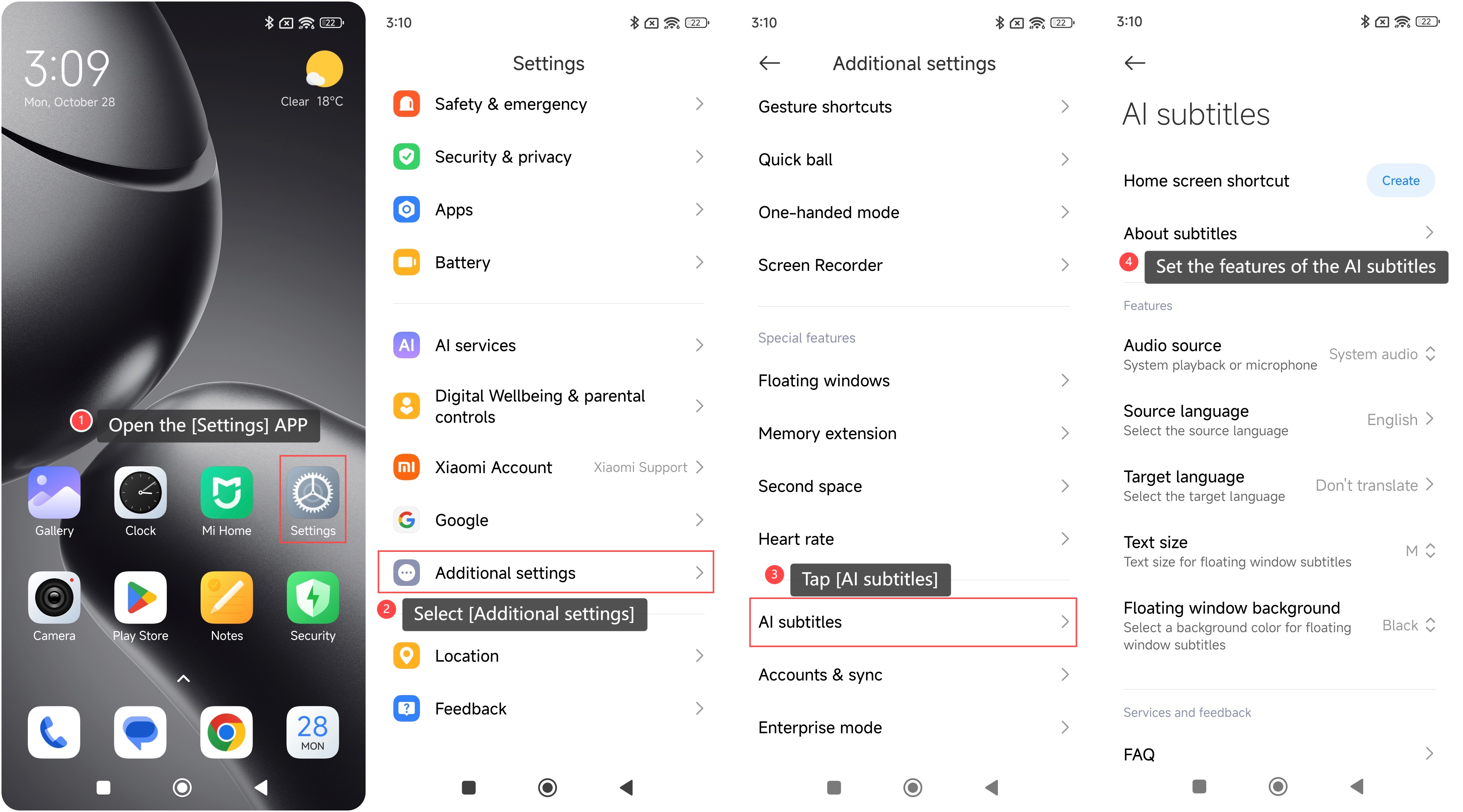
To set the AI subtitles on the phone, please refer to the following steps:
1. Open the [Settings] APP on your phone;
2. Select [Additional settings];
3. Tap [AI subtitles];
4. On this interface, you can set the features of the AI subtitles, such as creating a Home screen shortcut, learning more about AI subtitles, and configuring its features, etc.
To set the AI subtitles on the phone, please refer to the following steps:
1. Open the [Settings] APP on your phone;
2. Select [Additional settings];
3. Tap [AI subtitles];
4. On this interface, you can set the features of the AI subtitles, such as creating a Home screen shortcut, learning more about AI subtitles, and configuring its features, etc.
Does it help?
Yes
No