

What are the accessories functions of the Xiaomi Smart Scent Diffuser?
The top of the Xiaomi Smart Scent Diffuser features the Power Button, Ambiance Light On/Off Button, Diffusion Outlet, Indicators (I, II, III), and Ambiance Light. The side of the device has the Charging Port and Reset Button. The Sensor Area is located above the Xiaomi logo.
You can refer to the image below:
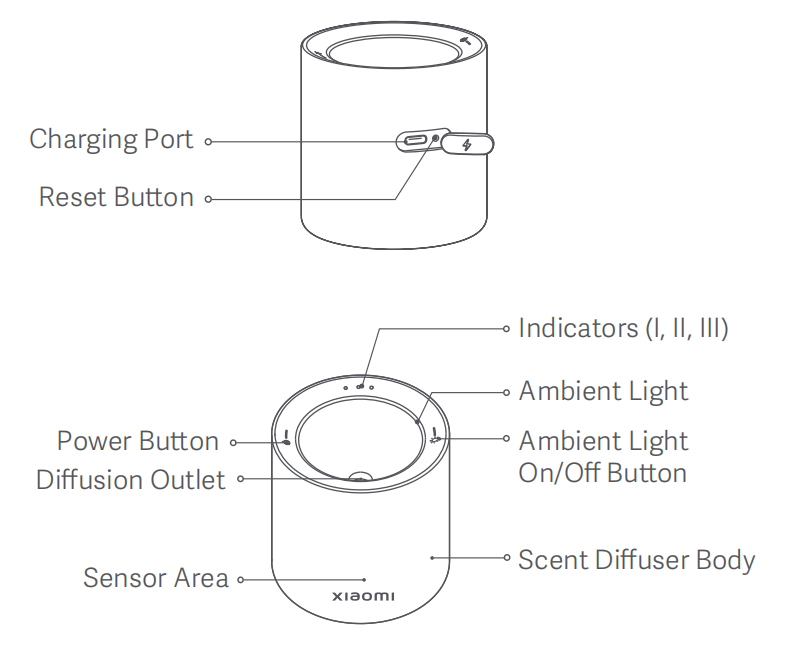
The detailed introductions are as follows:
1. Power button: Press the power button to turn on and press and hold the power button for 2 seconds to turn off. After turning it on, press the power button to cycle through level 1, level 2, level 3, and off;
2. Ambient light: Press the ambient light on/off button to turn the ambient light on/off;
3. Diffusion outlet: The location where the fragrance is emitted when the scent diffuser is in operation;
4. Indicators: The indicators I, II, III correspond to different levels of operation, showing which level the device is currently working at;
5. Charging port: Type-C charging port;
6. Reset button: The button used to reset the device and reconnect it to the network.
You can refer to the image below:
The detailed introductions are as follows:
1. Power button: Press the power button to turn on and press and hold the power button for 2 seconds to turn off. After turning it on, press the power button to cycle through level 1, level 2, level 3, and off;
2. Ambient light: Press the ambient light on/off button to turn the ambient light on/off;
3. Diffusion outlet: The location where the fragrance is emitted when the scent diffuser is in operation;
4. Indicators: The indicators I, II, III correspond to different levels of operation, showing which level the device is currently working at;
5. Charging port: Type-C charging port;
6. Reset button: The button used to reset the device and reconnect it to the network.
Does it help?
Yes
No