

Xiaomi Smart Audio Glasses FAQ
Overview
1. Q: Why can others hear the sound from the Xiaomi Smart Audio Glasses?
A: Unlike regular headphones with a closed design, the glasses use an open design. The reduction of the far-field sound via reverse sound fields ensures clear sound for the wearer while minimizing sound leakage.In relatively quiet environments, you can adjust the volume to an appropriate level to reduce sound leakage.
2. Q: How to replace the lenses of the Xiaomi Smart Audio Glasses?
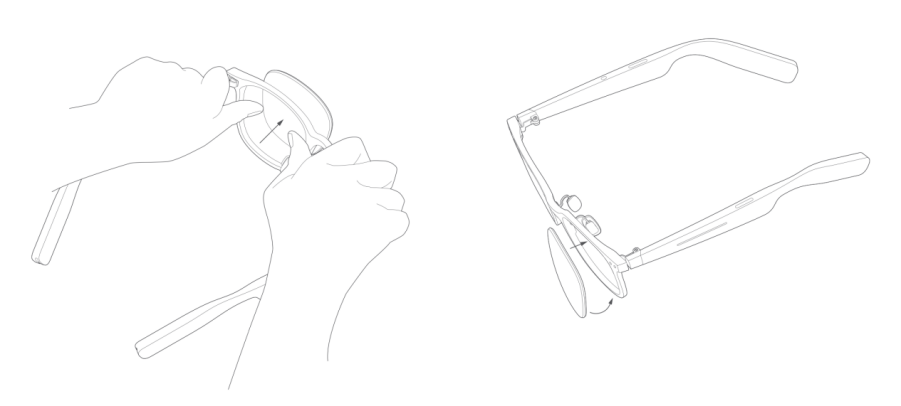
A: The optical version of the Xiaomi Smart Audio Glasses allows lens replacement.If you need to replace the lenses, it is recommended to visit a professional optical store for the replacement. Replacing them yourself could lead to damage to the glasses or lenses due to improper handling.
If you choose to replace the lenses yourself, please refer to the image below. Please note that any product damage caused by self-replacement will not be covered under warranty.
3. Q: How to replace the nose pads of the Xiaomi Smart Audio Glasses?
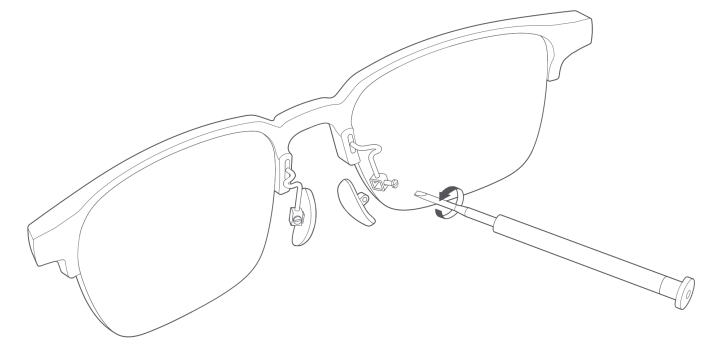
A: Some of the Xiaomi Smart Audio Glasses with nose pads allow for replacement with similar types of nose pads.It is recommended to visit a professional optical store for the replacement. Replacing them yourself could cause damage to the glasses due to improper handling.
4. Q: How to turn off the Xiaomi Smart Audio Glasses?
A: The Xiaomi Smart Audio Glasses do not have a dedicated power off button or interaction.When the glasses are removed, they automatically enter standby mode after 3 minutes. In standby mode, power consumption is reduced, and with a full charge, they can last for more than 7 days.
The glasses offer a battery endurance: 10 hours of music playback at 60% volume, and 7 hours of voice calls.
After being removed, the glasses automatically enter standby mode for extended battery endurance.
5. Q: How to adjust the volume on the Xiaomi Smart Audio Glasses?
A: You can adjust the volume on your phone or by sliding the touch area on the right temple to increase or decrease the volume. For detailed instructions, please refer to the user manual.6. Q: How to switch music on the Xiaomi Smart Audio Glasses?
A: You can switch music on your phone or by sliding the touch area on the left temple to switch the tracks. For detailed instructions, please refer to the user manual.7. Q: How to answer the call on the Xiaomi Smart Audio Glasses?
A: You can answer calls from your phone or by double-tapping the touch area on either temple when a call comes in. For detailed instructions, please refer to the user manual.8. Q: How to confirm that the Xiaomi Smart Audio Glasses are fully charged?
A: Follow the instructions in the manual to connect the glasses, charging cable, and power source.1. If the charging cable indicator shows no response, it indicates a charging issue. Please reconnect the charging cable and the temples;
2. If the charging cable indicator flashes white, it means charging is in progress;
3. After charging, when the charging cable indicator turns off, it means the glasses are fully charged.
9. Q: Why cannot hear clearly in the subway with the Xiaomi Smart Audio Glasses?
A: The Xiaomi Smart Audio Glasses use an open sound field technology that helps reduce discomfort caused by long-term headphone use. However, due to the product's design, they lack noise cancellation features, so in noisy environments like the subway, it will be difficult to hear clearly.10. Q: Can the Xiaomi Smart Audio Glasses be fitted with myopia lenses?
A: The Xiaomi Smart Audio Glasses can be fitted with myopia lenses. You can visit a suitable offline optical shop to have the lenses fitted.11. Q: What type of lenses are included in the packaging of the Xiaomi Smart Audio Glasses?
A: The Xiaomi Smart Audio Glasses come with acrylic display lenses. They are for display purposes only and should not be worn long-term.
If you need other types of lenses (e.g., anti-blue light lenses, myopia lenses, hyperopia glasses, or sunglasses), you can visit a suitable offline optical shop for fitting.
12. Q: Do the Xiaomi Smart Audio Glasses use bone conduction technology?
A: No, the Xiaomi Smart Audio Glasses use an open sound field solution. Compared to bone conduction technology, this provides better sound quality.13. Q: Are there any environmental requirements for using the Xiaomi Smart Audio Glasses?
A: The operating temperature range for the Xiaomi Smart Audio Glasses is 0-45℃. Temperatures that are too high or too low will cause the product to function abnormally.Please charge the glasses in an environment between 15℃and 35℃. Charging could be slow or abnormal in temperatures that are too high or too low.
14. Q: Are the Xiaomi Smart Audio Glasses waterproof, and can they be used in the rain?
A: The Xiaomi Smart Audio Glasses are rated with an IP54 waterproof level, which means they can withstand splashes and some water exposure. However, do not expose the product to water directly in rainy or wet environments.15. Q: How to locate the touch area on the Xiaomi Smart Audio Glasses?
A: The Xiaomi Smart Audio Glasses have indicator strips on the touch area on both temples. You can use the touch control in these marked regions.16. Q: Is there a limit to the thickness of lenses that can be fitted into the frame of the Xiaomi Smart Audio Glasses?
A: The Xiaomi Smart Audio Glasses can accommodate lenses of similar thickness to those used in regular glasses. For specific lens fitting, you can consult a suitable offline optical shop.Frequently asked questions
1. Q: Why do the Xiaomi Smart Audio Glasses sometimes remain connected to the phone's Bluetooth after being removed?
A: The current logic for disconnecting Bluetooth when removing the glasses is as follows:When the glasses are removed, the capacitance value in the wear detection area on the temple changes. By comparing the capacitance value in this area with a baseline, the glasses determine whether they are being worn. When switching from a "wearing" to a "non-wearing" state, the glasses initiate a Bluetooth disconnection with the phone.
The following are the known scenarios where the Bluetooth connection could be maintained even after the glasses are removed:
If there is some residual sweat on the temples. In such cases, wiping the temples or waiting for the sweat to evaporate can help trigger the transition to a non-wearing state, prompting the glasses to disconnect from the phone's Bluetooth.
2. Q: Will the ears or nose hurt if wearing the Xiaomi Smart Audio Glasses for a long time?
A: The total weight of the product starts at 40g (including display lenses; the weight varies with different models). This weight is somewhat heavier than regular glasses, however you will gradually get used to it after a few days of use.If the style and size of the glasses are not suitable, they will cause discomfort or pain when worn. It is recommended to try them on at a flagship or experience store before purchasing.
If you have already purchased them, you can try the following methods to reduce pain or discomfort:
1. Choose lenses with an appropriate refractive index. If the lenses are too thick, they can increase the overall weight, causing discomfort or pain. Lightweight lenses are recommended;
2. Adjust the nose pads. You can visit a professional optical store to adjust the nose pads to a comfortable angle, which can help relieve discomfort. Self-adjustment is not recommended, as improper handling could damage the glasses.
3. Q: What to do if the temples of the Xiaomi Smart Audio Glasses are loose?
A: It is common for glasses to have slightly loose temples after some use. You can resolve this by tightening the screws that connect the temples to the frame.4. Q: Why is there no prompt sound when wearing the Xiaomi Smart Audio Glasses?
A: Please ensure the glasses have sufficient battery. If the battery is low, charge it for at least 10 minutes.Make sure the Xiaomi Smart Audio Glasses are worn correctly, with the inner sides of the temples in contact with the skin.
5. Q: What to do if the Xiaomi Smart Audio Glasses cannot connect to Bluetooth?
A: Please make sure the glasses have sufficient battery. If the battery is low, charge it for at least 10 minutes.For unpaired devices, follow these steps to pair:
1. Put on the glasses;
2. Press and hold the touch area on both sides of the temples for 2 seconds. After the prompt sound, the glasses will enter pairing mode;
3. Enable Bluetooth on your device (such as your phone), search for "Xiaomi Smart Audio Glasses" and connect. Once connected, you will hear a corresponding prompt tone in the glasses.
6. Q: How to reset the Xiaomi Smart Audio Glasses to factory settings?
A: While the glasses are charging, press and hold the touch area on both sides of the temples for 7 seconds. Once you hear the corresponding prompt tone, the factory reset is complete.Does it help?
Yes
No