

How to remove the smart frame of the Xiaomi Outdoor Camera CW500 Dual?
The smart frame feature of the Xiaomi Outdoor Camera CW500 Dual highlights specific targets (such as people or vehicles) by framing them with a rectangle in the video feed. This allows you to easily identify and focus on the monitored subjects, helping to quickly locate key areas of interest within the monitoring interface.
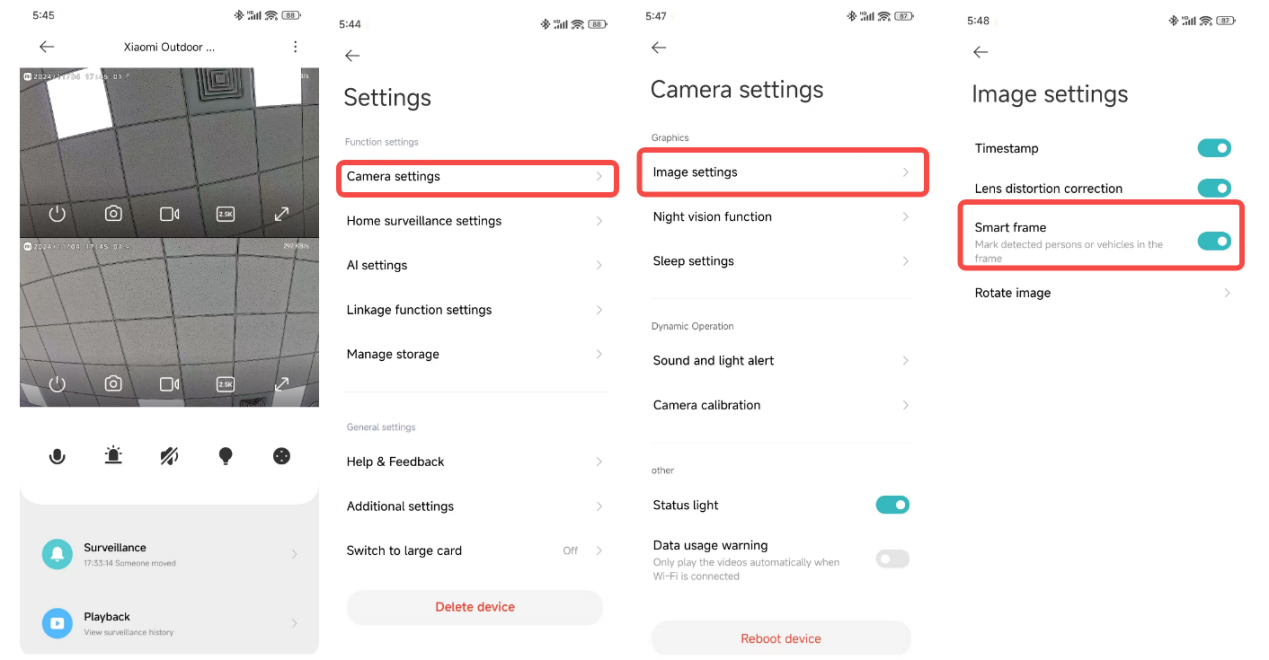
To remove the smart frame displayed on the real-time monitoring interface, please refer to the following steps:
1. Open the Mi Home/Xiaomi Home APP on your phone;
2. Select the Xiaomi Outdoor Camera CW500 Dual;
3. Tap the three-dot icon at the upper right corner of the screen;
4. Tap [Camera settings];
5. Tap [Image settings];
6. Turn off [Smart frame].
Note:
If you enable the smart frame feature, the camera will mark detected objects such as people or vehicles.
To remove the smart frame displayed on the real-time monitoring interface, please refer to the following steps:
1. Open the Mi Home/Xiaomi Home APP on your phone;
2. Select the Xiaomi Outdoor Camera CW500 Dual;
3. Tap the three-dot icon at the upper right corner of the screen;
4. Tap [Camera settings];
5. Tap [Image settings];
6. Turn off [Smart frame].
Note:
If you enable the smart frame feature, the camera will mark detected objects such as people or vehicles.
Does it help?
Yes
No