

How to enable image stabilization on the Xiaomi 14T Pro?
The Xiaomi 14T Pro supports enabling image stabilization, which counters hand movements and slight shakes that can make videos appear blurry or wobbly, especially in low light or zoomed-in shots. For action shots or recording while moving, stabilization prevents the video being impacted, which is great for capturing dynamic scenes like sports or walking tours. Stabilization helps the camera maintain a steady view on the main subject.
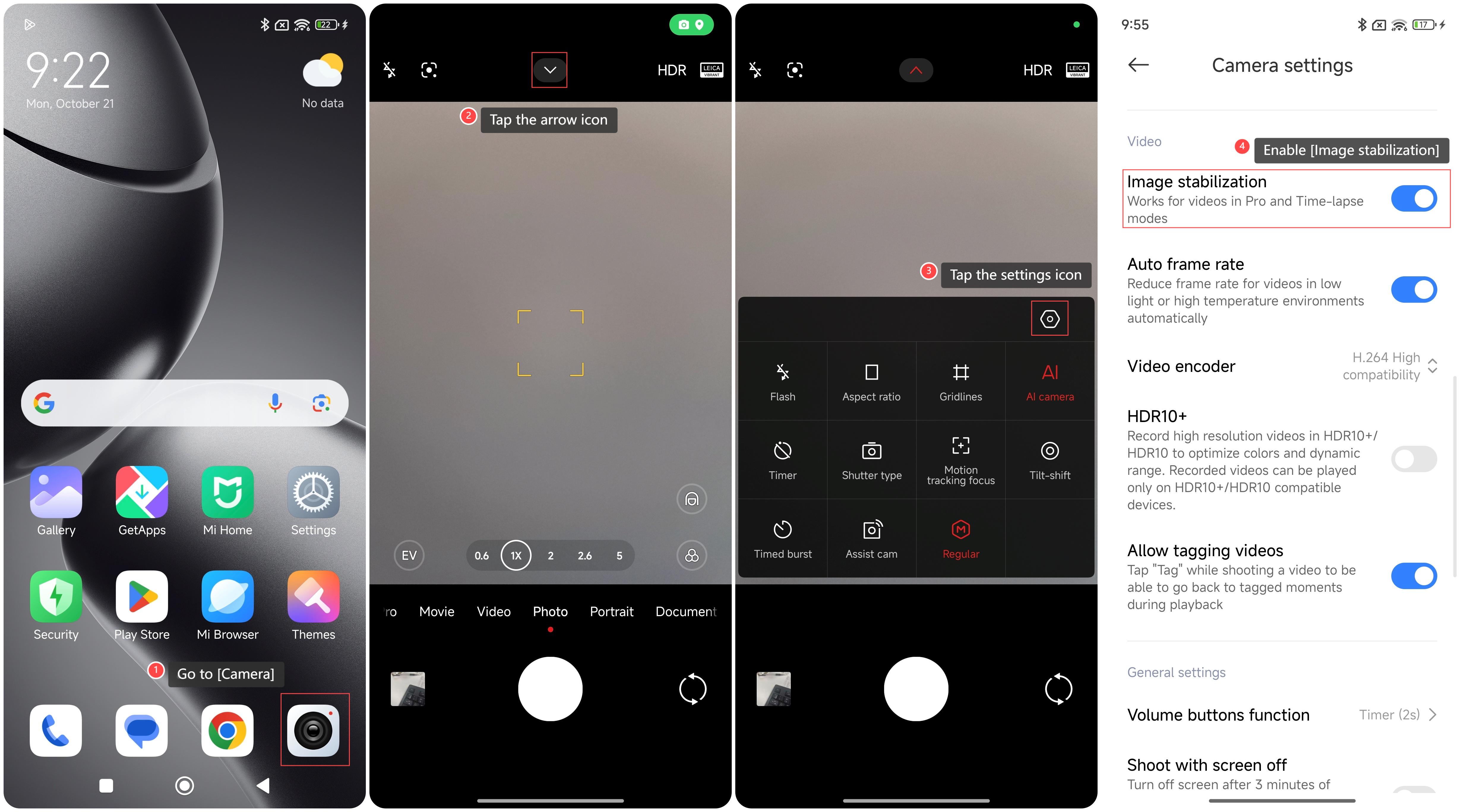
To enable image stabilization on your phone, please refer to the following steps:
1. Go to [Camera];
2. Tap the arrow icon;
3. Tap the settings icon;
4. Swipe down to find and enable [Image stabilization].
To enable image stabilization on your phone, please refer to the following steps:
1. Go to [Camera];
2. Tap the arrow icon;
3. Tap the settings icon;
4. Swipe down to find and enable [Image stabilization].
Does it help?
Yes
No