

How to turn on the Mirror front camera on the Xiaomi 14T?
The Mirror front camera feature on the Xiaomi 14T flips the image horizontally when taking selfies, similar to how you'd see yourself in a mirror. This feature allows you to capture photos that look like your reflection.
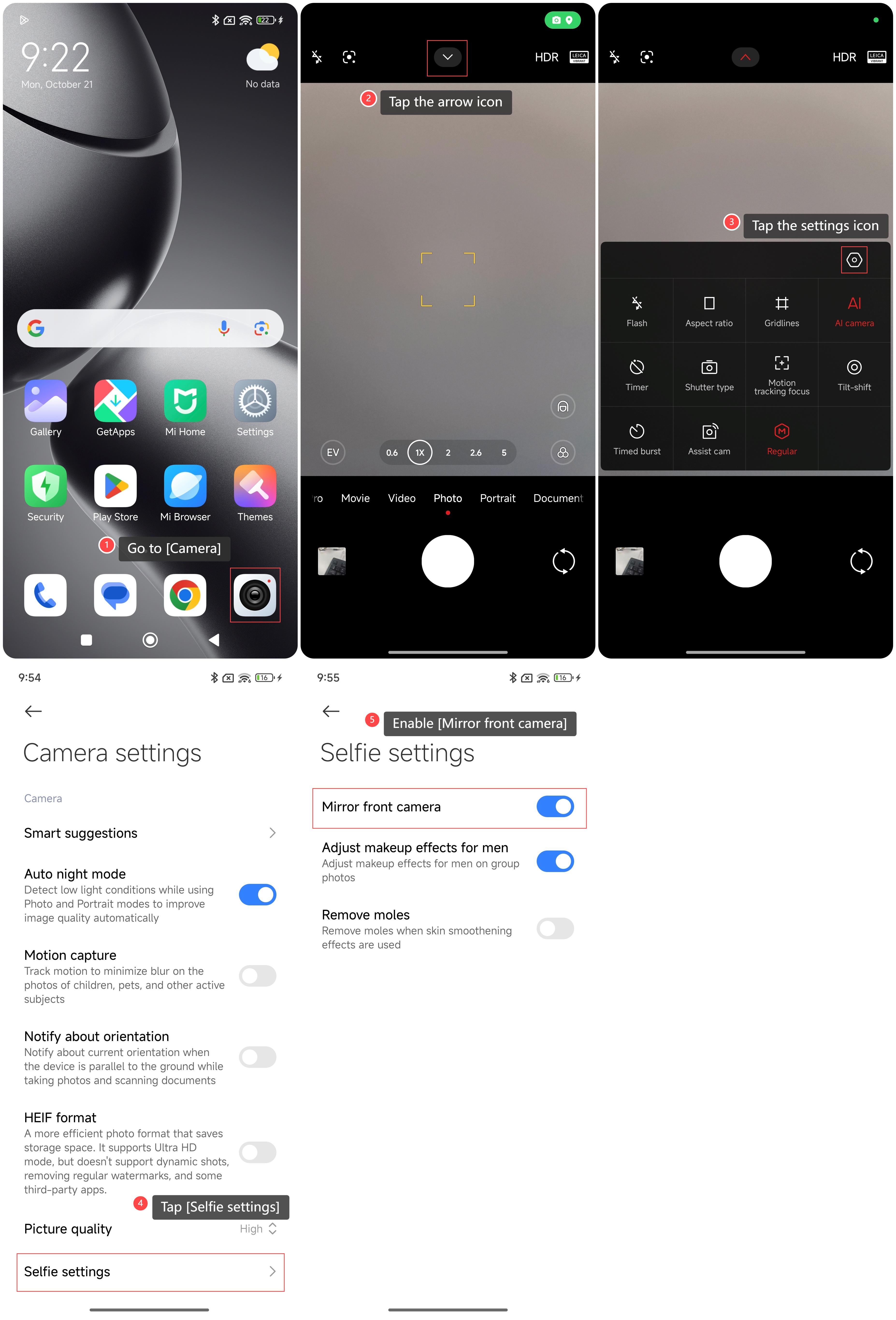
To turn on the mirror front camera on your phone, please refer to the following steps:
1. Go to [Camera];
2. Tap the arrow icon;
3. Tap the settings icon;
4. Tap [Selfie settings];
5. Enable [Mirror front camera].
Note:
The photo looks like yourself in the mirror, which is in line with people's accustomed visual effects.
To turn on the mirror front camera on your phone, please refer to the following steps:
1. Go to [Camera];
2. Tap the arrow icon;
3. Tap the settings icon;
4. Tap [Selfie settings];
5. Enable [Mirror front camera].
Note:
The photo looks like yourself in the mirror, which is in line with people's accustomed visual effects.
Does it help?
Yes
No