

How to operate and control the Redmi Buds 6?
The earbuds use a tapping method to control functions. After properly wearing the earbuds, apply a slight force to tap the flat area at the top of the earbud stem, as shown in the image below. You will hear a sound indicating the button operation, and you can follow the instructions in the user manual for various functions. If there is no response after tapping, try adjusting the fit of the earbuds or repositioning them.
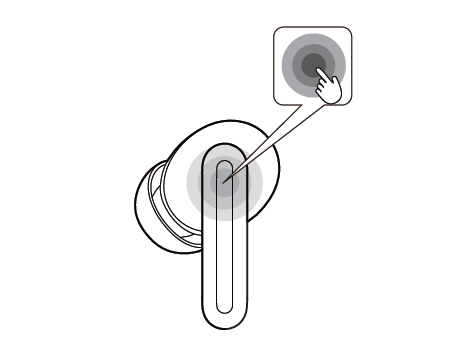
The default functions for the touch control area of the earbuds are as follows:
1. Double-tap to answer/hang up the calls. Triple-tap to reject the calls;
2. Double-tap to play/pause the music. Triple-tap to play the next track;
3. Press and hold for 2 seconds to switch from Transparency, Noise Cancellation and Off modes.
Note:
You can customize the touch gesture functions for the left and right earbuds through the Xiaomi Earbuds APP. After resetting the earbuds, the left and right functions will revert to their default settings.
The default functions for the touch control area of the earbuds are as follows:
1. Double-tap to answer/hang up the calls. Triple-tap to reject the calls;
2. Double-tap to play/pause the music. Triple-tap to play the next track;
3. Press and hold for 2 seconds to switch from Transparency, Noise Cancellation and Off modes.
Note:
You can customize the touch gesture functions for the left and right earbuds through the Xiaomi Earbuds APP. After resetting the earbuds, the left and right functions will revert to their default settings.
Does it help?
Yes
No