

How to update the camera on the Xiaomi 14T Pro?
Updating the camera on the Xiaomi 14T Pro involves installing software updates that can enhance the camera’s performance or add new features.
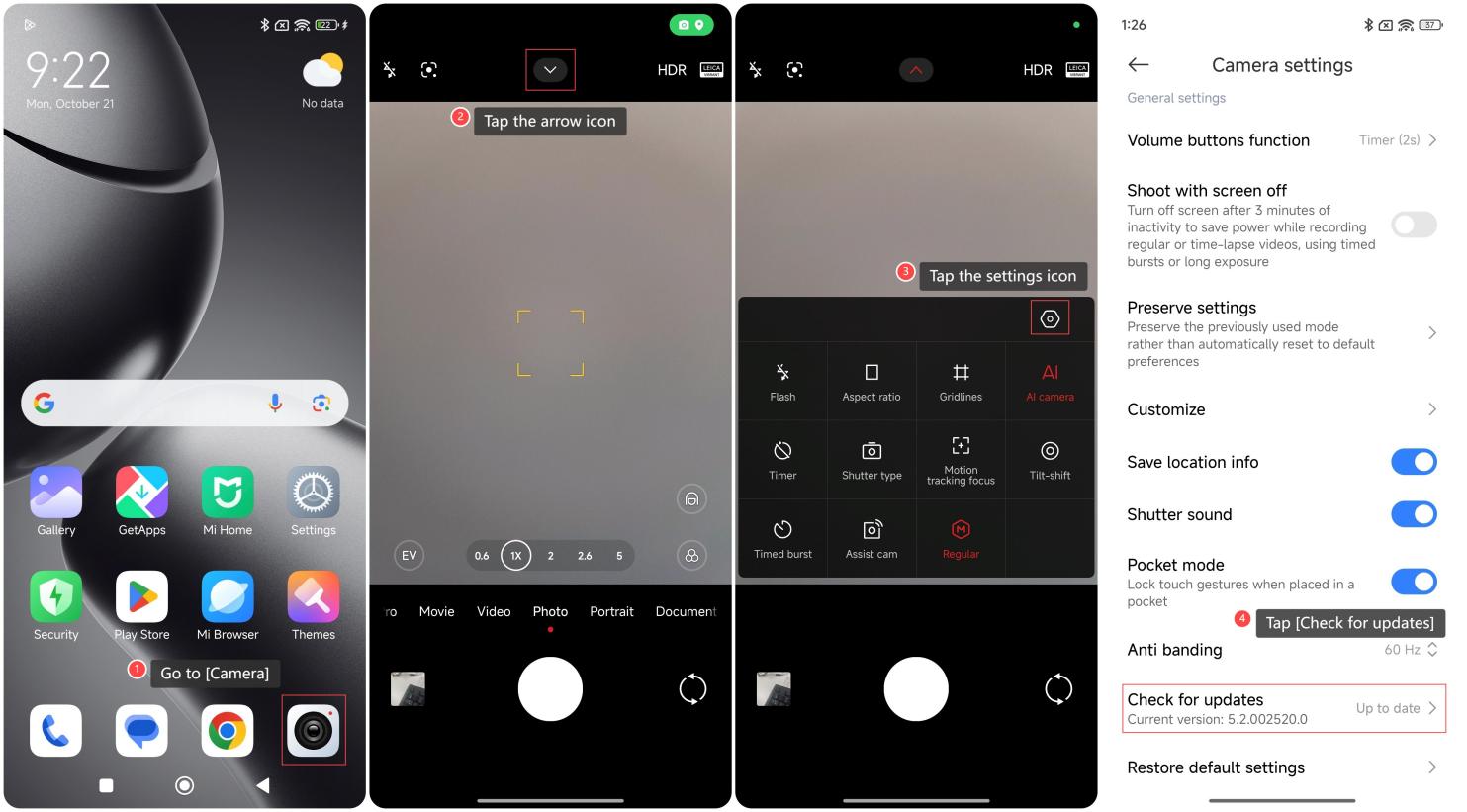
To update the camera on your phone, please refer to the following steps:
1. Go to [Camera];
2. Tap the arrow icon;
3. Tap the settings icon;
4. Swipe down to find and tap [Check for updates].
Note:
1. Before updating, it is recommended that you back up important photos and data to prevent problems during the update process;
2. Make sure to update in a stable Wi-Fi environment to avoid download interruptions;
3. During the update process, make sure the device has sufficient power;
4. Make sure the camera update is compatible with other software and applications on the device to avoid functional conflicts.
To update the camera on your phone, please refer to the following steps:
1. Go to [Camera];
2. Tap the arrow icon;
3. Tap the settings icon;
4. Swipe down to find and tap [Check for updates].
Note:
1. Before updating, it is recommended that you back up important photos and data to prevent problems during the update process;
2. Make sure to update in a stable Wi-Fi environment to avoid download interruptions;
3. During the update process, make sure the device has sufficient power;
4. Make sure the camera update is compatible with other software and applications on the device to avoid functional conflicts.
Does it help?
Yes
No