

How to enable HEIF format on the Xiaomi 14T?
The Xiaomi 14T supports configuring HEIF format, which is designed to maintain high-quality images while significantly reducing file size, making it an efficient option for saving storage space without compromising photo quality. HEIF uses advanced compression methods, allowing it to save images that are up to 50% smaller than JPEGs, which means more photos can be stored on your phone without filling up storage quickly.
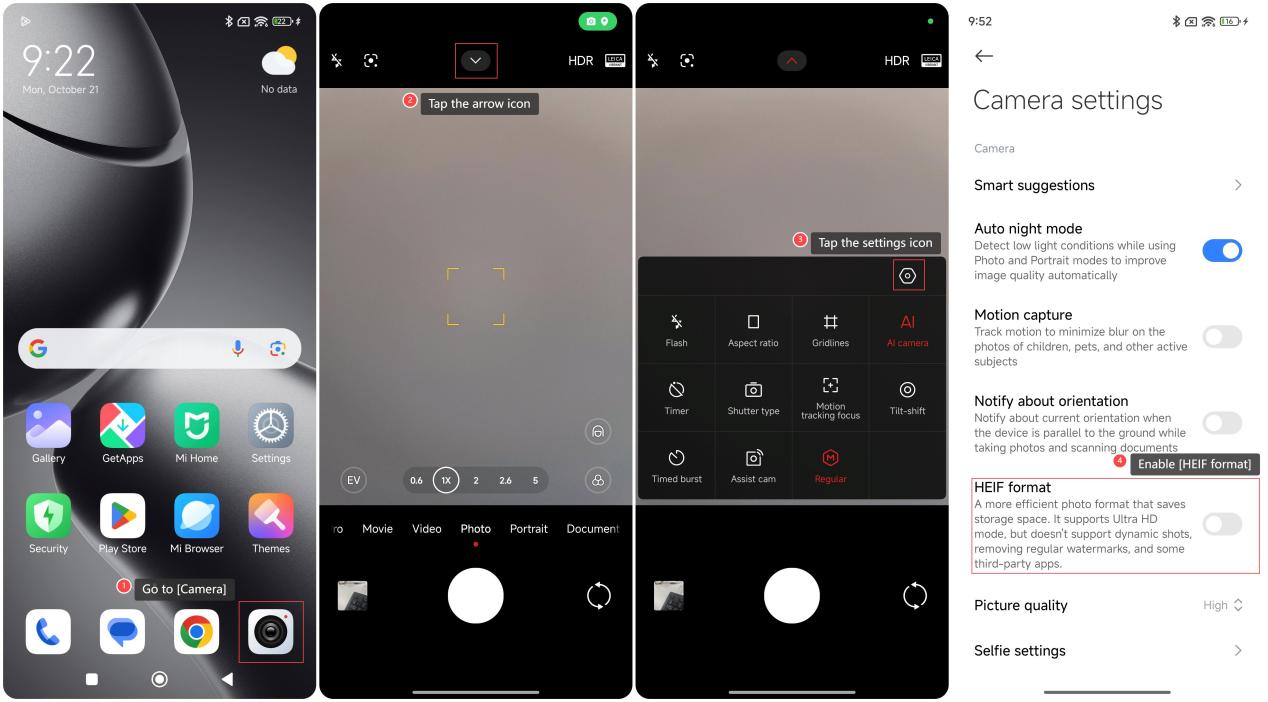
To enable HEIF format on your phone, please refer to the following steps:
1. Go to [Camera];
2. Tap the arrow icon;
3. Tap the settings icon;
4. Enable [HEIF format].
Note:
After HEIF format is enabled, a more efficient photo format that saves storage space will be provided. It supports Ultra HD mode, but doesn’t support dynamic shots, removing regular watermarks, and some third-party APPs.
To enable HEIF format on your phone, please refer to the following steps:
1. Go to [Camera];
2. Tap the arrow icon;
3. Tap the settings icon;
4. Enable [HEIF format].
Note:
After HEIF format is enabled, a more efficient photo format that saves storage space will be provided. It supports Ultra HD mode, but doesn’t support dynamic shots, removing regular watermarks, and some third-party APPs.
Does it help?
Yes
No