

How to set the sidebar on the Xiaomi 14T?
The Xiaomi 14T supports setting the sidebar, which allows you to add favorite or frequently used APPs to the sidebar, making it easy to switch between them without returning to the home screen. You can run multiple APPs in split-screen or pop-up views directly from the sidebar, enabling efficient multitasking, especially on larger screens.
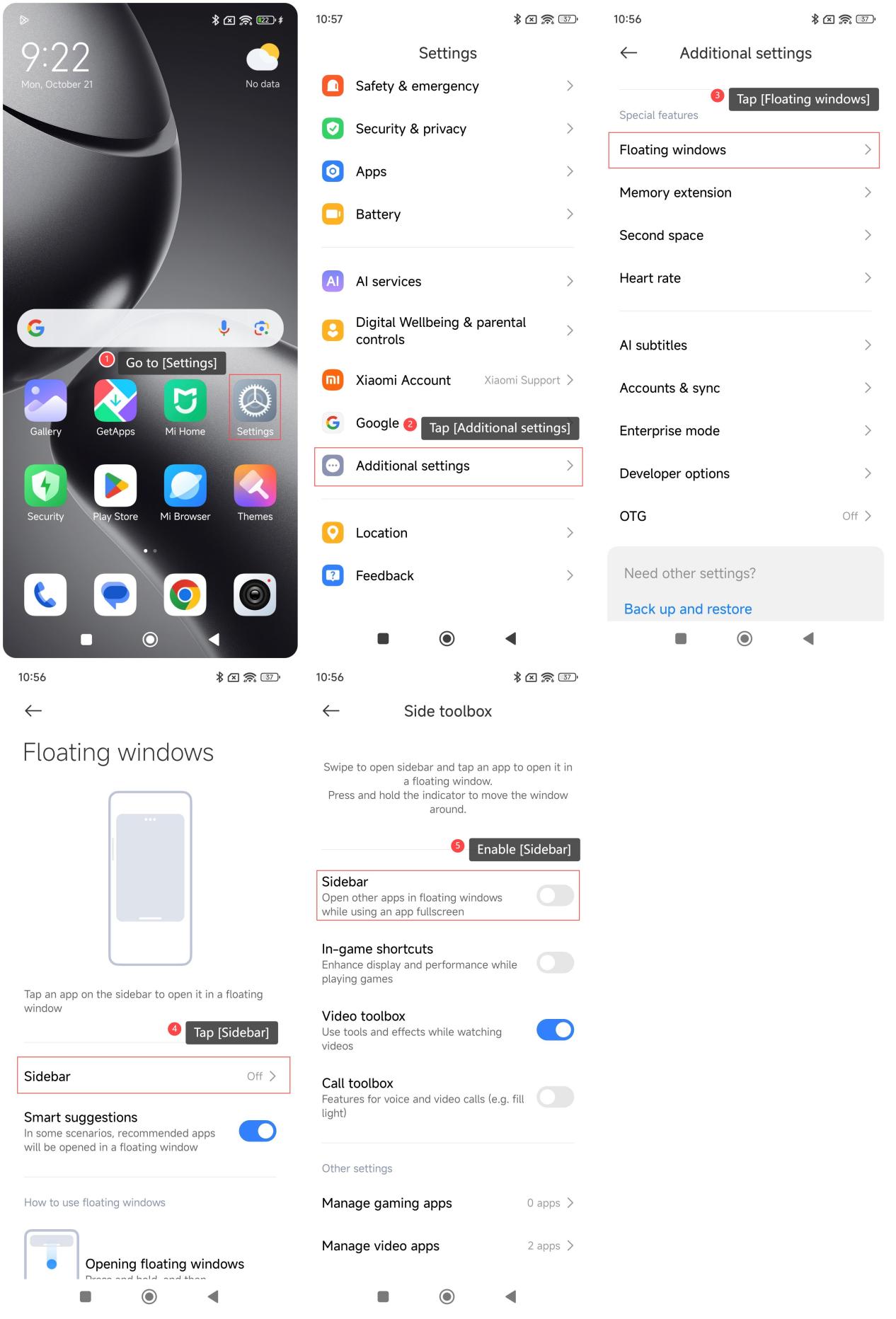
To set the sidebar on your phone, please refer to the following steps:
1. Go to [Settings];
2. Tap [Additional settings];
3. Tap [Floating windows];
4. Tap [Sidebar];
5. Enable [Sidebar].
Note:
1. Swipe to open sidebar and tap an APP to open it in a floating window;
2. Press and hold the indicator to move the window around.
To set the sidebar on your phone, please refer to the following steps:
1. Go to [Settings];
2. Tap [Additional settings];
3. Tap [Floating windows];
4. Tap [Sidebar];
5. Enable [Sidebar].
Note:
1. Swipe to open sidebar and tap an APP to open it in a floating window;
2. Press and hold the indicator to move the window around.
Does it help?
Yes
No