

How to set the region on the Xiaomi 14T?
On the Xiaomi 14T, region refers to the geographic area or country settings configured on the device. It determines local features like available applications and services. Region settings can affect system updates, content in the application store, and access to certain features due to regional restrictions. Adjusting the region can help optimize application performance and access region-specific services, such as local news or weather updates.
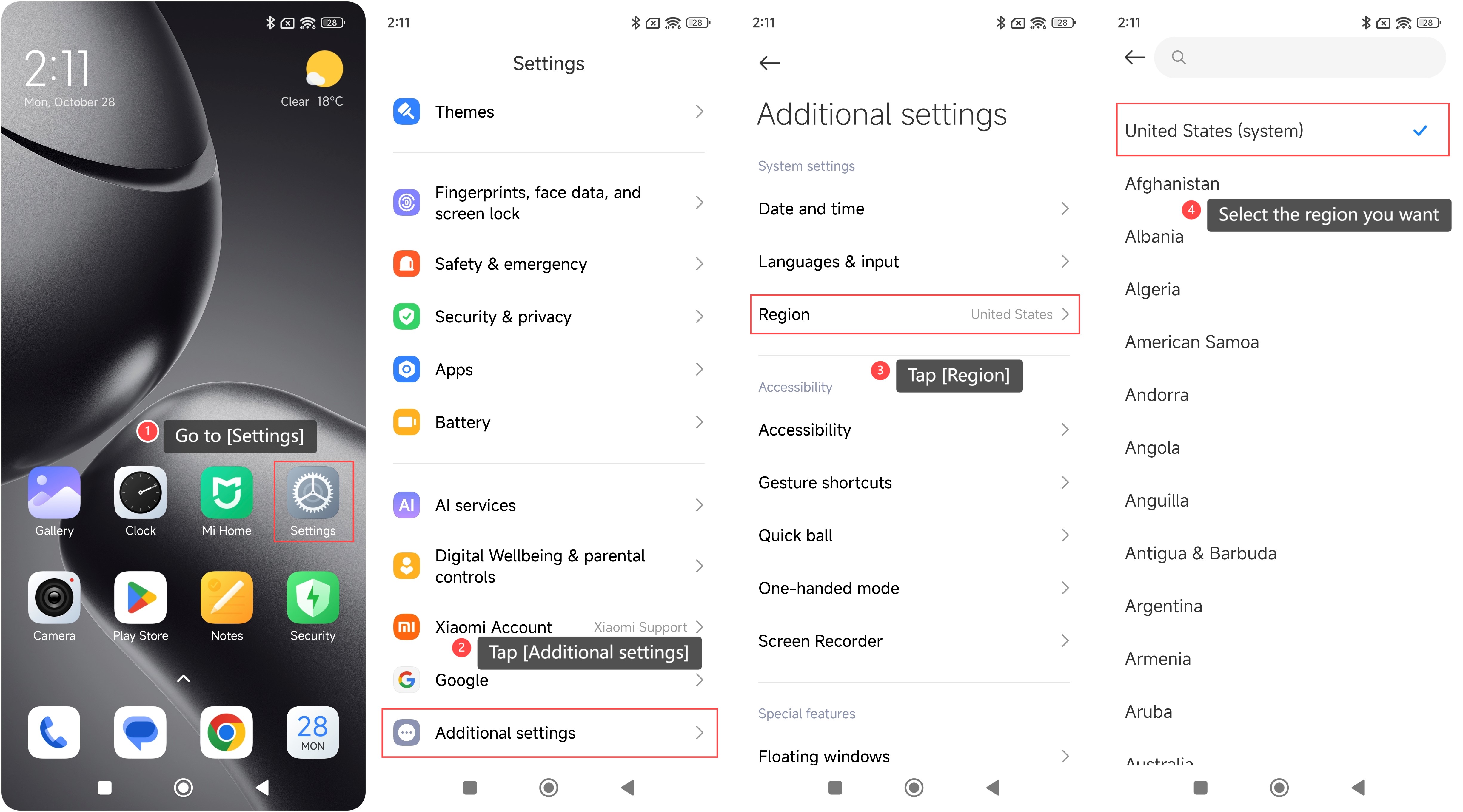
To set the region on the Xiaomi 14T, please refer to the following steps:
1. Go to [Settings] on your phone;
2. Tap [Additional settings];
3. Tap [Region];
4. Select the region you want.
Note:
1. Certain applications and services will be unavailable or limited based on the selected region;
2. Some features or network settings can not function correctly if the region is incorrectly set;
3. A wrong region setting can affect GPS accuracy and location-based functionalities.
To set the region on the Xiaomi 14T, please refer to the following steps:
1. Go to [Settings] on your phone;
2. Tap [Additional settings];
3. Tap [Region];
4. Select the region you want.
Note:
1. Certain applications and services will be unavailable or limited based on the selected region;
2. Some features or network settings can not function correctly if the region is incorrectly set;
3. A wrong region setting can affect GPS accuracy and location-based functionalities.
Does it help?
Yes
No