

How to set dual clock on the Xiaomi 14T?
The dual clock feature on the Xiaomi 14T allows you to display two different time zones simultaneously. This is particularly useful if you frequently communicate with people in different time zones, travel often, or have family and friends in various locations. You can set one clock to your local time and the other to another time zone of your choice, making it easier to keep track of important meetings, calls, or events.
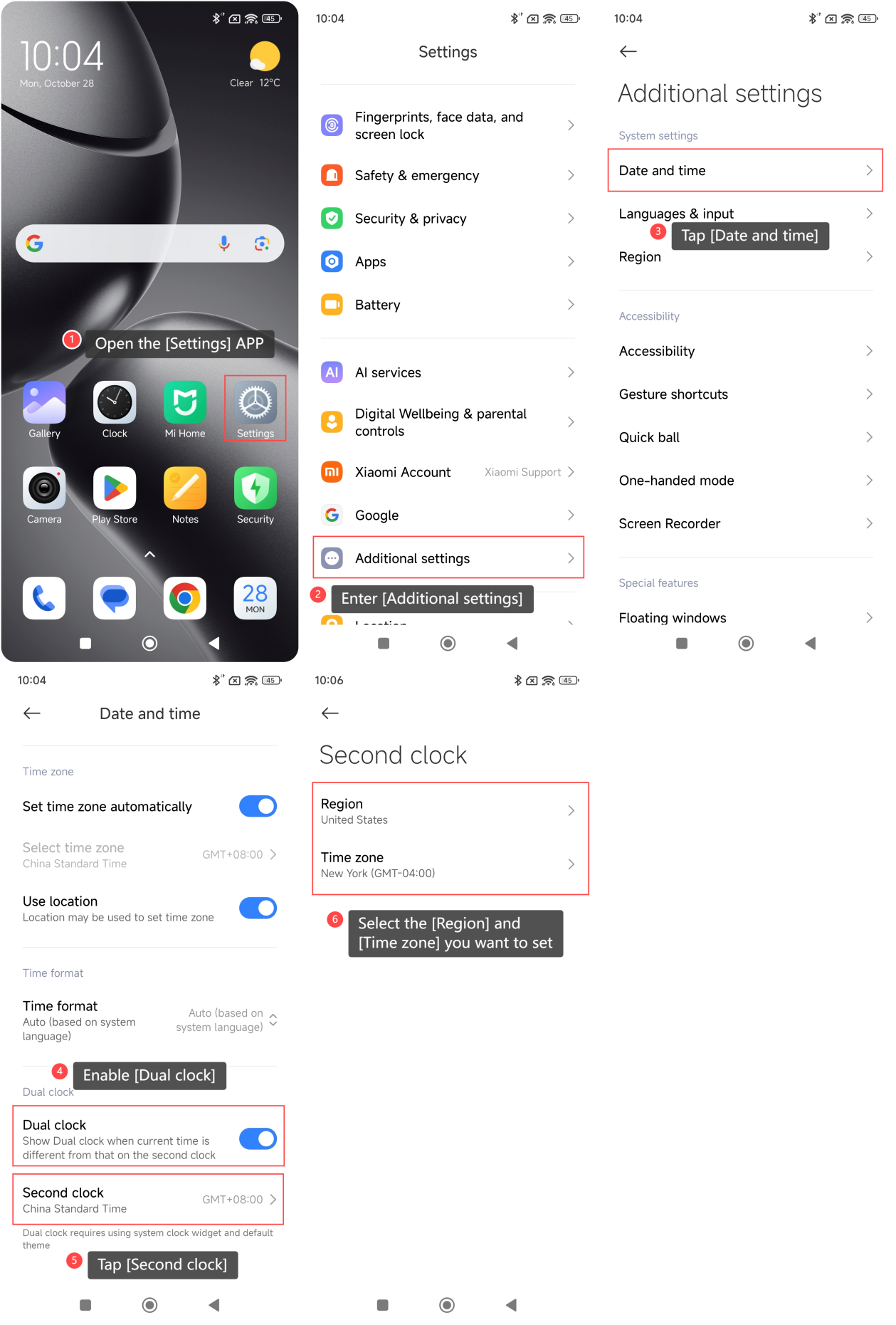
To set the dual clock on the Xiaomi 14T, please refer to the following steps:
1. Open the [Settings] APP on your phone;
2. Enter [Additional settings];
3. Tap [Date and time];
4. Enable [Dual clock];
5. Tap [Second clock];
6. Select the [Region] and [Time zone] you want to set.
Note:
1. Dual clock will be displayed on the Lock screen, Home screen, and turned off screen;
2. Dual clock requires using system clock widget and default theme.
To set the dual clock on the Xiaomi 14T, please refer to the following steps:
1. Open the [Settings] APP on your phone;
2. Enter [Additional settings];
3. Tap [Date and time];
4. Enable [Dual clock];
5. Tap [Second clock];
6. Select the [Region] and [Time zone] you want to set.
Note:
1. Dual clock will be displayed on the Lock screen, Home screen, and turned off screen;
2. Dual clock requires using system clock widget and default theme.
Does it help?
Yes
No