

How to update the Google Play system on the Xiaomi 14T Pro?
The Xiaomi 14T Pro supports updating the Google Play system, including patches for vulnerabilities, protecting your device from malware and security threats. Regular updates can resolve issues and bugs, enhancing the overall stability and performance of your device. Besides, updates can optimize system performance, leading to faster APP loading times and smoother operation.
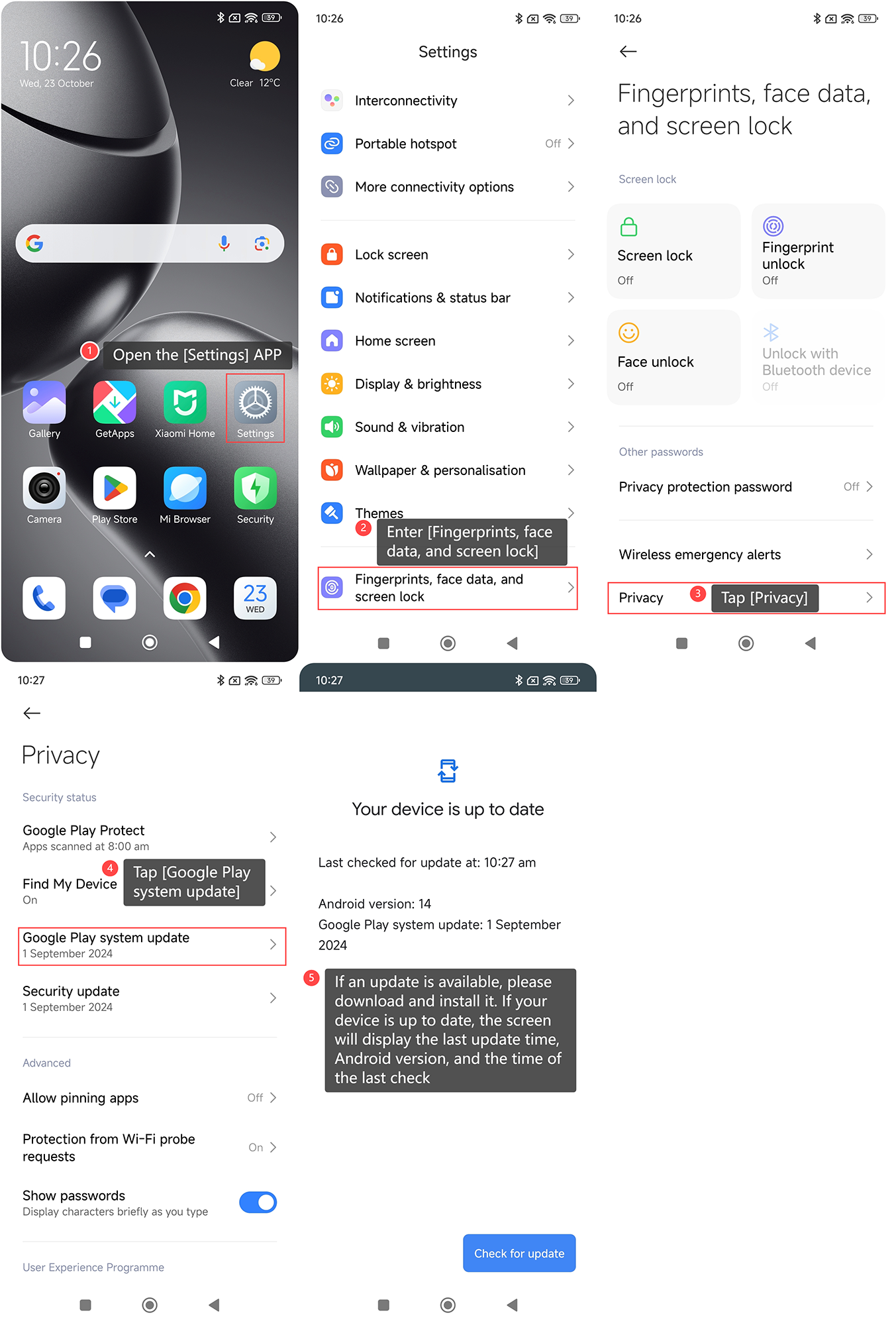
To update the Google Play system on your phone, please refer to the following steps:
1. Open the [Settings] APP on your phone;
2. Enter [Fingerprints, face data, and screen lock];
3. Tap [Privacy];
4. Tap [Google Play system update];
5. If an update is available, please download and install it. If your device is up to date, the screen will display the last update time, Android version, and the time of the last check.
To update the Google Play system on your phone, please refer to the following steps:
1. Open the [Settings] APP on your phone;
2. Enter [Fingerprints, face data, and screen lock];
3. Tap [Privacy];
4. Tap [Google Play system update];
5. If an update is available, please download and install it. If your device is up to date, the screen will display the last update time, Android version, and the time of the last check.
Does it help?
Yes
No