

What to do if the Privacy protection password has been forgotten on the Xiaomi 14T?
The Xiaomi 14T supports configuring Privacy protection password, which protects sensitive information stored on the device and can restrict access to photos, documents and notes, safeguarding personal data and preventing others from accessing to these personal data to avoid information leakage.
If the Privacy protection password has been forgotten, please refer to the following steps:
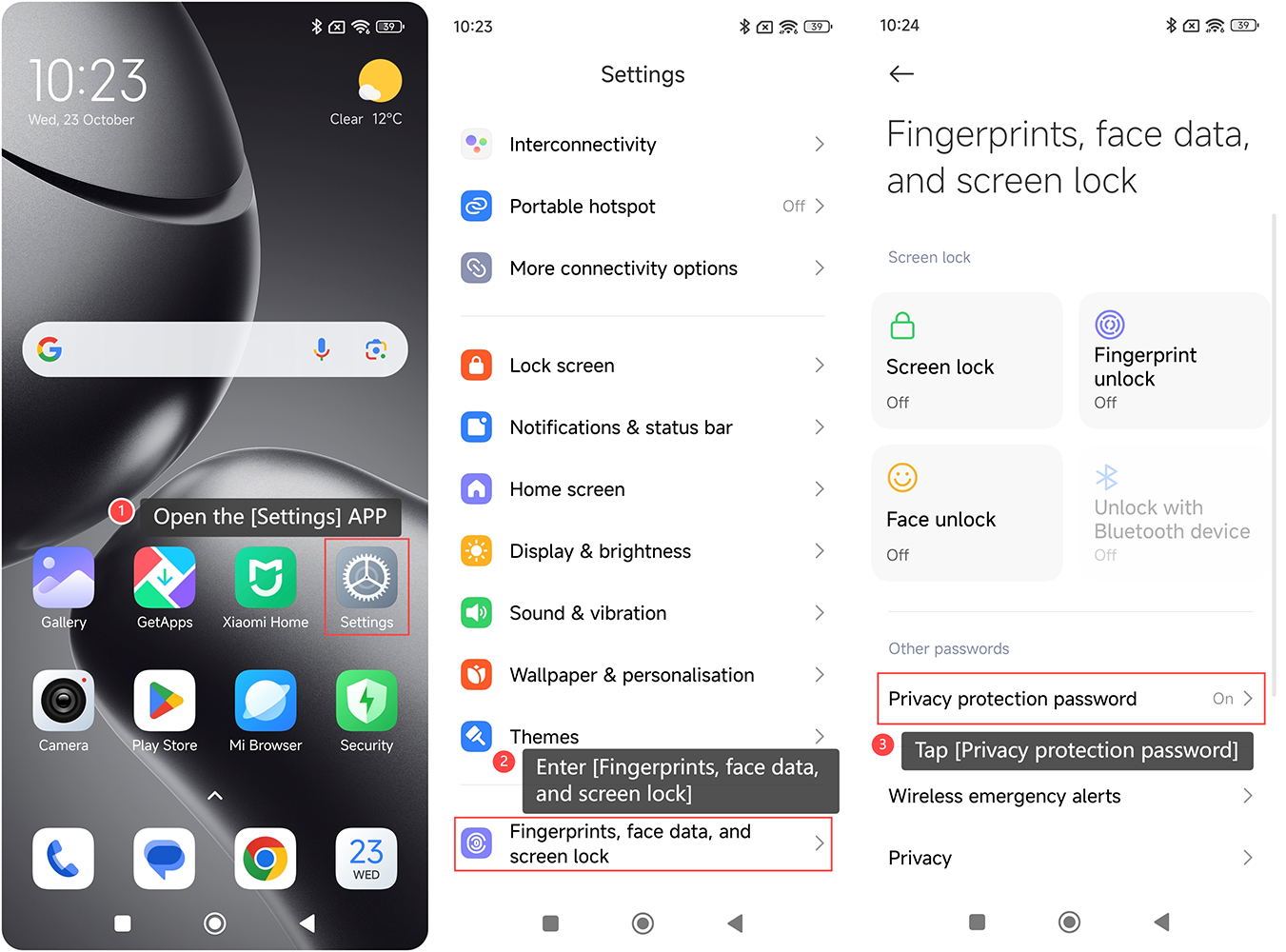
1. Open the [Settings] APP on your phone;
2. Enter [Fingerprints, face data, and screen lock];
3. Tap [Privacy protection password];
4. Tap [Forgot pattern];
5. If you've added a Xiaomi Account, you can change to a new privacy password by entering the Xiaomi Account password. If you haven't added a Xiaomi Account, the only option is to perform a factory reset to set a new one.
If the Privacy protection password has been forgotten, please refer to the following steps:
1. Open the [Settings] APP on your phone;
2. Enter [Fingerprints, face data, and screen lock];
3. Tap [Privacy protection password];
4. Tap [Forgot pattern];
5. If you've added a Xiaomi Account, you can change to a new privacy password by entering the Xiaomi Account password. If you haven't added a Xiaomi Account, the only option is to perform a factory reset to set a new one.
Does it help?
Yes
No