

How to use AI Notes on the Xiaomi 14T?
The Xiaomi 14T supports AI Notes, which includes AI summary, AI layout, AI proofreading, and AI translate. These allow you to quickly summarize content, correct errors, format your notes, and assist you in completing them efficiently and accurately, enhancing productivity.
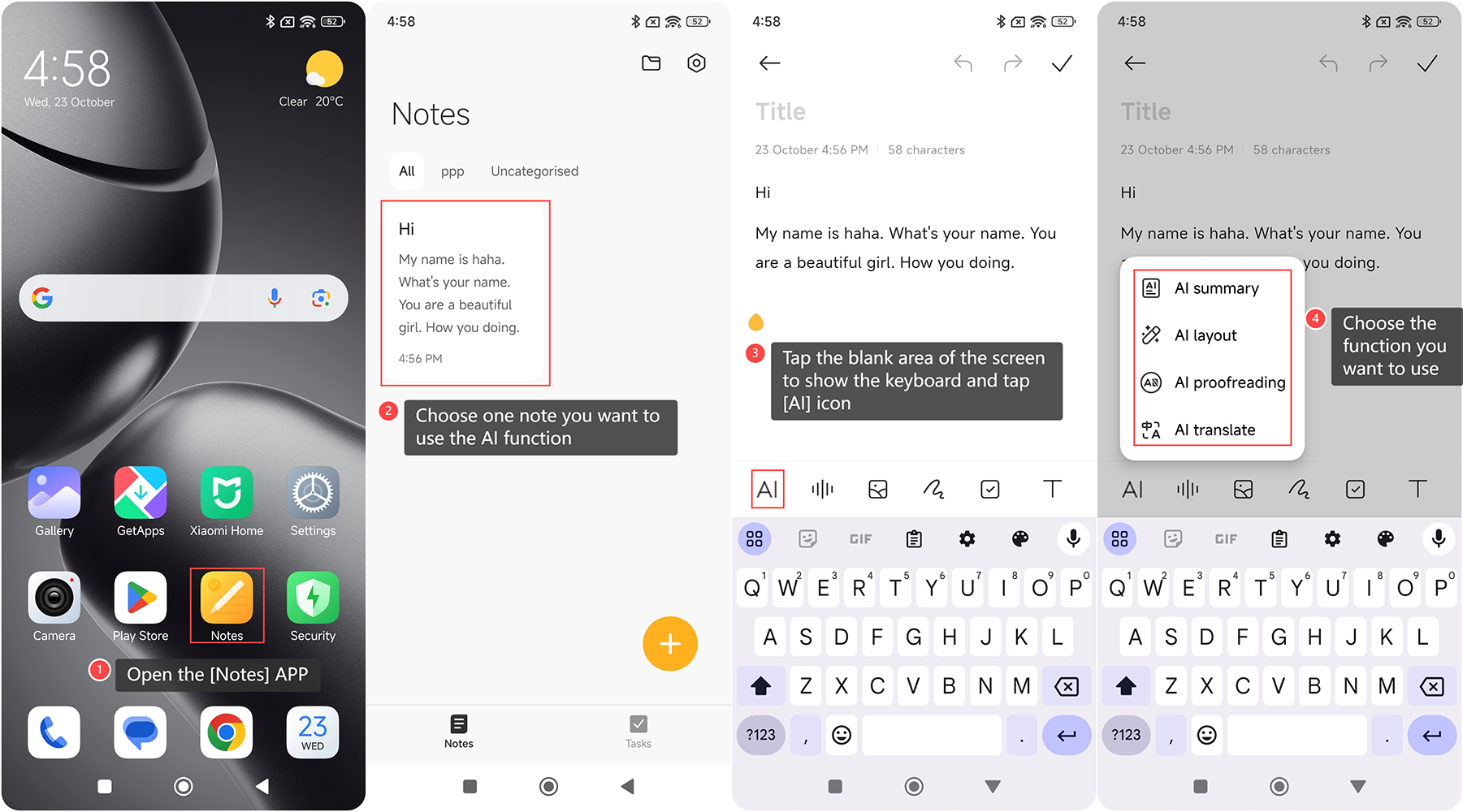
To use AI Notes on the Xiaomi 14T, please refer to the following steps:
1. Open the [Notes] APP on your phone;
2. Choose one note you want to use the AI function;
3. Tap the blank area of the screen to show the keyboard and tap [AI] icon;
4. Choose the function you want to use: [AI summary], [AI layout], [AI proofreading], and [AI translate].
The introductions to these functions are as follows:
1. AI Summary: Quickly create summaries of long texts with key points highlighted at the top;
2. AI Layout: Reformat messy notes into a neat and organized structure for easy reading;
3. AI Proofreading: Spell check text with one tap to fix typos and grammatical errors;
4. AI Translate: Automatically detect and translate foreign languages.
To use AI Notes on the Xiaomi 14T, please refer to the following steps:
1. Open the [Notes] APP on your phone;
2. Choose one note you want to use the AI function;
3. Tap the blank area of the screen to show the keyboard and tap [AI] icon;
4. Choose the function you want to use: [AI summary], [AI layout], [AI proofreading], and [AI translate].
The introductions to these functions are as follows:
1. AI Summary: Quickly create summaries of long texts with key points highlighted at the top;
2. AI Layout: Reformat messy notes into a neat and organized structure for easy reading;
3. AI Proofreading: Spell check text with one tap to fix typos and grammatical errors;
4. AI Translate: Automatically detect and translate foreign languages.
Does it help?
Yes
No