

How to manage the third-party applications on the Xiaomi 14T?
Managing third-party applications on the Xiaomi 14T involves tasks such as uninstalling APPs, managing permissions, and clearing data. This process allows you to control which APPs can access your device’s resources, ensuring they function efficiently and securely.
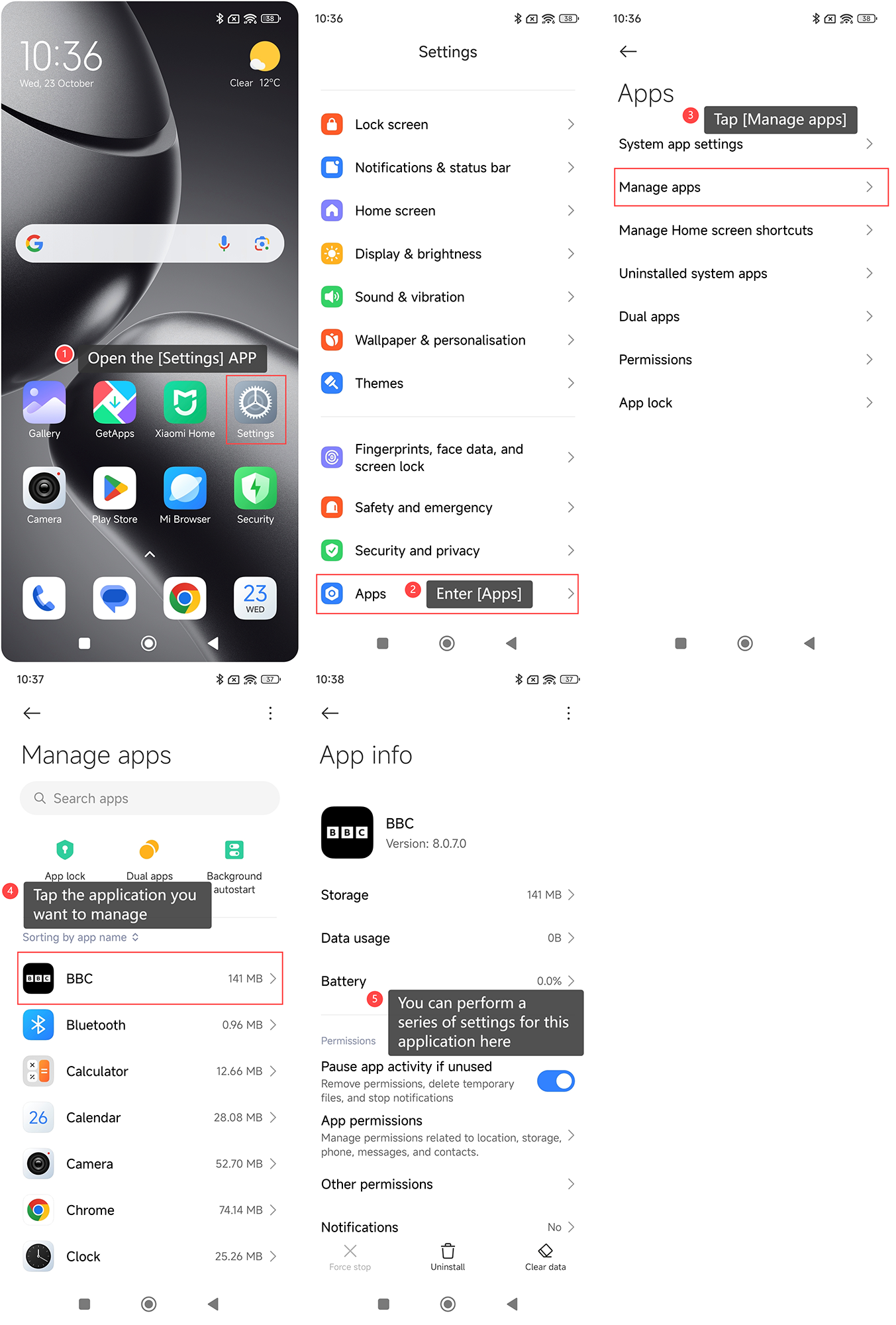
To manage third-party APPs on your phone, please refer to the following steps:
1. Open the [Settings] APP on your phone;
2. Enter [Apps];
3. Tap [Manage apps];
4. Tap the application you want to manage;
5. You can perform a series of settings for this application here.
Note:
By regularly reviewing and managing third-party APPs, you can improve both the performance and security of your device, keeping it running smoothly while protecting your personal information.
To manage third-party APPs on your phone, please refer to the following steps:
1. Open the [Settings] APP on your phone;
2. Enter [Apps];
3. Tap [Manage apps];
4. Tap the application you want to manage;
5. You can perform a series of settings for this application here.
Note:
By regularly reviewing and managing third-party APPs, you can improve both the performance and security of your device, keeping it running smoothly while protecting your personal information.
Does it help?
Yes
No