

How to change the background color for compatible icons on the Xiaomi 14T?
On the Xiaomi 14T, compatible icons have a transparent or light background color, which allows them to blend seamlessly with the overall interface. However, the specific appearance can vary depending on the theme you choose. You can also customize the look of icons through the settings, including changing the background colors to match your personal preferences or themes. Additionally, adjusting icon appearances can help improve visibility and accessibility, making navigation easier for you.
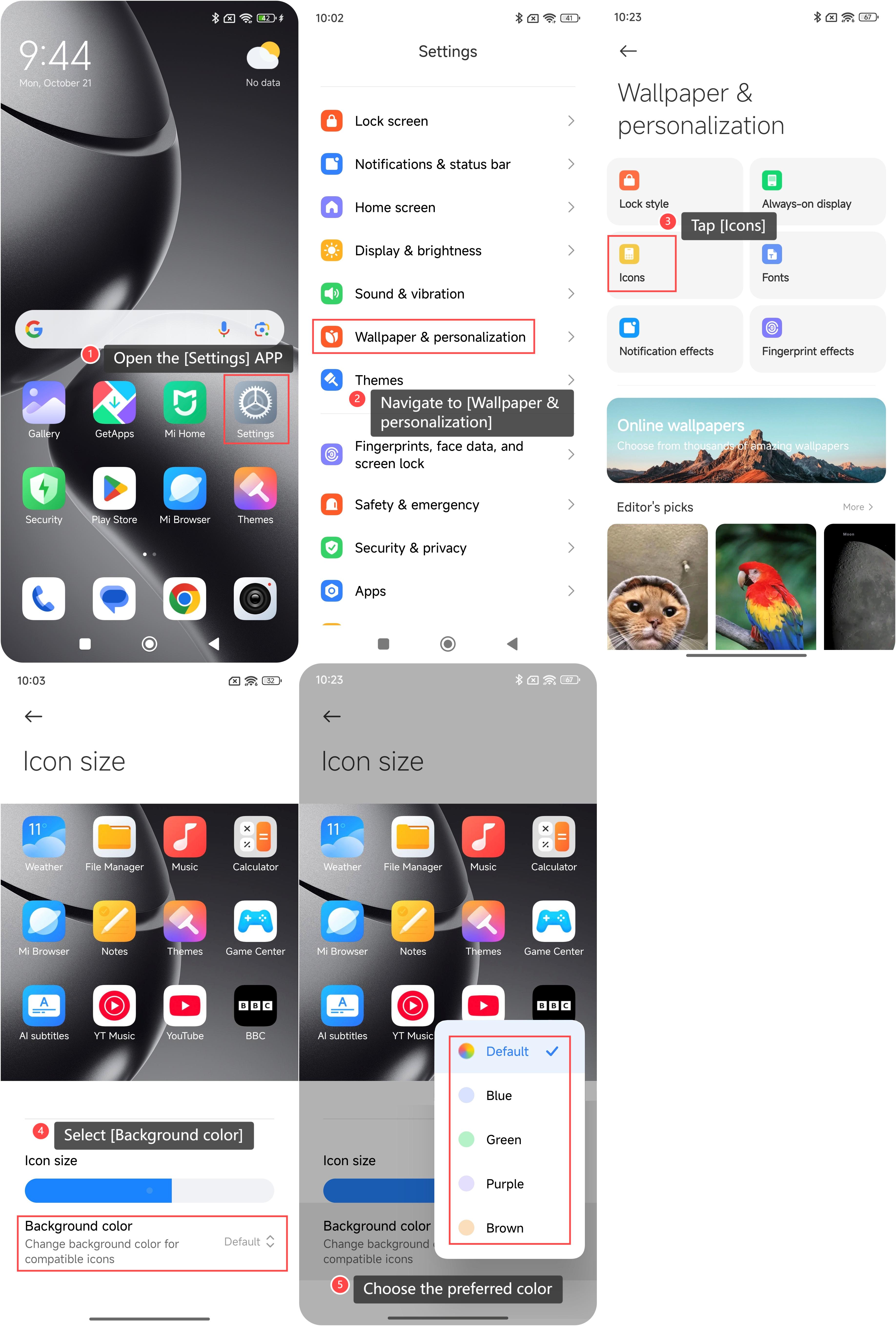
To change the background color for compatible icons on your phone, please refer to the following steps:
1. Open the [Settings] APP on your phone;
2. Navigate to [Wallpaper & personalization] and tap it;
3. Tap [Icons];
4. Select [Background color];
5. Choose the preferred color from the options to customize the icons.
To change the background color for compatible icons on your phone, please refer to the following steps:
1. Open the [Settings] APP on your phone;
2. Navigate to [Wallpaper & personalization] and tap it;
3. Tap [Icons];
4. Select [Background color];
5. Choose the preferred color from the options to customize the icons.
Does it help?
Yes
No