

How to adjust the Animation speed of the Home screen on the Xiaomi 14T Pro?
The Animation speed on the Xiaomi 14T Pro refers to the rate at which animations occur when transitioning between different screens and elements on the device. These animations are part of your interface and are designed to provide a smoother and visually pleasing experience when navigating through the system.
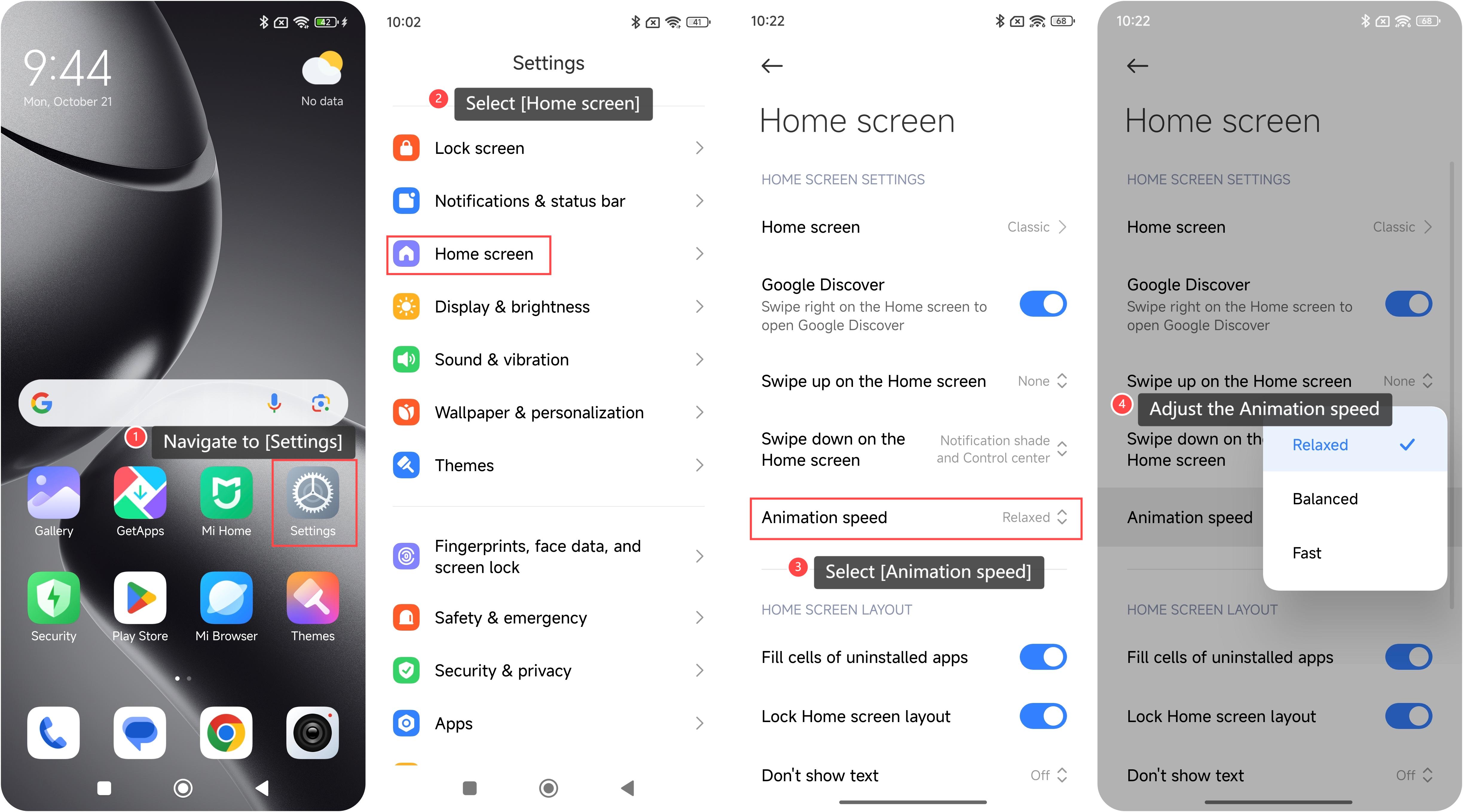
To adjust the Animation speed on your device, please refer to the following steps:
1. Navigate to [Settings] on your smartphone. You can find it on your home screen;
2. Look for and select the [Home screen] option;
3. Within the home screen settings, you can find and select an option called [Animation speed];
4. When you find the [Animation speed] option, you can adjust the Animation speed as your preference here.
Note:
Adjusting animation speed can affect the visual transitions between different screens and elements on your smartphone.
To adjust the Animation speed on your device, please refer to the following steps:
1. Navigate to [Settings] on your smartphone. You can find it on your home screen;
2. Look for and select the [Home screen] option;
3. Within the home screen settings, you can find and select an option called [Animation speed];
4. When you find the [Animation speed] option, you can adjust the Animation speed as your preference here.
Note:
Adjusting animation speed can affect the visual transitions between different screens and elements on your smartphone.
Does it help?
Yes
No