

How to lower the brightness of the fingerprint icon on the Xiaomi 14T Pro?
The Xiaomi 14T Pro supports Low light fingerprint unlock. This function can lower the brightness of the fingerprint icon in low light conditions. Your device can unlock slower when this feature is on.
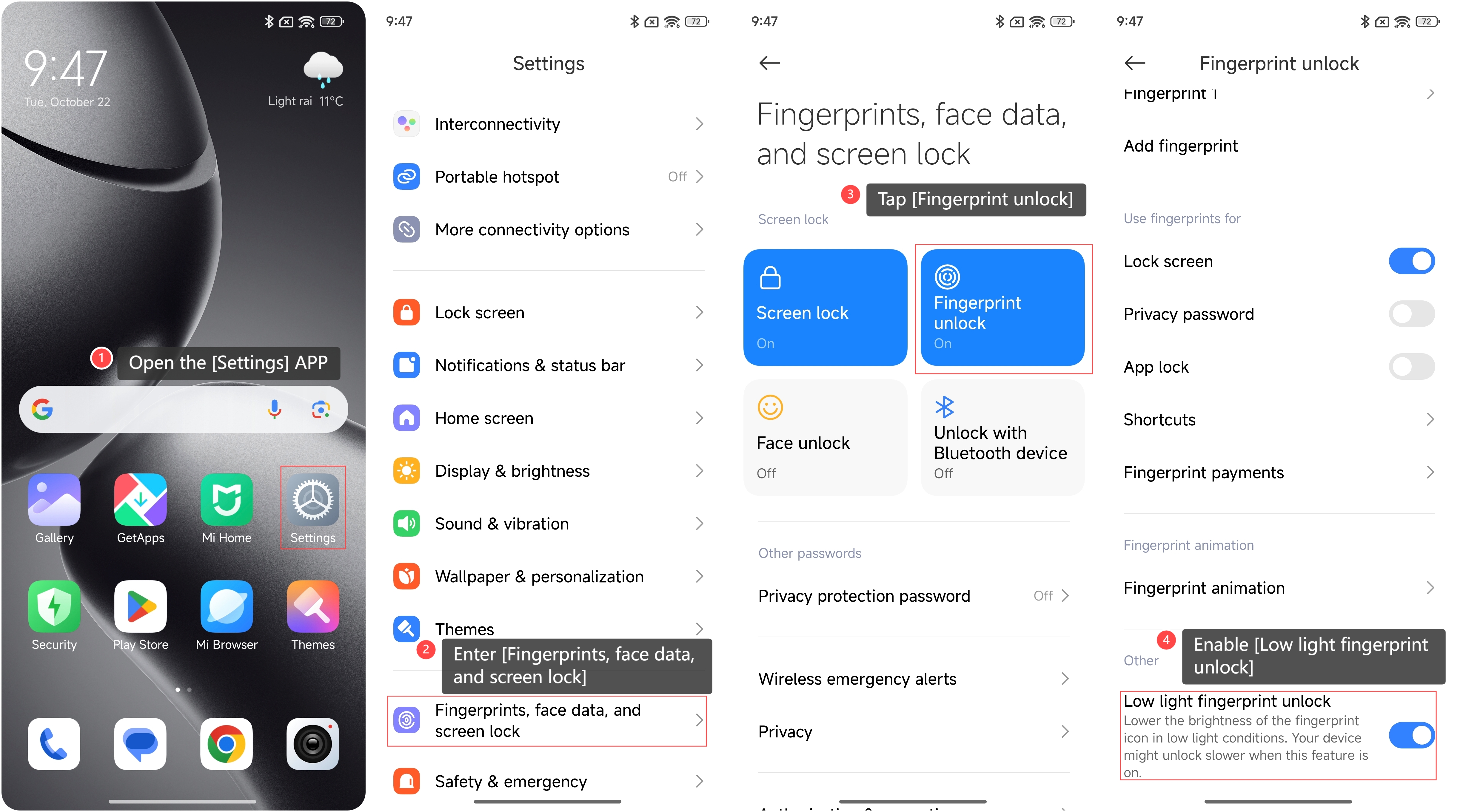
To lower the brightness of the fingerprint icon on the phone, please refer to the following steps:
1. Open the [Settings] APP on your phone;
2. Enter [Fingerprints, face data, and screen lock];
3. Tap [Fingerprint unlock];
4. Enable [Low light fingerprint unlock].
To lower the brightness of the fingerprint icon on the phone, please refer to the following steps:
1. Open the [Settings] APP on your phone;
2. Enter [Fingerprints, face data, and screen lock];
3. Tap [Fingerprint unlock];
4. Enable [Low light fingerprint unlock].
Note:
Screen protectors can interfere with the screen fingerprint recognition. It is recommended to use an official Xiaomi film if you require screen protection.
Screen protectors can interfere with the screen fingerprint recognition. It is recommended to use an official Xiaomi film if you require screen protection.
Does it help?
Yes
No