

How to turn on Auto frame rate on the Xiaomi 14T?
The Xiaomi 14T supports enabling Auto frame rate, which adjusts the frames per second (FPS) when recording video. It helps optimize the video quality based on lighting and motion conditions. In darker environments, the phone will reduce the frame rate to allow more light into each frame, improving brightness and clarity. A lower frame rate gives the sensor more time to capture light, enhancing details in dimly lit scenes.
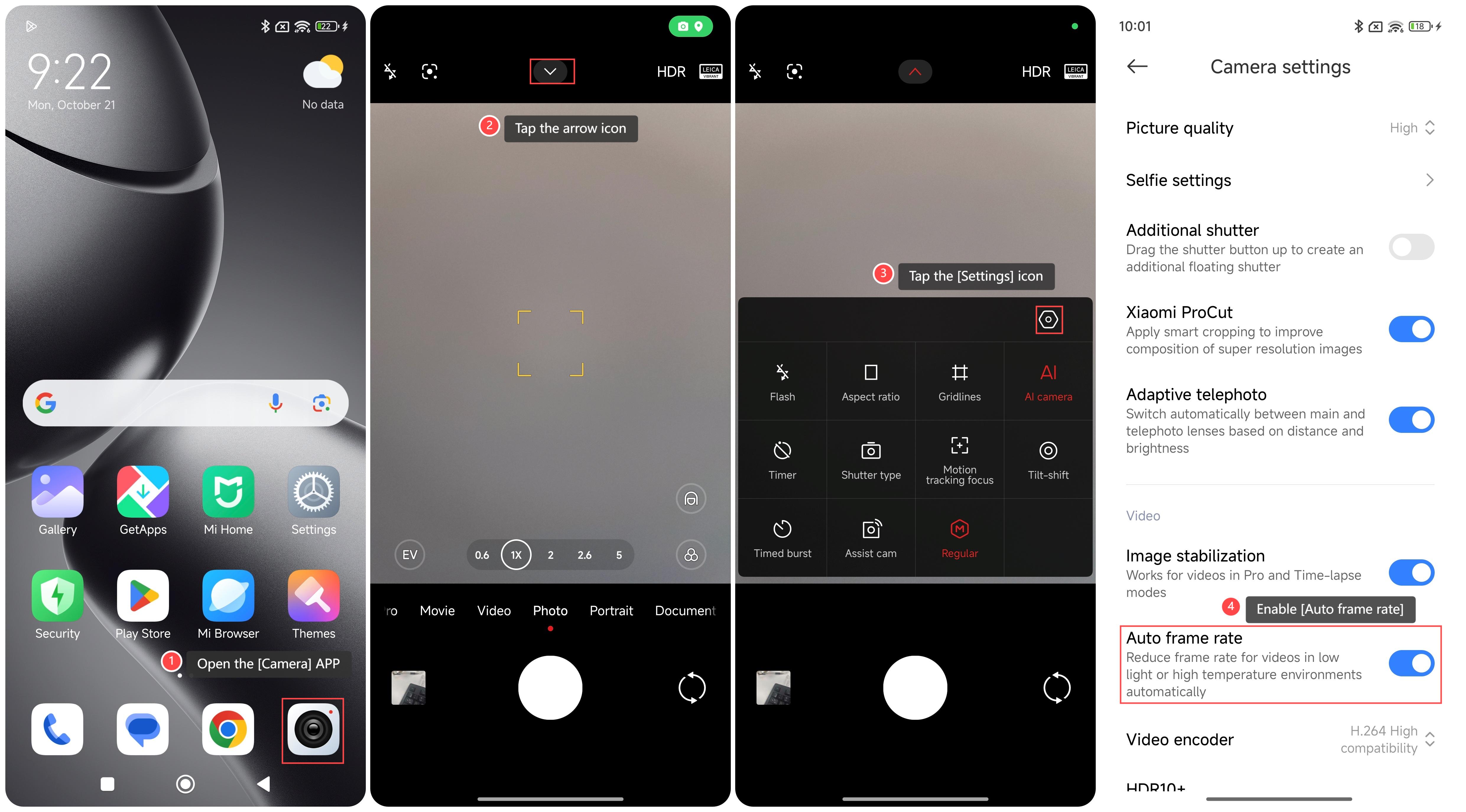
To turn on Auto frame rate on your phone, please refer to the following steps:
1. Open the [Camera] APP on your phone;
2. Tap the arrow icon on the top of the screen;
3. Tap the [Settings] icon;
4. Enable [Auto frame rate].
Note:
In mobile or dynamic scenes, automatic adjustment of the frame rate will result in slight changes in smoothness.
To turn on Auto frame rate on your phone, please refer to the following steps:
1. Open the [Camera] APP on your phone;
2. Tap the arrow icon on the top of the screen;
3. Tap the [Settings] icon;
4. Enable [Auto frame rate].
Note:
In mobile or dynamic scenes, automatic adjustment of the frame rate will result in slight changes in smoothness.
Does it help?
Yes
No