

How to turn on voice shutter on the Xiaomi 14T?
Turning on voice shutter on the Xiaomi 14T enables hands-free photography by allowing you to take photos with voice commands, such as saying cheese. This feature is particularly useful in situations where pressing the shutter button can be inconvenient, such as group photos, selfies, or when using a tripod. It enhances convenience and reduces the need for physical interaction with the phone.
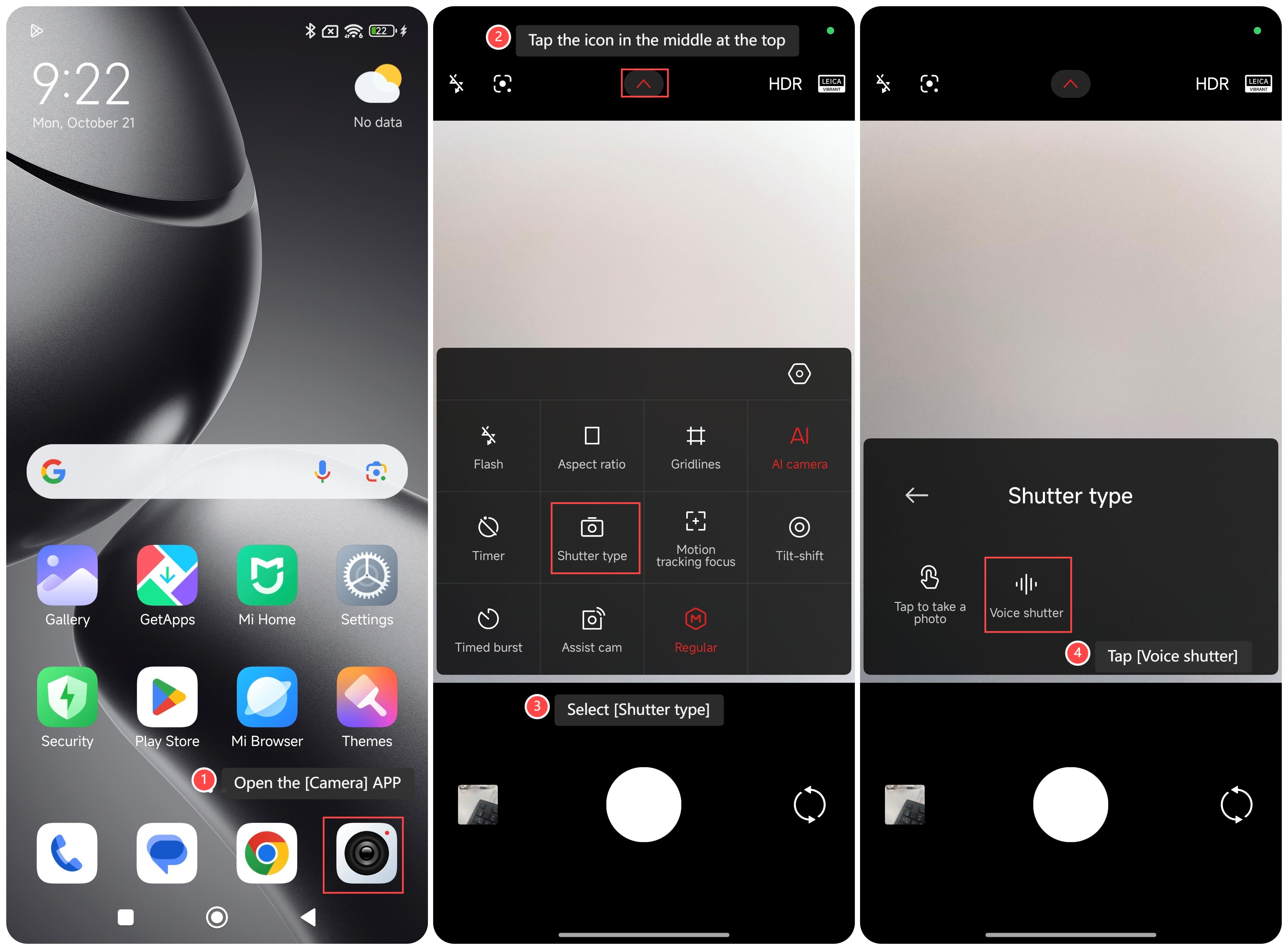
To turn on the voice shutter on your phone, please refer to the following steps:
1. Open the [Camera] APP on your phone;
2. Tap the icon in the middle at the top;
3. Select [Shutter type];
4. Tap [Voice shutter], and then you can take a photo by saying cheese.
Note:
It is recommended to stay close enough to the phone for it to detect your voice accurately.
To turn on the voice shutter on your phone, please refer to the following steps:
1. Open the [Camera] APP on your phone;
2. Tap the icon in the middle at the top;
3. Select [Shutter type];
4. Tap [Voice shutter], and then you can take a photo by saying cheese.
Note:
It is recommended to stay close enough to the phone for it to detect your voice accurately.
Does it help?
Yes
No