

How to clip photos on the Xiaomi 14T Pro?
Clipping photos on the Xiaomi 14T Pro is a feature that can automatically create a short video by combining multiple photos. It allows you to select different templates and add audio for a customized touch. The feature simplifies video creation by automatically arranging and styling photos, making it easy to create professional-looking clips without needing any editing experience.
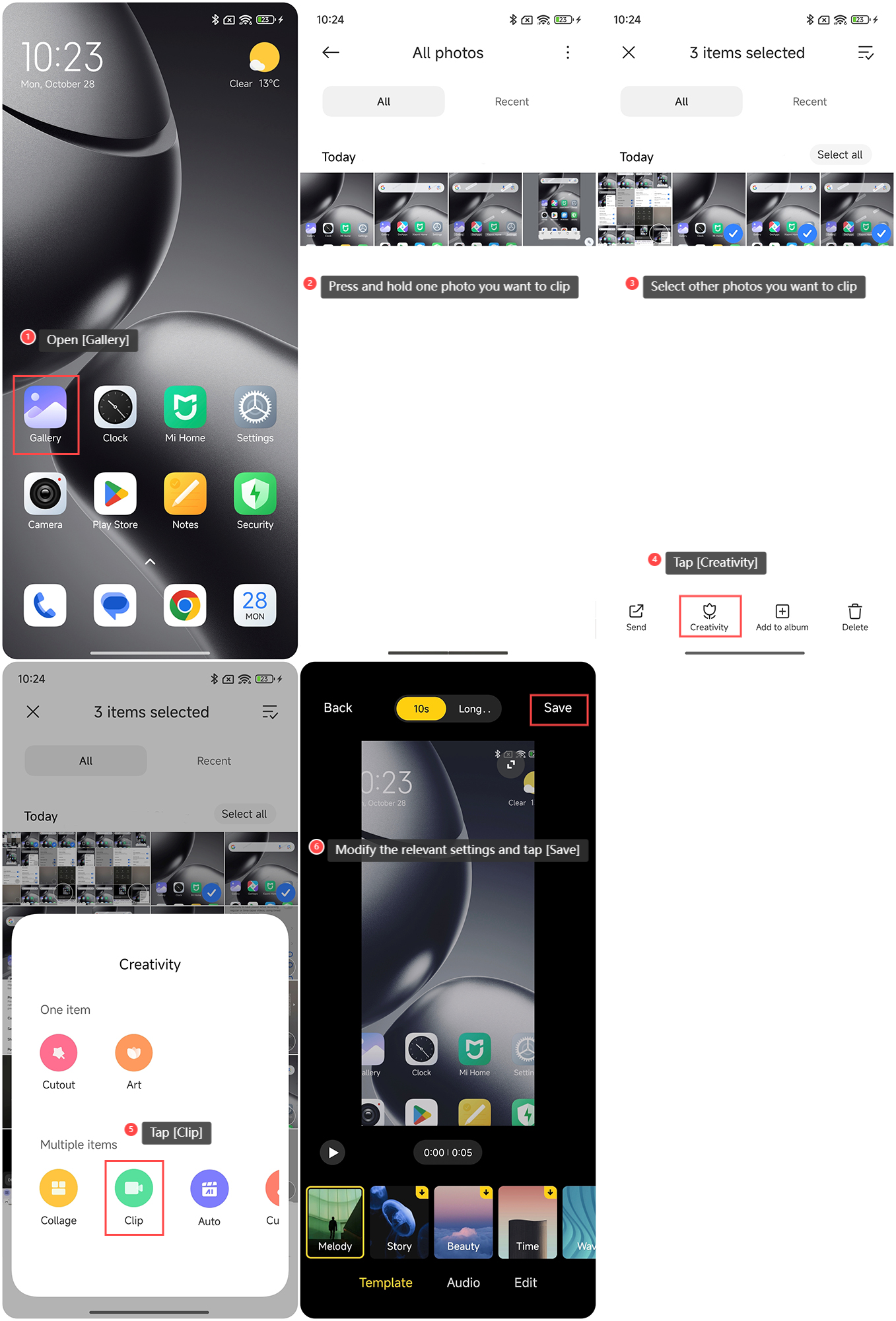
To clip photos on the Xiaomi 14T Pro, please refer to the following steps:
1. Open the [Gallery] APP on your phone;
2. Press and hold one photo you want to clip;
3. Select other photos you want to clip;
4. Tap [Creativity];
5. Tap [Clip];
6. Modify the relevant settings and tap [Save].
To clip photos on the Xiaomi 14T Pro, please refer to the following steps:
1. Open the [Gallery] APP on your phone;
2. Press and hold one photo you want to clip;
3. Select other photos you want to clip;
4. Tap [Creativity];
5. Tap [Clip];
6. Modify the relevant settings and tap [Save].
Does it help?
Yes
No