

How to adjust the Recents styles on the Xiaomi 14T?
The Xiaomi 14T supports adjusting the Recents styles, which enhances your experience by allowing you to customize the layout of the Recents screen according to your preferences. This feature not only improves accessibility but also provides a more organized view of your recently used APPs.
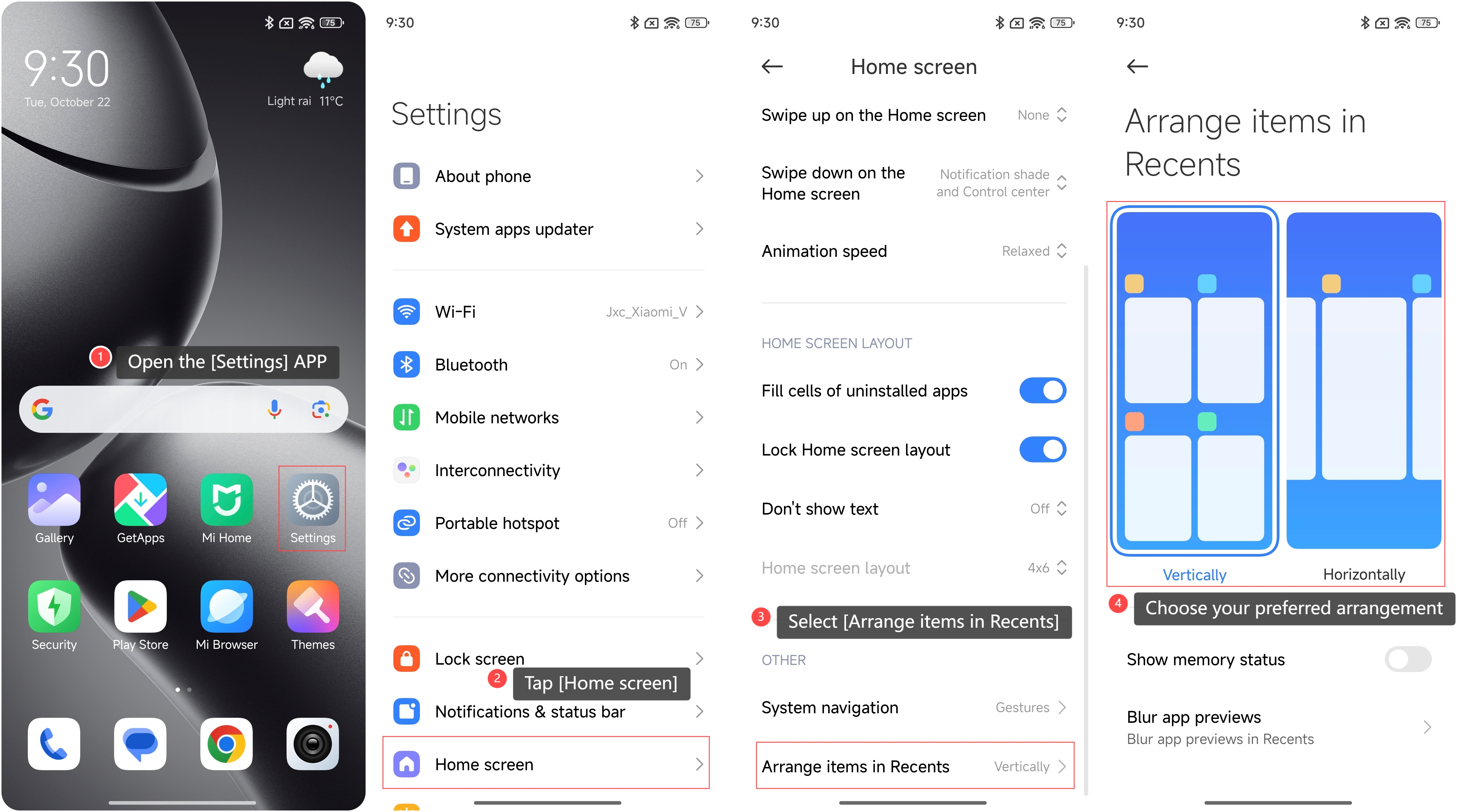
To adjust the Recents styles on the phone, please refer to the following steps:
1. Open the [Settings] APP on your phone;
2. Scroll down to locate and tap [Home screen]. This section contains various customization options for your device’s interface;
3. Select [Arrange items in Recents] to enter the layout settings;
4. Choose your preferred arrangement: [Vertically] for a stacked view or [Horizontally] for a side-by-side layout.
To adjust the Recents styles on the phone, please refer to the following steps:
1. Open the [Settings] APP on your phone;
2. Scroll down to locate and tap [Home screen]. This section contains various customization options for your device’s interface;
3. Select [Arrange items in Recents] to enter the layout settings;
4. Choose your preferred arrangement: [Vertically] for a stacked view or [Horizontally] for a side-by-side layout.
Does it help?
Yes
No