

How to hide notch on the Xiaomi 14T Pro?
The Xiaomi 14T Pro supports hiding notch. The function of notch involves enhancing use experience, which allows for a more immersive viewing experience when watching videos, browsing the web, or multitasking, as you can enjoy a larger display area.
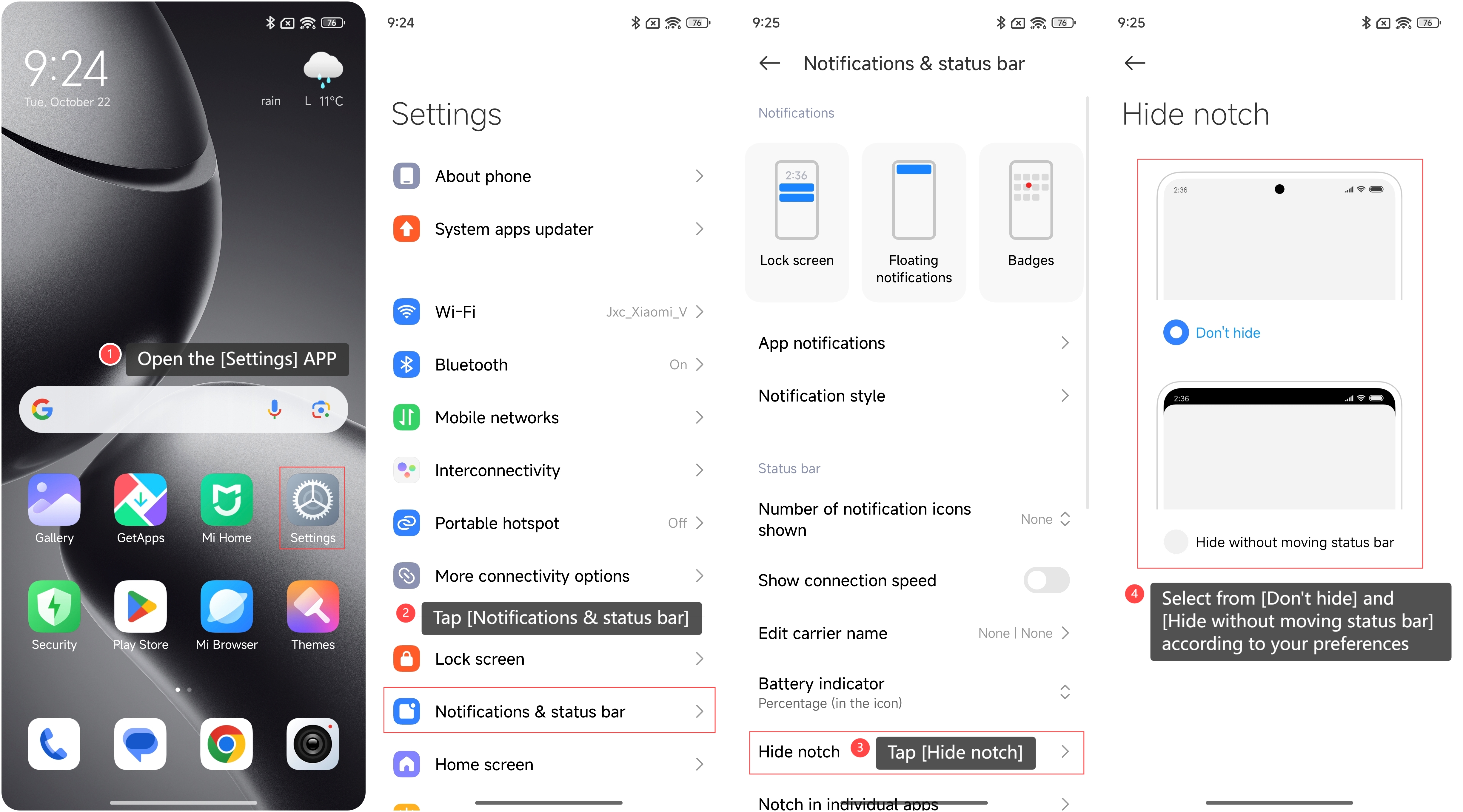
To hide notch on your phone, please refer to the following steps:
1. Open the [Settings] APP on your phone;
2. Swipe down to find and tap [Notifications & status bar];
3. Swipe down to find and tap [Hide notch];
4. Select from [Don’t hide] and [Hide without moving status bar] according to your preferences.
To hide notch on your phone, please refer to the following steps:
1. Open the [Settings] APP on your phone;
2. Swipe down to find and tap [Notifications & status bar];
3. Swipe down to find and tap [Hide notch];
4. Select from [Don’t hide] and [Hide without moving status bar] according to your preferences.
Note:
After hiding the notch, the interface layout of some APPs can change. Therefore, it is recommended to test this feature with different APPs to ensure that your experience is not affected.
After hiding the notch, the interface layout of some APPs can change. Therefore, it is recommended to test this feature with different APPs to ensure that your experience is not affected.
Does it help?
Yes
No