

How to manage the number of notification icons shown on the Xiaomi 14T?
Setting the number of notification icons in the status bar on the Xiaomi 14T allows you to control how many icons appear at the top of the screen when notifications are received. By limiting the number of icons, you can maintain a cleaner and less cluttered status bar, improving the overall appearance.
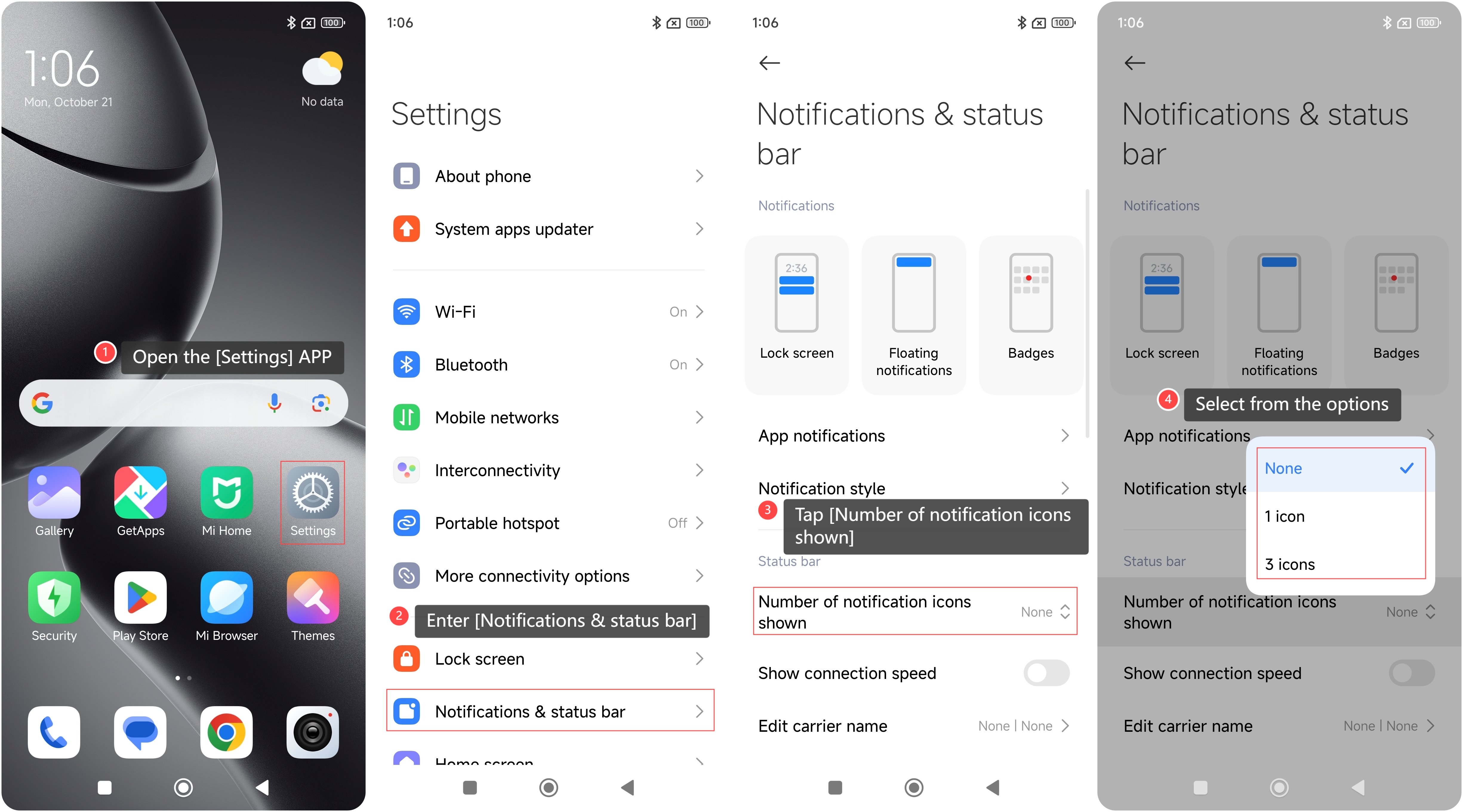
To manage the number of notification icons shown on your phone, please refer to the following steps:
1. Open the [Settings] APP on your phone;
2. Enter [Notifications & status bar];
3. Tap [Number of notification icons shown];
4. Select from the options according to your needs.
To manage the number of notification icons shown on your phone, please refer to the following steps:
1. Open the [Settings] APP on your phone;
2. Enter [Notifications & status bar];
3. Tap [Number of notification icons shown];
4. Select from the options according to your needs.
Note:
After the settings are completed, you can check the status bar to see if the number of icons displayed matches your selection.
After the settings are completed, you can check the status bar to see if the number of icons displayed matches your selection.
Does it help?
Yes
No