

How to turn on sixth generation standard on the Xiaomi 14T Pro?
The hotspot function of the Xiaomi 14T Pro supports the sixth generation standard, also known as Wi-Fi 6 or 802.11ax standard, which is the sixth generation of Wi-Fi technology. This feature provides faster, more reliable, and more efficient wireless connectivity, especially in high-density areas.
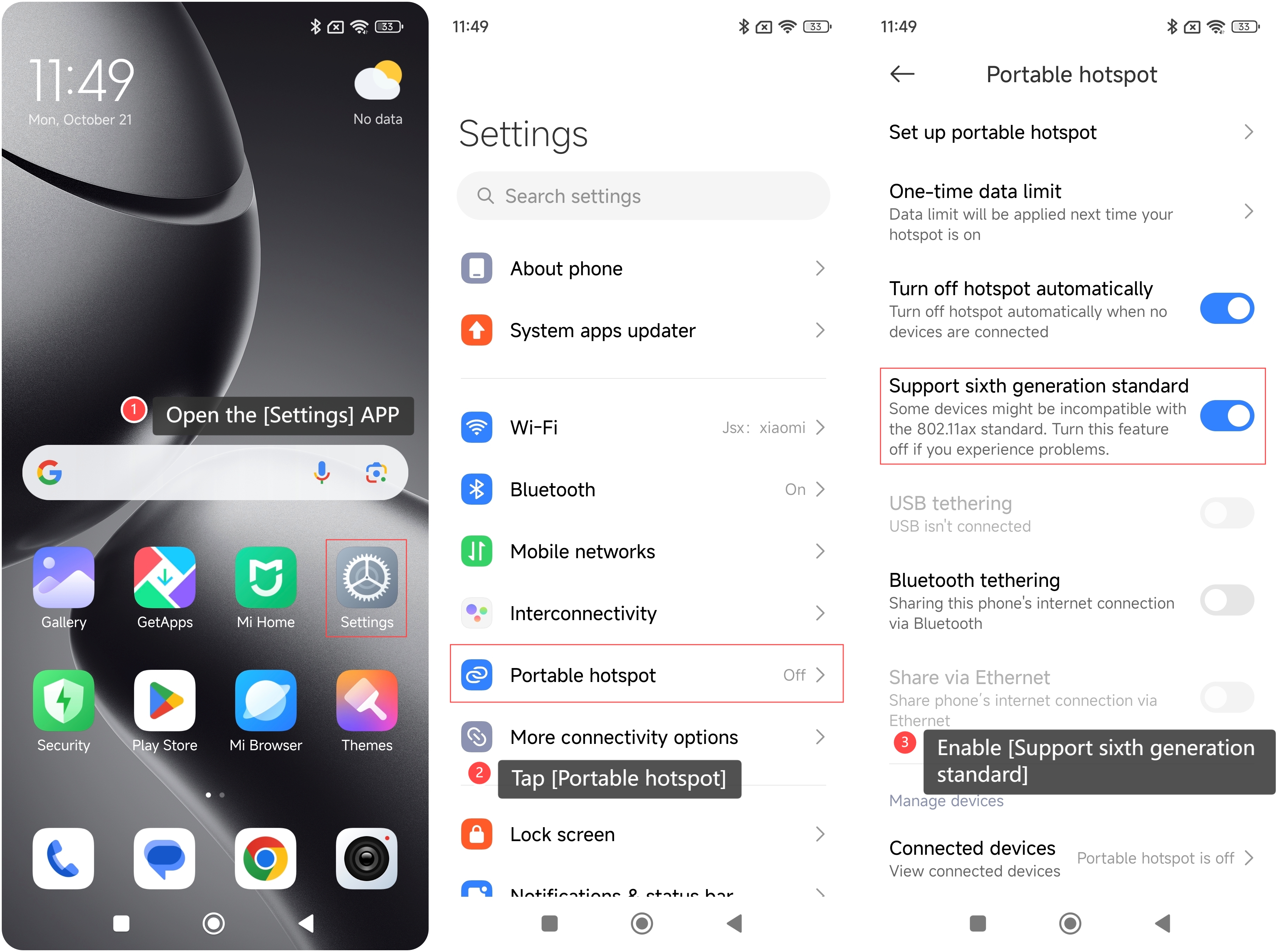
To enable sixth generation standard on your device, please refer to the following steps:
1. Open the [Settings] APP on your device. You can find the gear icon on your home screen or in your APP drawer;
2. Tap [Portable hotspot];
3. Scroll down and enable [Support sixth generation standard].
To enable sixth generation standard on your device, please refer to the following steps:
1. Open the [Settings] APP on your device. You can find the gear icon on your home screen or in your APP drawer;
2. Tap [Portable hotspot];
3. Scroll down and enable [Support sixth generation standard].
Note:
Some devices can be incompatible with the 802.11ax standard. Please turn off this feature if you experience problems.
Some devices can be incompatible with the 802.11ax standard. Please turn off this feature if you experience problems.
Does it help?
Yes
No