

How to set the fingerprint effects on the Xiaomi 14T?
The Xiaomi 14T supports configuring different fingerprint effects when unlocking the screen, which can enrich your use experience in terms of unlocking the screen with fingerprints.
To set the fingerprint effects on your phone, please refer to the following methods:
Method 1:
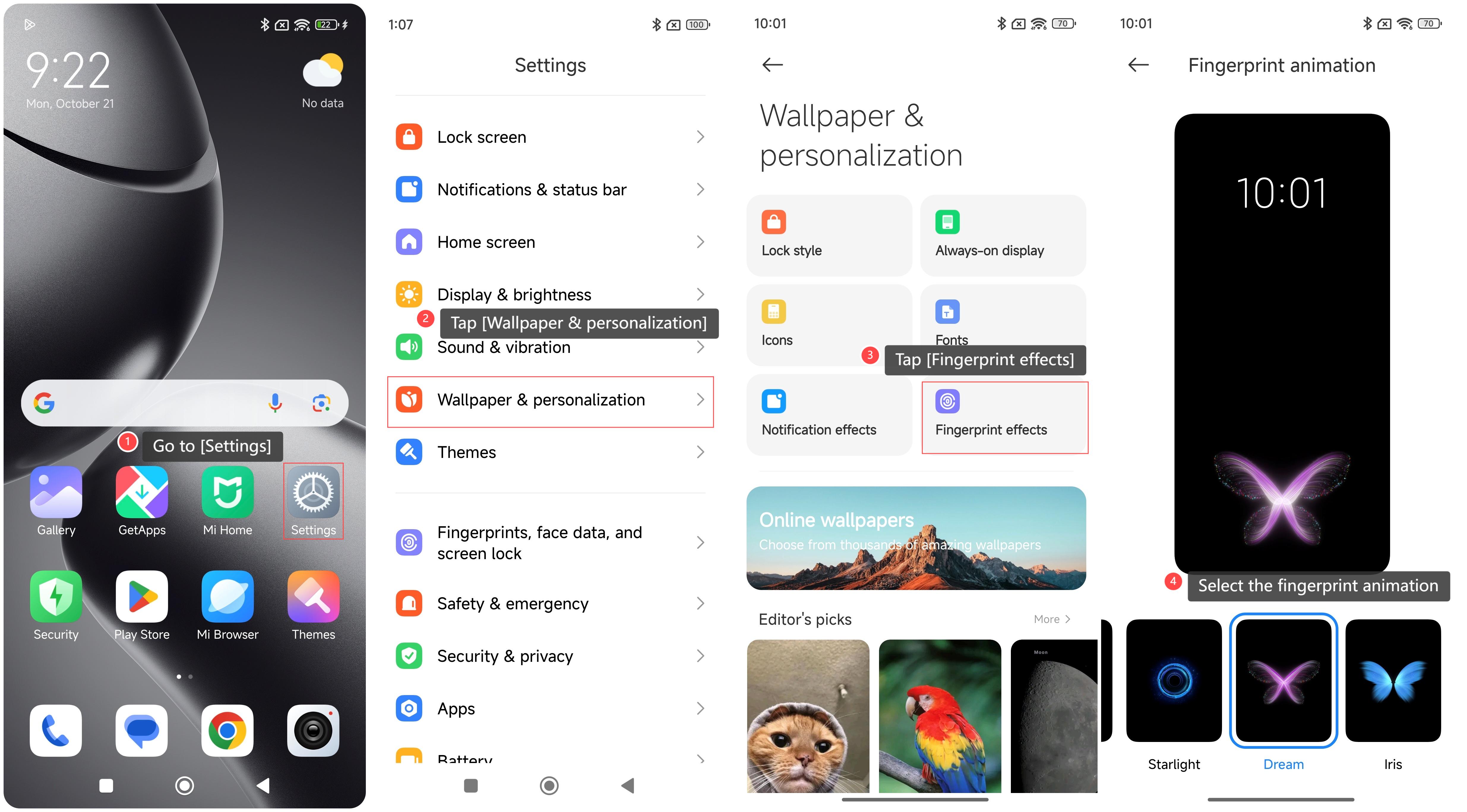
1. Go to [Settings];
2. Tap [Wallpaper & personalization];
3. Tap [Fingerprint effects];
4. Swipe left or right to select the fingerprint animation.
Method 2:
1. Go to [Settings];
2. Tap [Fingerprints, face data, and screen lock];
3. Tap [Fingerprint unlock];
4. Tap [Fingerprint animation];
5. Swipe left or right to select the fingerprint animation.

To set the fingerprint effects on your phone, please refer to the following methods:
Method 1:
1. Go to [Settings];
2. Tap [Wallpaper & personalization];
3. Tap [Fingerprint effects];
4. Swipe left or right to select the fingerprint animation.
Method 2:
1. Go to [Settings];
2. Tap [Fingerprints, face data, and screen lock];
3. Tap [Fingerprint unlock];
4. Tap [Fingerprint animation];
5. Swipe left or right to select the fingerprint animation.
Does it help?
Yes
No