

How to hide the notification content of App lock on the Xiaomi 14T Pro?
After turning on the App lock, you can enable the hide notification content feature on the Xiaomi 14T Pro. It is designed to enhance privacy by preventing sensitive information from appearing in notifications. When this feature is enabled, the content of notifications, such as messages, is hidden.
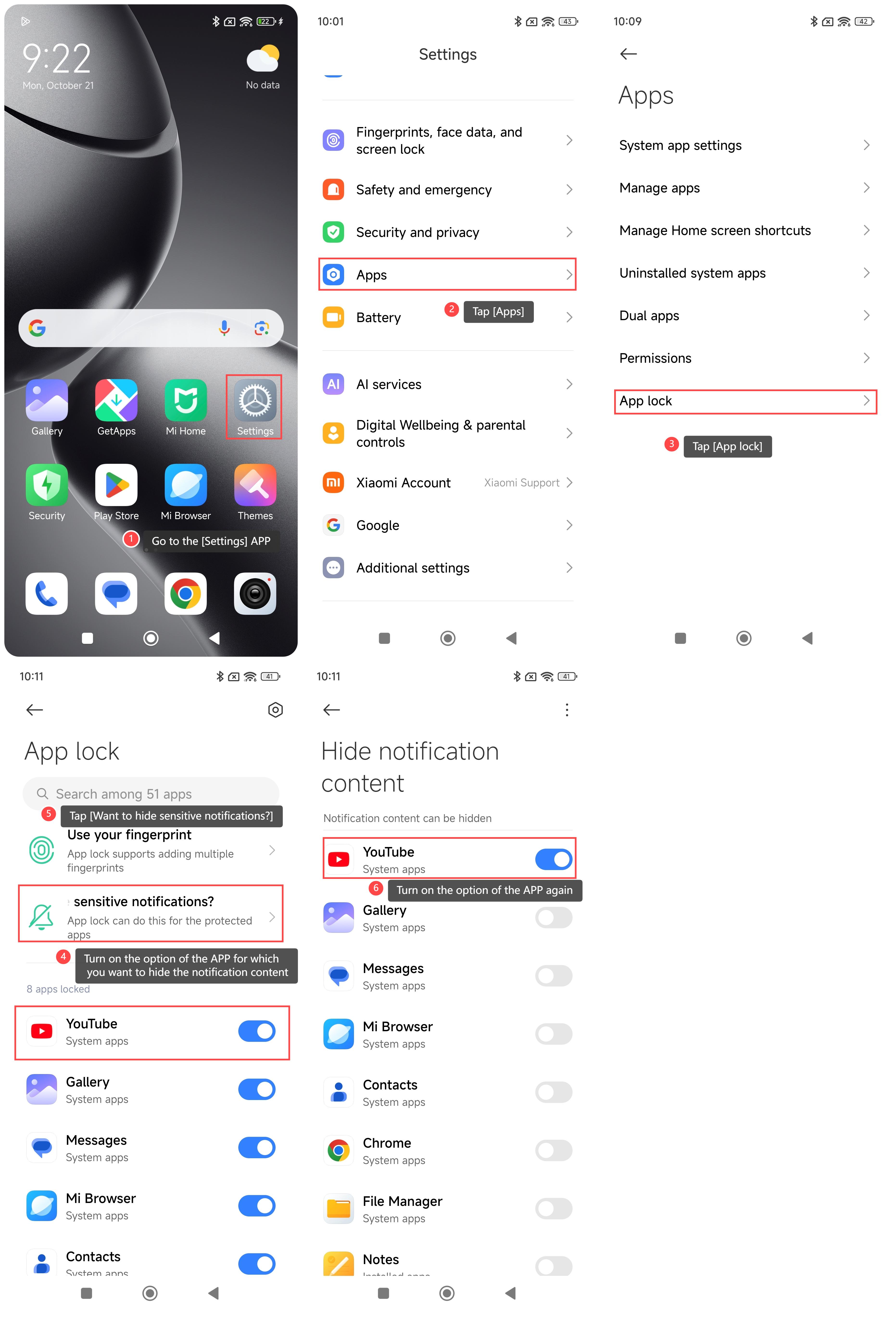
To hide the notification content of App lock on your phone, please refer to the following steps:
1. Go to the [Settings] APP on your phone;
2. Scroll down and tap [Apps];
3. Tap [App lock];
4. Turn on the option of the APP for which you want to hide the notification content;
5. Tap [Want to hide sensitive notifications?] at the upper part of the interface;
6. Turn on the option of the APP again and the notification content will be hidden.
To hide the notification content of App lock on your phone, please refer to the following steps:
1. Go to the [Settings] APP on your phone;
2. Scroll down and tap [Apps];
3. Tap [App lock];
4. Turn on the option of the APP for which you want to hide the notification content;
5. Tap [Want to hide sensitive notifications?] at the upper part of the interface;
6. Turn on the option of the APP again and the notification content will be hidden.
Does it help?
Yes
No