

How to enable Raise to wake on the Xiaomi 14T Pro?
Raise to wake is a feature available on the Xiaomi 14T Pro that utilizes the phone's accelerometer sensor to achieve. When enabled, it allows the phone's screen to automatically wake up or turn on when you pick up or raise the device and shows your lock screen, notifications, or the time without the need to press any buttons.
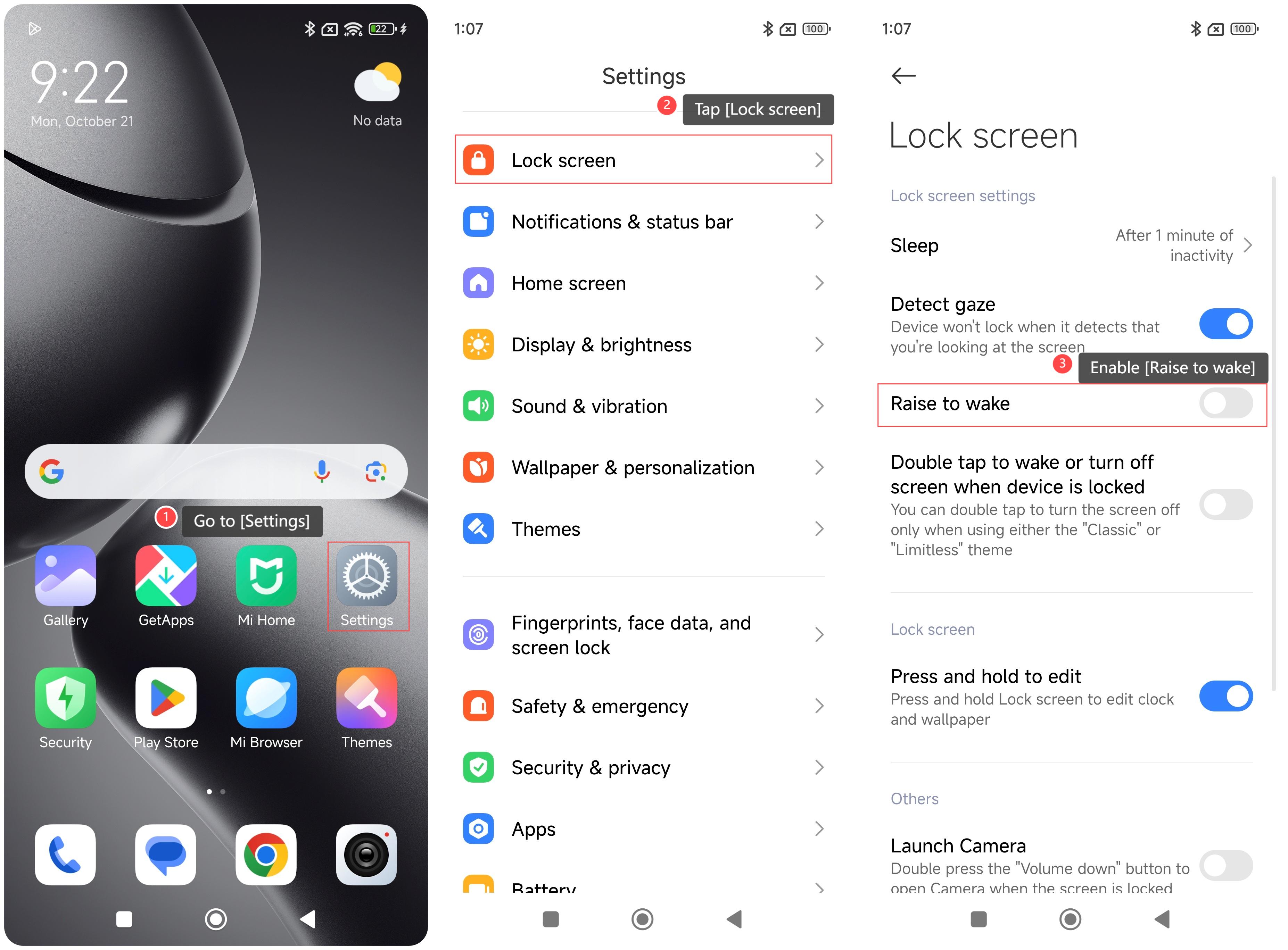
To enable this feature on your phone, please refer to the following steps:
1. Go to [Settings];
2. Swipe down to find and tap [Lock screen];
3. Enable [Raise to wake].
Note:
While it's a convenient feature, it can increase the power consumption of the phone, although the consumption is small. You can choose to turn off this feature to conserve battery if needed.
To enable this feature on your phone, please refer to the following steps:
1. Go to [Settings];
2. Swipe down to find and tap [Lock screen];
3. Enable [Raise to wake].
Note:
While it's a convenient feature, it can increase the power consumption of the phone, although the consumption is small. You can choose to turn off this feature to conserve battery if needed.
Does it help?
Yes
No