

How to enable Spell checker on the Redmi 13C?
The spell checker on the Redmi 13C is a feature that helps you identify and correct spelling errors in text typing. This feature is part of the keyboard software used on your phone and is designed to improve the accuracy and clarity of written communication by highlighting or suggesting corrections for misspelled words.
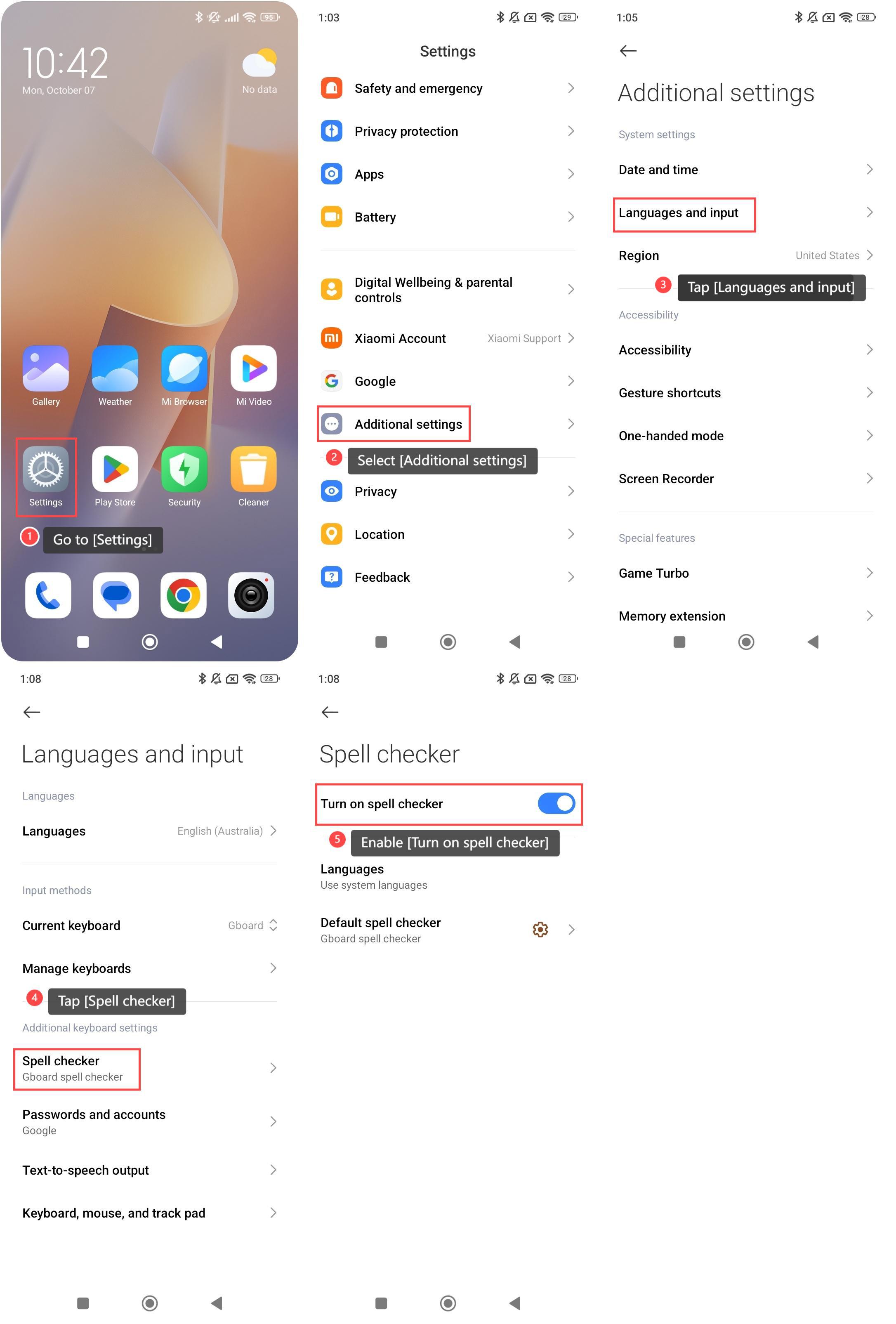
To enable Spell checker on your phone, please refer to the following steps:
1. Go to [Settings] on your phone;
2. Select [Additional settings];
3. Tap [Languages and input];
4. Tap the [Spell checker] option;
5. Enable [Turn on spell checker].
Note:
1. Ensure the selected language matches what the spell checker supports;
2. Keep your keyboard APP and system software updated to ensure optimal performance and access to the latest features.
To enable Spell checker on your phone, please refer to the following steps:
1. Go to [Settings] on your phone;
2. Select [Additional settings];
3. Tap [Languages and input];
4. Tap the [Spell checker] option;
5. Enable [Turn on spell checker].
Note:
1. Ensure the selected language matches what the spell checker supports;
2. Keep your keyboard APP and system software updated to ensure optimal performance and access to the latest features.
Does it help?
Yes
No