

How to share the hotspot of the Xiaomi 14T via USB?
The Xiaomi 14T supports sharing the hotspot via USB. USB tethering provides a more stable and reliable internet connection compared to wireless tethering, reducing potential interference. It can deliver faster data transfer rates, making it ideal for activities requiring high bandwidth.
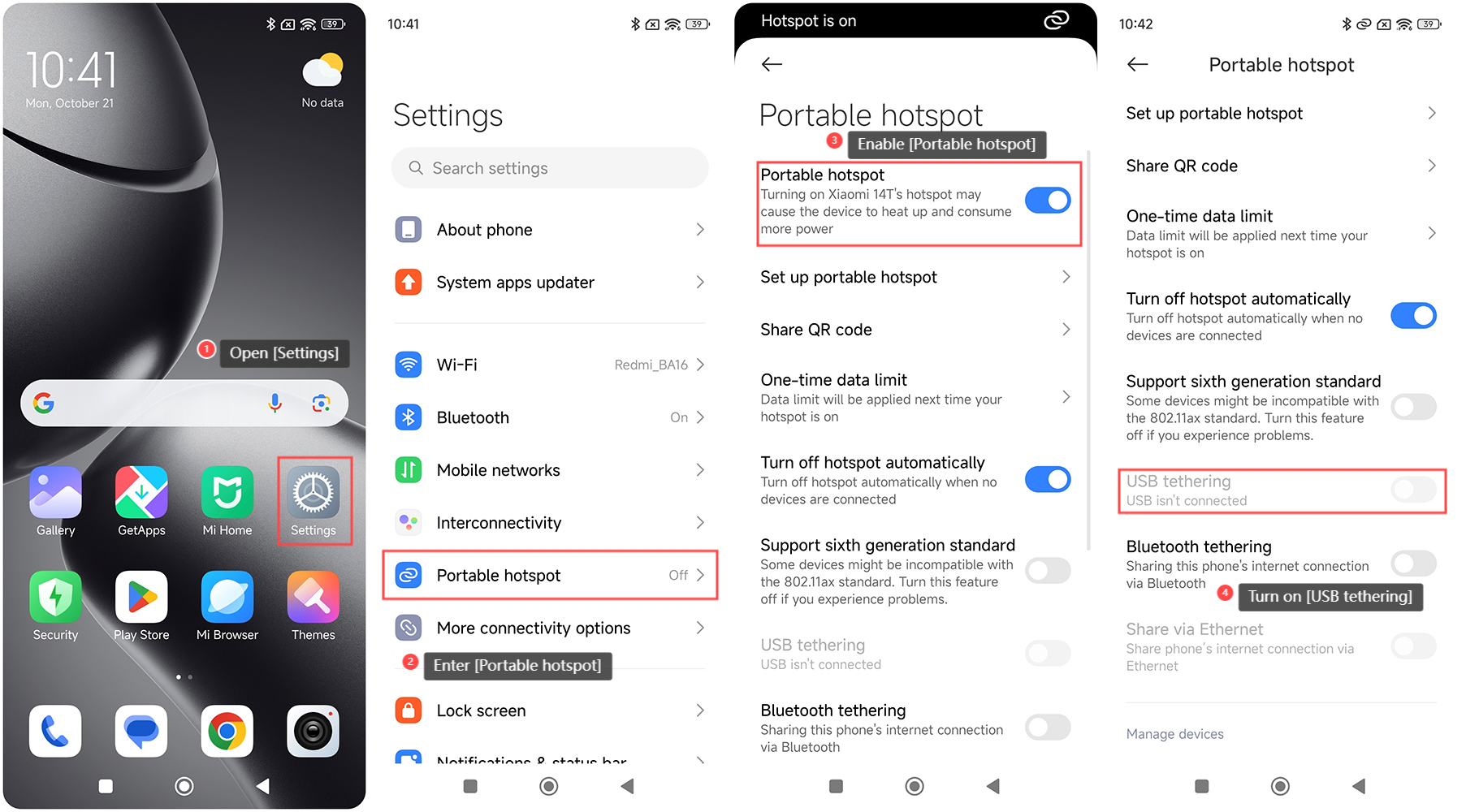
To share the hotspot of the Xiaomi 14T via USB, please refer to the following steps:
1. Open the [Settings] APP on your phone;
2. Enter [Portable hotspot];
3. Enable [Portable hotspot];
4. Turn on [USB tethering].
Note:
1. USB tethering will use your mobile data, so make sure you understand your data plan before enabling this feature to avoid exceeding your data limit and incurring extra charges;
2. USB tethering increases your phone's battery consumption and causes the phone to heat up.
To share the hotspot of the Xiaomi 14T via USB, please refer to the following steps:
1. Open the [Settings] APP on your phone;
2. Enter [Portable hotspot];
3. Enable [Portable hotspot];
4. Turn on [USB tethering].
Note:
1. USB tethering will use your mobile data, so make sure you understand your data plan before enabling this feature to avoid exceeding your data limit and incurring extra charges;
2. USB tethering increases your phone's battery consumption and causes the phone to heat up.
Does it help?
Yes
No