

How to take a photo with a timer on the Redmi 13C?
Taking a photo with a timer on the Redmi 13C allows for hands-free photography, giving you time to position yourself before the shot is taken. It's especially useful for group photos, selfies, or when using a tripod. The timer helps ensure stability, reducing the chance of blurred images caused by tapping the shutter.
To take a photo with a timer on the phone, please refer to the following steps:
1. Open the [Camera] APP on your phone;
2. Tap the icon in the middle at the top;
3. Select [Timer];
4. Select the desired countdown duration.
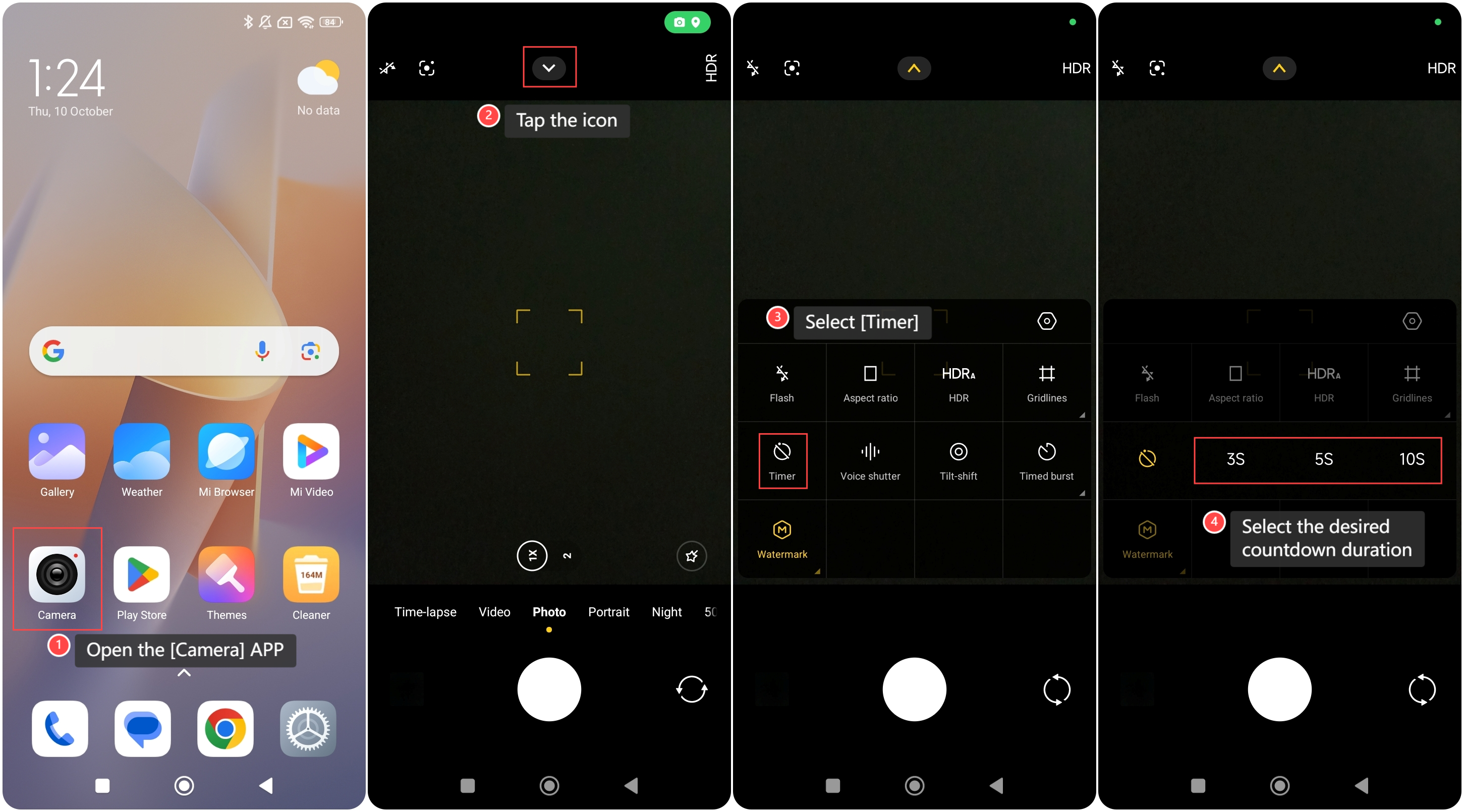
To take a photo with a timer on the phone, please refer to the following steps:
1. Open the [Camera] APP on your phone;
2. Tap the icon in the middle at the top;
3. Select [Timer];
4. Select the desired countdown duration.
Note:
The Redmi 13C supports timer settings of 3 seconds, 5 seconds, and 10 seconds for taking photos.
The Redmi 13C supports timer settings of 3 seconds, 5 seconds, and 10 seconds for taking photos.
Does it help?
Yes
No