

How to check EID on the Xiaomi 14T?
The Xiaomi 14T supports checking EID, which means Electronic Identity. It can help you verify your identification information, which is crucial to checking private information and implement some significant operations. Although checking EID involves personal information verification, it will not be uploaded to the cloud or third-party APPs, preventing information leakage and surveillance, ensuring your privacy security.
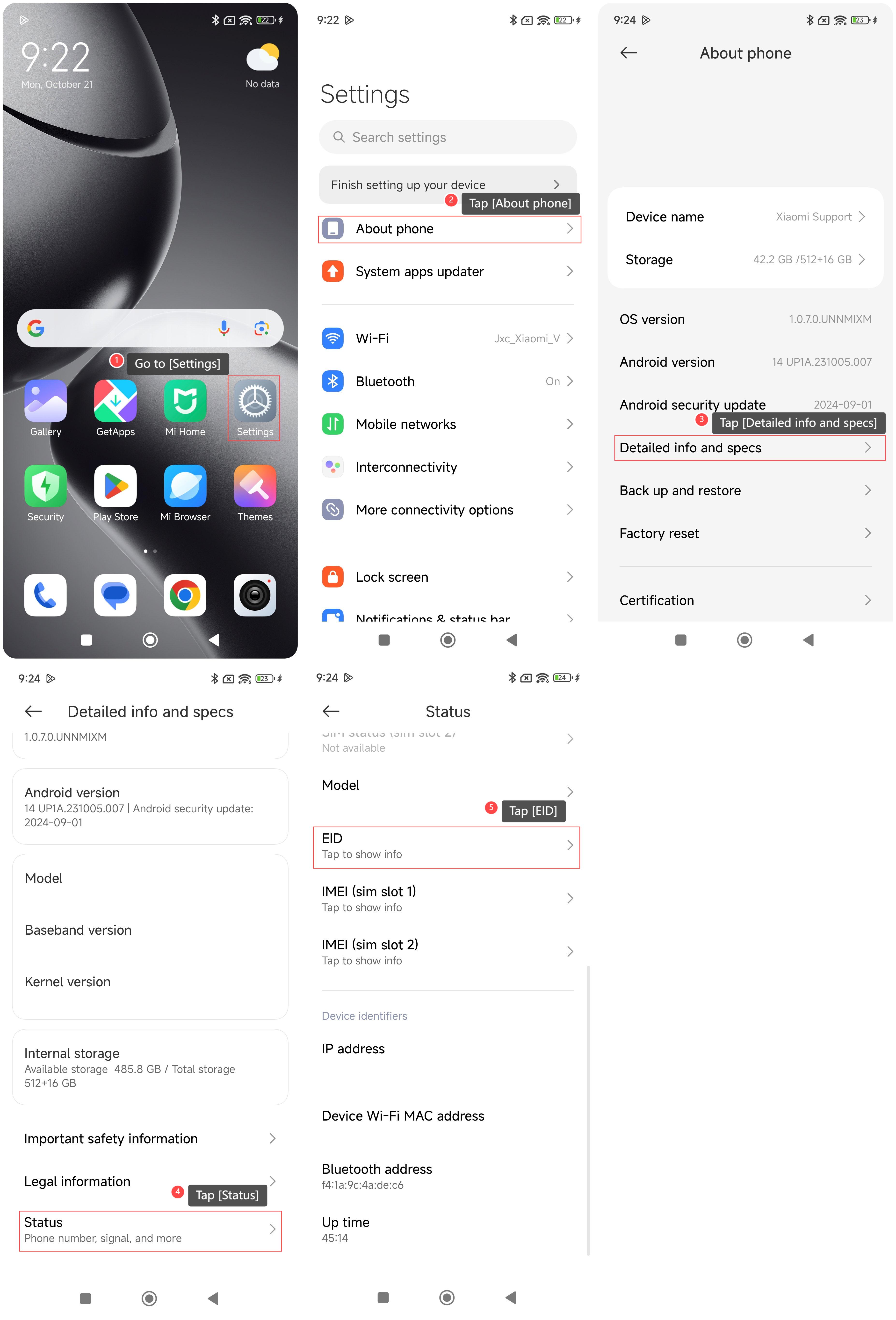
To check EID on your phone, please refer to the following steps:
1. Go to [Settings];
2. Tap [About phone];
3. Tap [Detailed info and specs];
4. Swipe down to find and tap [Status];
5. Tap [EID] and you can check the EID information.
To check EID on your phone, please refer to the following steps:
1. Go to [Settings];
2. Tap [About phone];
3. Tap [Detailed info and specs];
4. Swipe down to find and tap [Status];
5. Tap [EID] and you can check the EID information.
Does it help?
Yes
No