

How to manage notification shade style on the Xiaomi 14T?
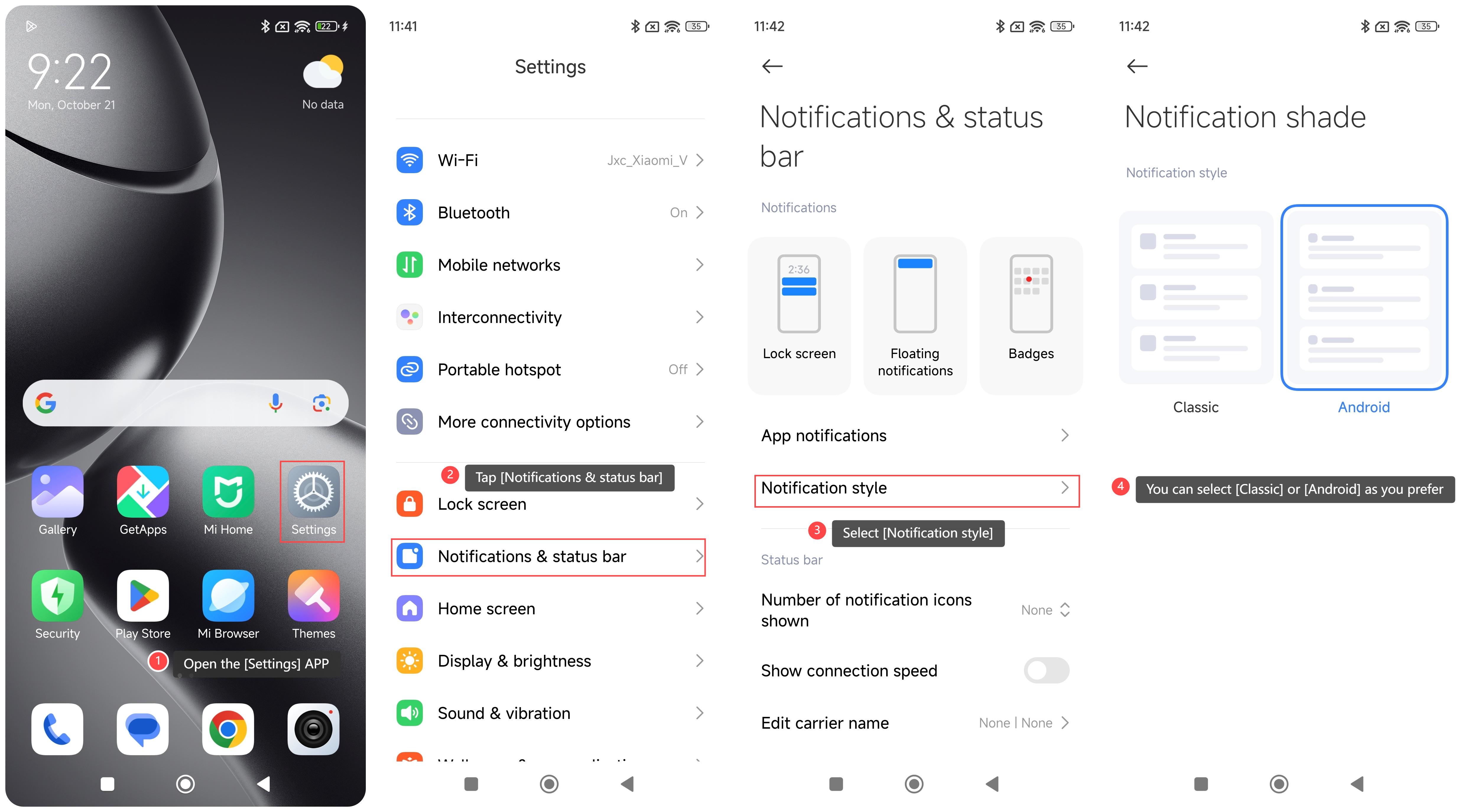
The notification shade on the Xiaomi 14T provides quick access to various messages and alerts. There are two notification shade styles, including Classic and Android.
To manage the notification shade style on your phone, please refer to the following steps:
1. Open the [Settings] APP on your phone;
2. Tap [Notifications & status bar];
3. Select [Notification style];
4. You will see there are two notification styles, and you can select [Classic] or [Android] as you prefer.
Note:
1. Swipe down from the left top of the screen to open the notification shade;
2. Swipe right or left on a notification to clear it individually, also you can tap the [×] icon at the bottom to remove all notifications.
To manage the notification shade style on your phone, please refer to the following steps:
1. Open the [Settings] APP on your phone;
2. Tap [Notifications & status bar];
3. Select [Notification style];
4. You will see there are two notification styles, and you can select [Classic] or [Android] as you prefer.
Note:
1. Swipe down from the left top of the screen to open the notification shade;
2. Swipe right or left on a notification to clear it individually, also you can tap the [×] icon at the bottom to remove all notifications.
Does it help?
Yes
No