

How to enable Pocket mode on the Xiaomi 14T Pro?
Pocket mode on the Xiaomi 14T Pro is designed to prevent accidental touches on the screen while the device is in your pocket or bag. When enabled, the phone detects that it is in a pocket and disables the touchscreen functionality to avoid unintentional inputs, like launching APPs or making calls. This helps preserve battery life and prevents unwanted actions while the phone is stored away.
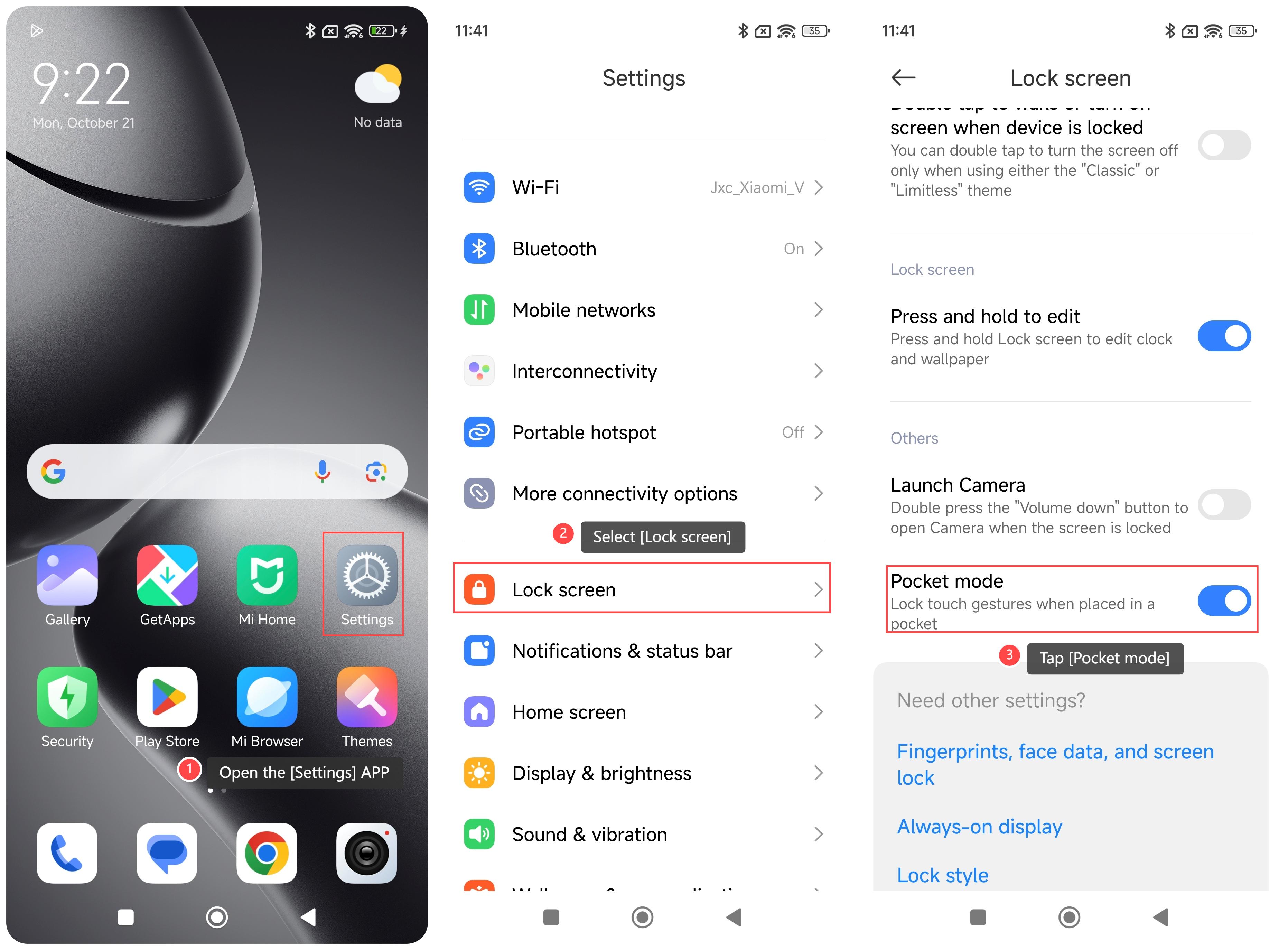
To enable Pocket mode on your phone, please refer to the following steps:
1. Open the [Settings] APP on your phone;
2. Select [Lock screen];
3. Scroll down and tap [Pocket mode].
Note:
1. Confirm that there are no other items in your pocket that interfere with the phone's sensors;
2. Make sure the phone software is the latest version for best performance.
To enable Pocket mode on your phone, please refer to the following steps:
1. Open the [Settings] APP on your phone;
2. Select [Lock screen];
3. Scroll down and tap [Pocket mode].
Note:
1. Confirm that there are no other items in your pocket that interfere with the phone's sensors;
2. Make sure the phone software is the latest version for best performance.
Does it help?
Yes
No