

How to set the payment method on the Xiaomi 14T Pro?
The Xiaomi 14T Pro supports paying with NFC, which allows for quick and easy payment without the need to opening other payment APPs. Touching the NFC payment area with your phone will improve the payment efficiency and save your time and energy.
To set the payment method on you phone, please refer to the following steps:
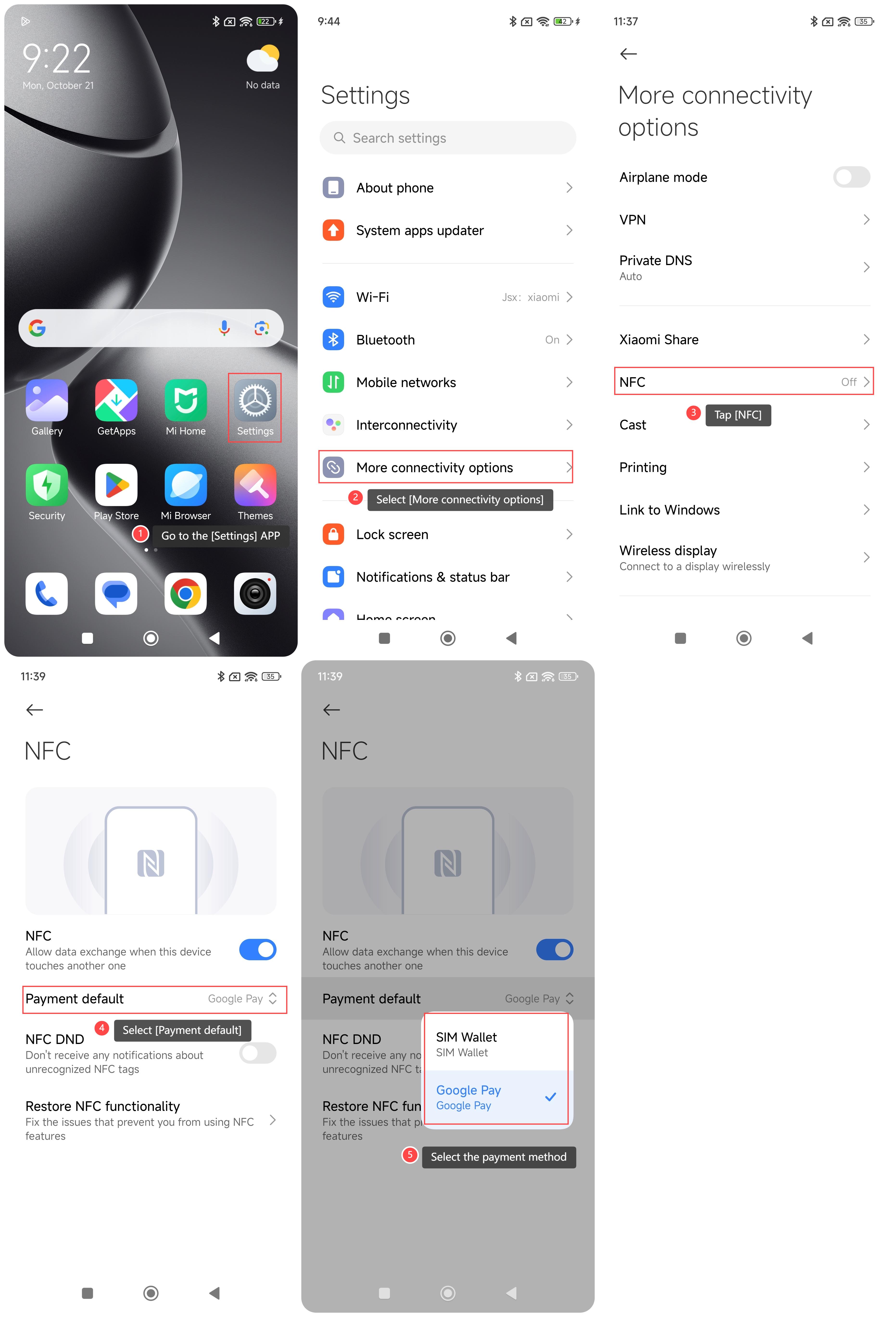
1. Go to the [Settings] APP on your phone;
2. Select [More connectivity options];
3. Tap [NFC];
4. Select [Payment default];
5. Select the payment method from [SIM Wallet] and [Google Pay] according to your needs.
Note:
1. To use the payment on the phone, the NFC needs to be enabled;
2. Always keep your payment information secure, using a strong password or biometric authentication on your device.
To set the payment method on you phone, please refer to the following steps:
1. Go to the [Settings] APP on your phone;
2. Select [More connectivity options];
3. Tap [NFC];
4. Select [Payment default];
5. Select the payment method from [SIM Wallet] and [Google Pay] according to your needs.
Note:
1. To use the payment on the phone, the NFC needs to be enabled;
2. Always keep your payment information secure, using a strong password or biometric authentication on your device.
Does it help?
Yes
No