

How to turn on Super resolution on the Xiaomi 14T Pro?
Super resolution on the Xiaomi 14T Pro leverages advanced AI algorithms to significantly enhance video resolution, resulting in sharper, clearer footage. This feature is especially valuable for improving low-quality videos, enriching the overall viewing experience, and providing a more immersive feel. You can enjoy your favorite content with enhanced detail and vibrancy, making every frame visually stunning.
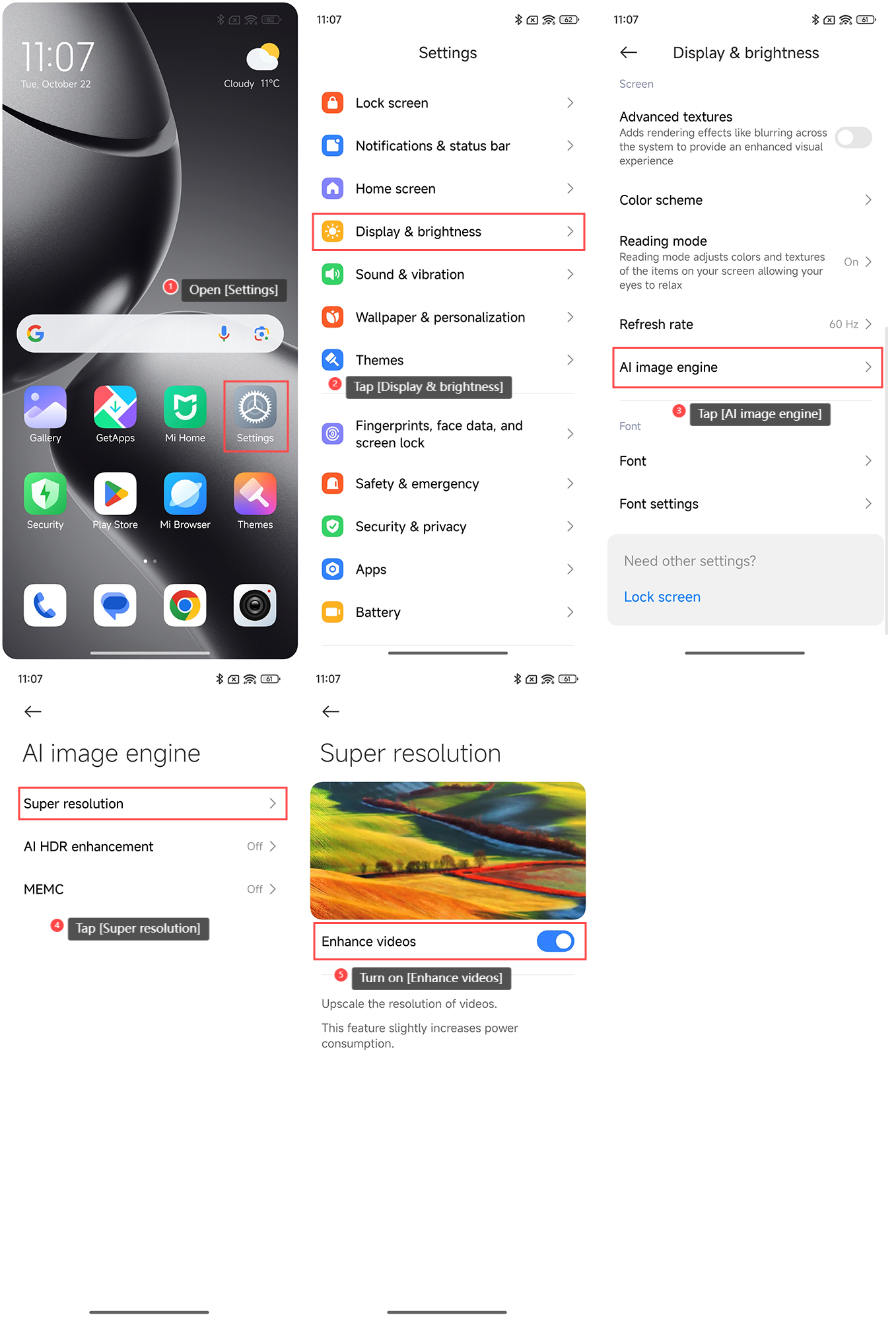
To turn on Super resolution on the Xiaomi 14T Pro, please refer to the following steps:
1. Open the [Settings] APP on your phone;
2. Tap [Display & brightness];
3. Tap [AI image engine];
4. Tap [Super resolution];
5. Turn on [Enhance videos].
Note:
Turning on this feature will slightly increase the power consumption of your phone. Please turn it on according to your needs.
To turn on Super resolution on the Xiaomi 14T Pro, please refer to the following steps:
1. Open the [Settings] APP on your phone;
2. Tap [Display & brightness];
3. Tap [AI image engine];
4. Tap [Super resolution];
5. Turn on [Enhance videos].
Note:
Turning on this feature will slightly increase the power consumption of your phone. Please turn it on according to your needs.
Does it help?
Yes
No