

How to rename an album in Gallery on the Redmi 13C?
The Redmi 13C allows you to rename albums, helping you organize and identify them more easily. This simplifies navigation and lets you reflect the content or theme of the photos in the title, adding personal significance. Additionally, a descriptive name makes it easier to search for and locate specific albums later, providing convenience and saving you time.
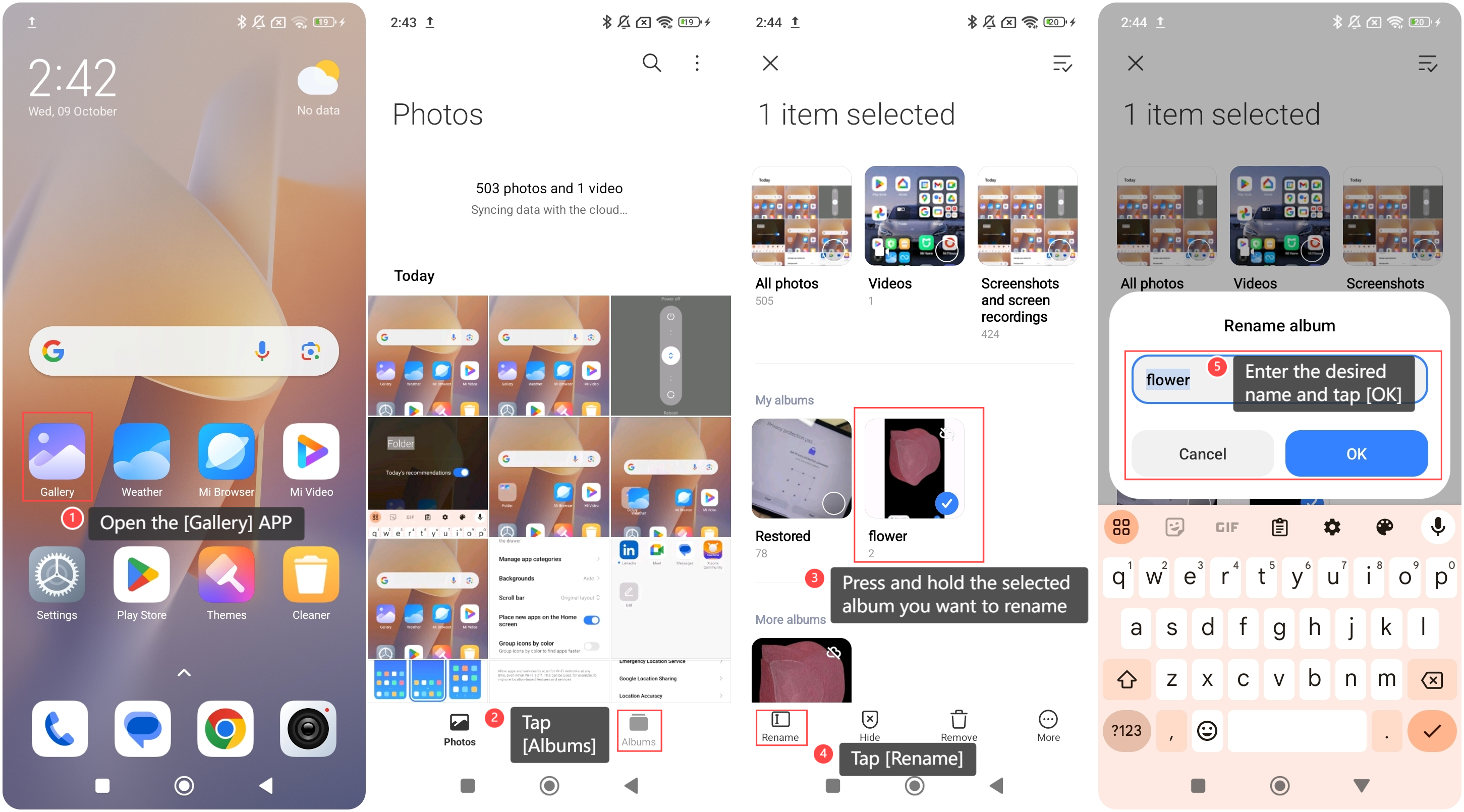
To rename an album on your phone, please refer to the following steps:
1. Open the [Gallery] APP on your phone;
2. Tap [Albums];
3. Press and hold the selected album you want to rename;
4. Tap [Rename];
5. Enter the desired name and tap [OK].
To rename an album on your phone, please refer to the following steps:
1. Open the [Gallery] APP on your phone;
2. Tap [Albums];
3. Press and hold the selected album you want to rename;
4. Tap [Rename];
5. Enter the desired name and tap [OK].
Does it help?
Yes
No