

How to blur app previews in Recents on the Xiaomi 14T Pro?
The Xiaomi 14T Pro supports blurring application previews in Recents, which will add a blur effect to the thumbnails of open applications, enhancing privacy by obscuring content while allowing you to navigate between applications more easily. This feature helps prevent others from seeing sensitive information displayed on the app previews. By activating this option, you can confidently use your devices in public settings. Additionally, it contributes to a cleaner, more organized interface, making it easier to switch between tasks without distractions.
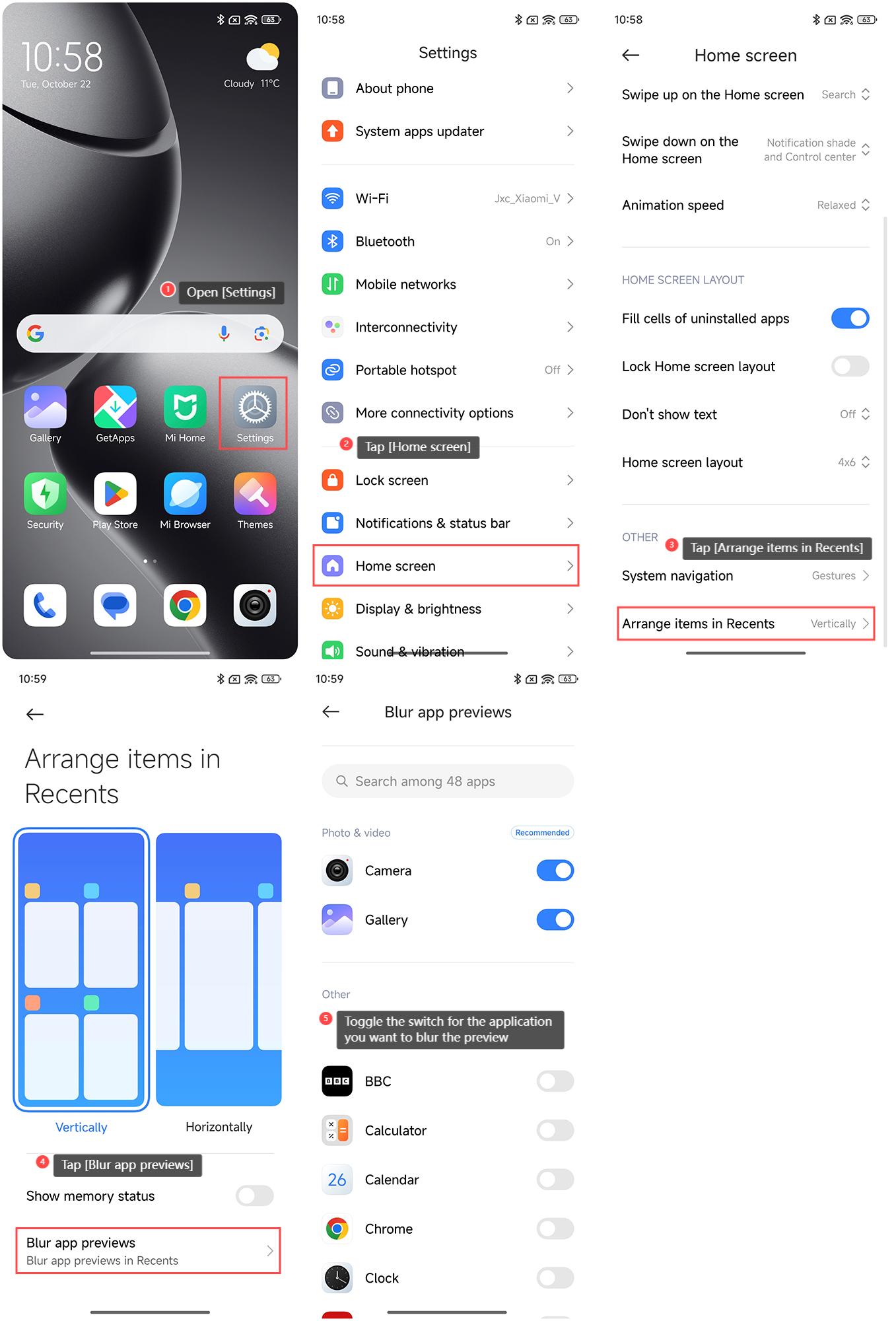
To blur app previews in Recents on the Xiaomi 14T Pro, please refer to the following steps:
1. Open [Settings] on your phone;
2. Tap [Home screen];
3. Tap [Arrange items in Recents];
4. Tap [Blur app previews];
5. Toggle the switch for the application you want to blur the preview.
To blur app previews in Recents on the Xiaomi 14T Pro, please refer to the following steps:
1. Open [Settings] on your phone;
2. Tap [Home screen];
3. Tap [Arrange items in Recents];
4. Tap [Blur app previews];
5. Toggle the switch for the application you want to blur the preview.
Does it help?
Yes
No