

How to use Broadcast audio on the Xiaomi 14T?
The Xiaomi 14T's Broadcast audio function allows you to stream audio to multiple devices simultaneously. This can include connecting to compatible Bluetooth speakers, headphones, or other devices, enabling you to enjoy music or other audio content across different speakers at the same time.
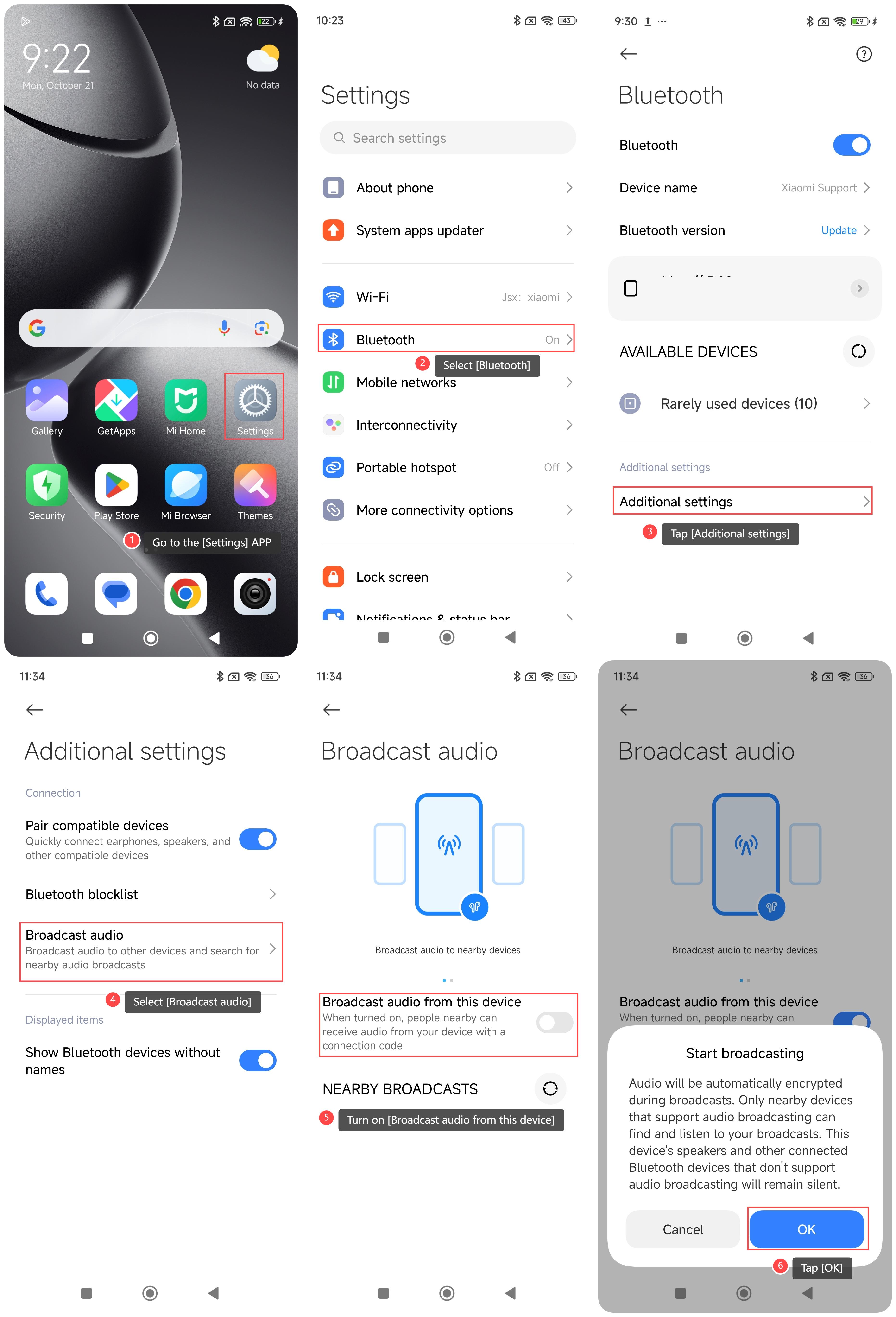
To use Broadcast audio on your phone, please refer to the following steps:
1. Go to the [Settings] APP on your phone;
2. Select [Bluetooth];
3. Tap [Additional settings];
4. Select [Broadcast audio];
5. Turn on [Broadcast audio from this device];
6. Tap [OK]. When turned on, people nearby can receive audio from your device with a correction code.
Note:
1. Make sure the connected device supports the broadcast audio function;
2. Make sure all devices are successfully paired and connected;
3. Playing multiple devices at the same time will affect the sound quality. It is recommended to choose high-quality devices;
4. Keep the device within the effective Bluetooth range to avoid signal interference;
5. Broadcast audio can consume more power. Make sure the device has enough power.
To use Broadcast audio on your phone, please refer to the following steps:
1. Go to the [Settings] APP on your phone;
2. Select [Bluetooth];
3. Tap [Additional settings];
4. Select [Broadcast audio];
5. Turn on [Broadcast audio from this device];
6. Tap [OK]. When turned on, people nearby can receive audio from your device with a correction code.
Note:
1. Make sure the connected device supports the broadcast audio function;
2. Make sure all devices are successfully paired and connected;
3. Playing multiple devices at the same time will affect the sound quality. It is recommended to choose high-quality devices;
4. Keep the device within the effective Bluetooth range to avoid signal interference;
5. Broadcast audio can consume more power. Make sure the device has enough power.
Does it help?
Yes
No