

How to turn on the Mi Home APP widget in the control center of the Xiaomi 14T?
The Mi Home APP widget in the control center of the Xiaomi 14T allows quick access to control and monitor smart home devices linked to the Mi Home/Xiaomi Home APP. You can easily adjust settings, view device statuses, and manage automation from this convenient interface. This not only saves time but also enhances your ability to create a more efficient and responsive smart home environment tailored to your needs.
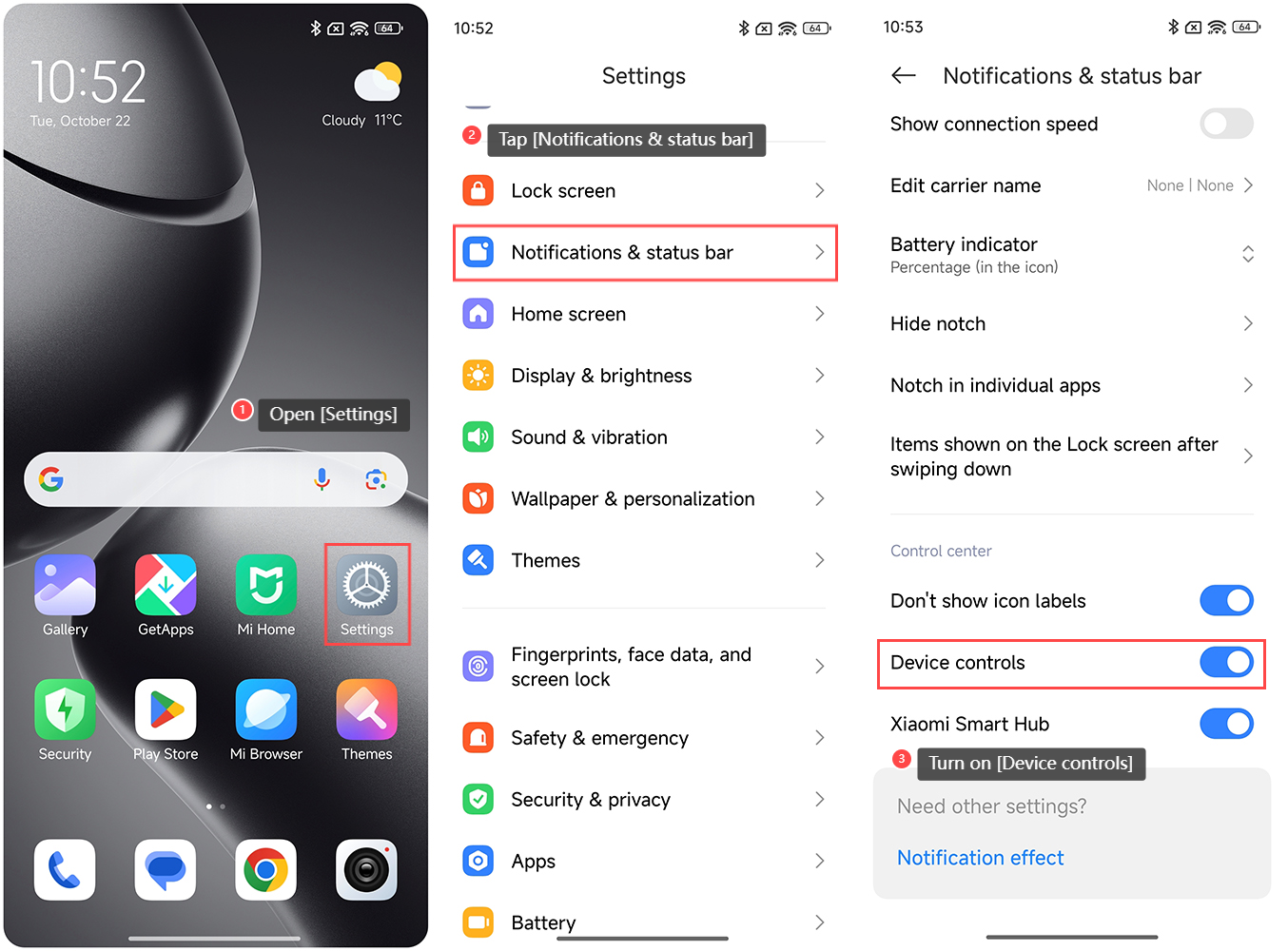
To turn on the Mi Home APP widget in the control center of the Xiaomi 14T, please refer to the following steps:
1. Open the [Settings] APP on your phone;
2. Tap [Notifications & status bar];
3. Turn on [Device controls].
Note:
If you want to manage devices in the Mi Home APP widget, please add them to the Mi Home/Xiaomi Home APP.
To turn on the Mi Home APP widget in the control center of the Xiaomi 14T, please refer to the following steps:
1. Open the [Settings] APP on your phone;
2. Tap [Notifications & status bar];
3. Turn on [Device controls].
Note:
If you want to manage devices in the Mi Home APP widget, please add them to the Mi Home/Xiaomi Home APP.
Does it help?
Yes
No