

How to set the picture quality on the Redmi 13C 5G?
The Redmi 13C 5G supports setting the picture quality, which allows you to control various aspects of how pictures are captured and stored, impacting file size, detail, and appearance. Setting the picture quality determines the number of pixels in a picture. Higher resolution provides more detail but creates larger file sizes. Lower resolution is useful for saving storage or sharing online quickly.
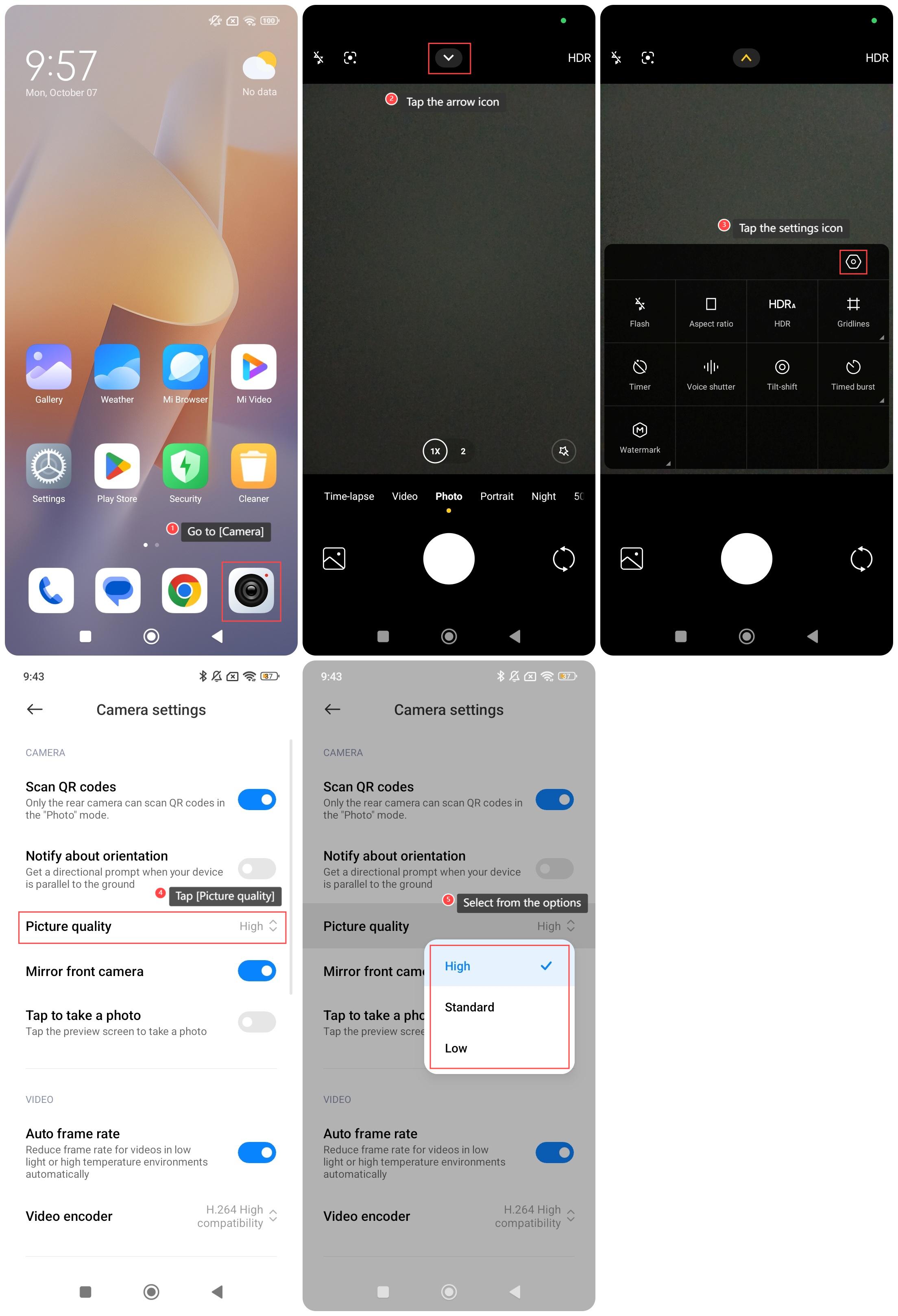
To set the picture on your phone, please refer to the following steps:
1. Go to [Camera];
2. Tap the arrow icon;
3. Tap the settings icon;
4. Tap [Picture quality];
5. Select from [High], [Standard] and [Low].
To set the picture on your phone, please refer to the following steps:
1. Go to [Camera];
2. Tap the arrow icon;
3. Tap the settings icon;
4. Tap [Picture quality];
5. Select from [High], [Standard] and [Low].
Does it help?
Yes
No