

How to use Control center on the Redmi 13C?
The Control center on the Redmi 13C provides quick access to various settings and features, including quick settings such as switching Wi-Fi, Bluetooth, and Do Not Disturb, media playback control, screen brightness adjustment, smart home device control, and shortcuts to commonly used settings. This feature enhances convenience and efficiency in managing the device.
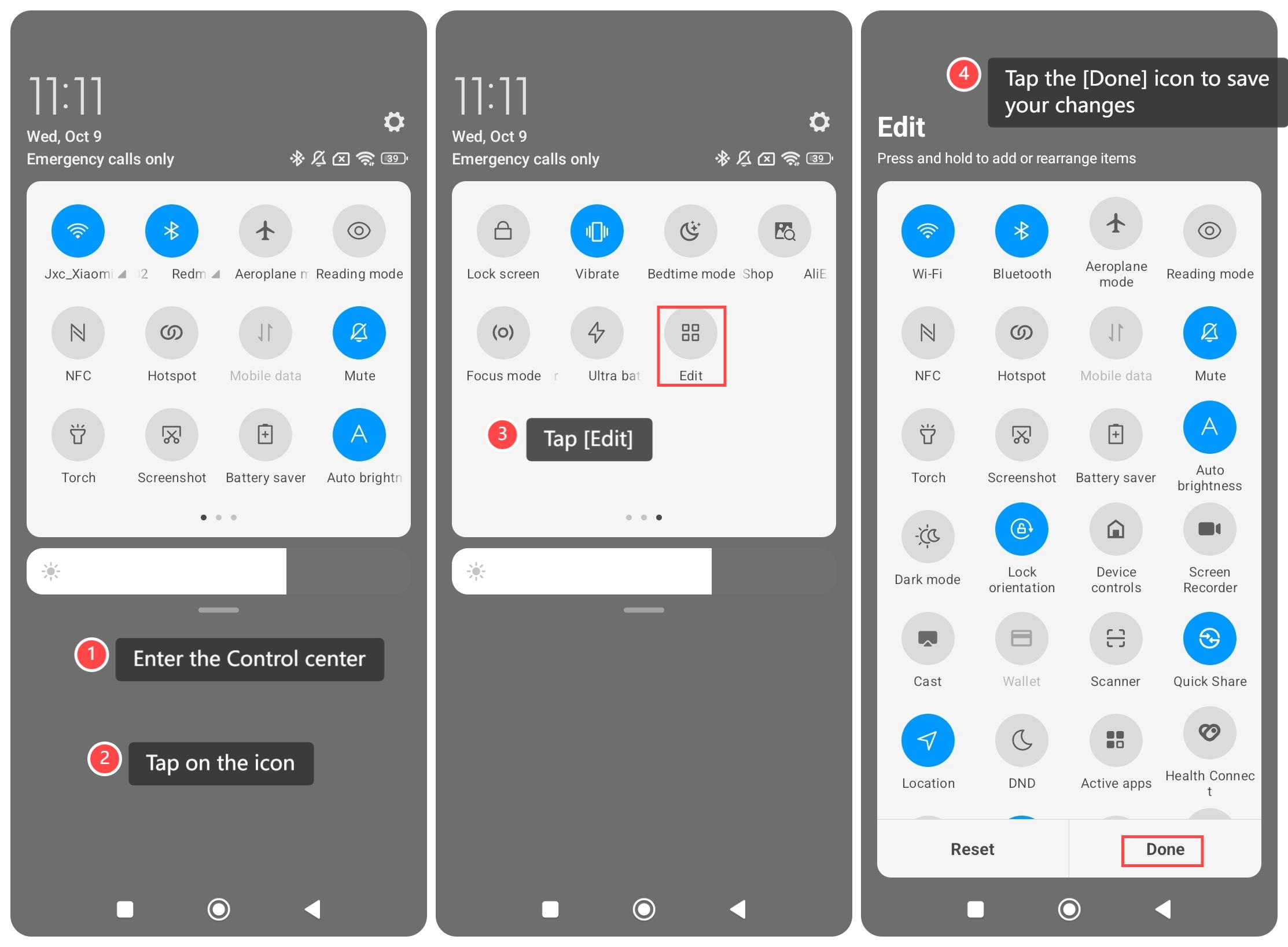
To use Control Center on your phone, please refer to the following steps:
1. Scroll down from the top of the screen to enter the Control center;
2. Tap on the icon to quickly enable the features that you want to use;
3. Tap [Edit], then you can add or delete the icon you want to modify;
4. Tap the [Done] icon to save your changes.
Note:
Please be cautious of accidental touches and ensure you don't accidentally disable critical settings.
To use Control Center on your phone, please refer to the following steps:
1. Scroll down from the top of the screen to enter the Control center;
2. Tap on the icon to quickly enable the features that you want to use;
3. Tap [Edit], then you can add or delete the icon you want to modify;
4. Tap the [Done] icon to save your changes.
Note:
Please be cautious of accidental touches and ensure you don't accidentally disable critical settings.
Does it help?
Yes
No