

How to set the time on the Redmi 13C?
The Redmi 13C supports setting the time, ensuring the device displays the correct time, which is essential for scheduling and time management. You can set the time manually or have it update automatically using network-provided time, ensuring accuracy. Correct time ensures that alarms, reminders, and calendar notifications are triggered at the right moment, so it can help you always be on time for meetings, appointments, and events, allowing you to manage your time more efficiently.
To set the time on the Redmi 13C, please refer to the following steps:
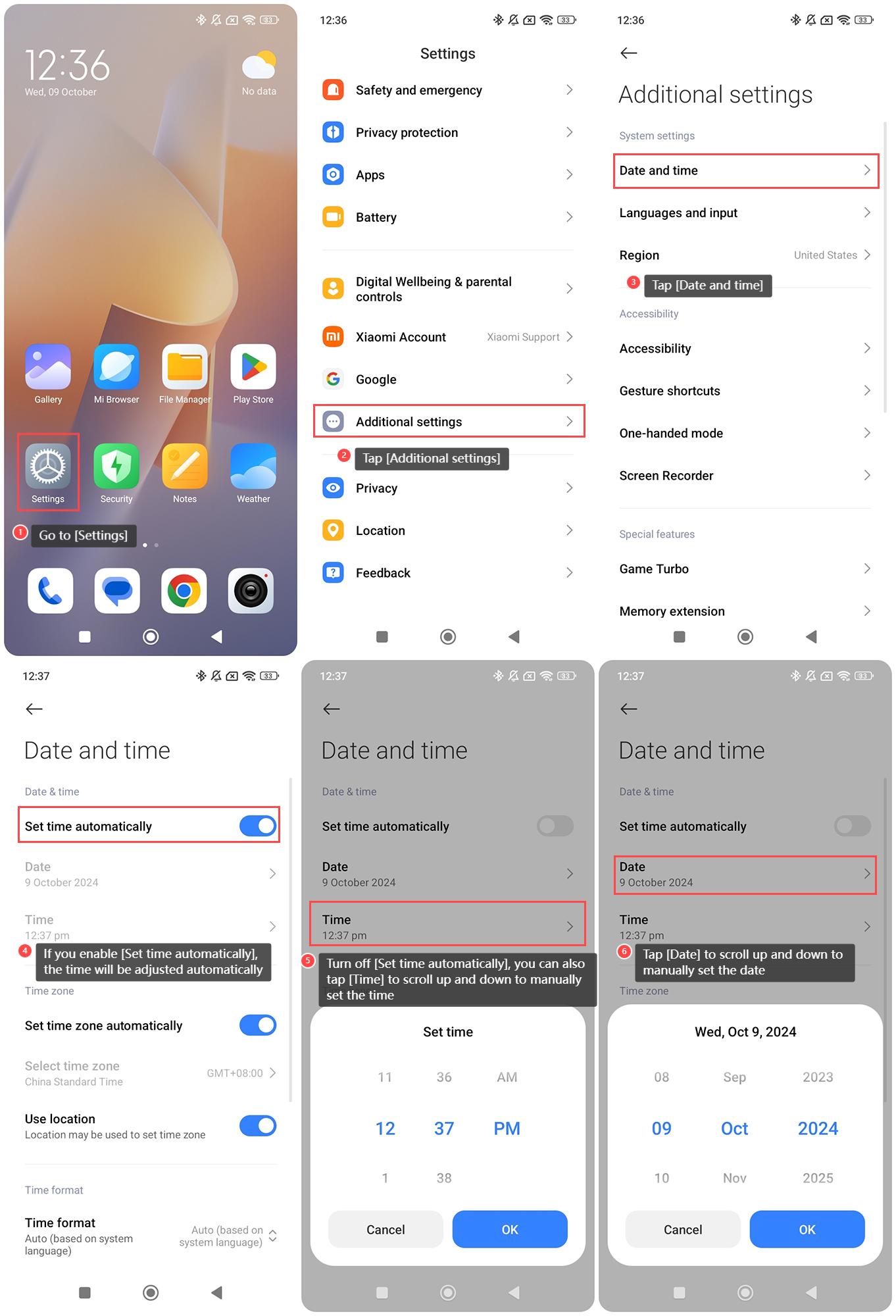
1. Go to [Settings] on your phone;
2. Tap [Additional settings];
3. Tap [Date and time];
4. If you enable [Set time automatically], the time will be adjusted automatically;
5. Turn off [Set time automatically], you can also tap [Time] to scroll up and down to manually set the time;
6. Tap [Date] to scroll up and down to manually set the date.
To set the time on the Redmi 13C, please refer to the following steps:
1. Go to [Settings] on your phone;
2. Tap [Additional settings];
3. Tap [Date and time];
4. If you enable [Set time automatically], the time will be adjusted automatically;
5. Turn off [Set time automatically], you can also tap [Time] to scroll up and down to manually set the time;
6. Tap [Date] to scroll up and down to manually set the date.
Does it help?
Yes
No